
Integrations overview
AI Overview
Integrations connect Tipo Appointment to other tools so booking data, such as service, date and time, and customer details, syncs automatically to calendars, spreadsheets, marketing apps, and automation platforms. Some integrations require you to log in and grant permission, and turning one on usually affects new or updated bookings going forward.
View moreView less
- Available: Google Calendar, Google Sheets, Klaviyo, Mailchimp, HubSpot, Omnisend, Brevo, GetResponse, and Zapier.
- Open the app, click Settings, then the Integrations tab.
- Turn on the option, connect your account, authorize access if required, and save.
- Test with a booking; if syncing stops, you may need to reconnect your account.
Summary generated by AI. It can make mistakes, so check the full guide below.
Integrations connect Tipo Appointment to other tools you already use so your booking data can automatically sync to calendars, spreadsheets, marketing apps, and automation platforms.
🧩 What integrations do
Section titled “🧩 What integrations do”When an integration is activated, Tipo can send booking information (like service, date/time, customer details) to another platform.
Common examples:
- Google Calendar: add bookings to your calendar
- Google Sheets: export bookings into a spreadsheet
- Klaviyo / Mailchimp / HubSpot: use booking data for marketing or CRM automation
- Zapier: connect Tipo to thousands of apps (Slack, Trello, Airtable, etc.)
🛠️ How to set
Section titled “🛠️ How to set”- Open Tipo app > click Settings
- Open the Integrations tab
- Turn on the option you want
- Connect your account (authorize access if required)
- Save
- Test with a booking
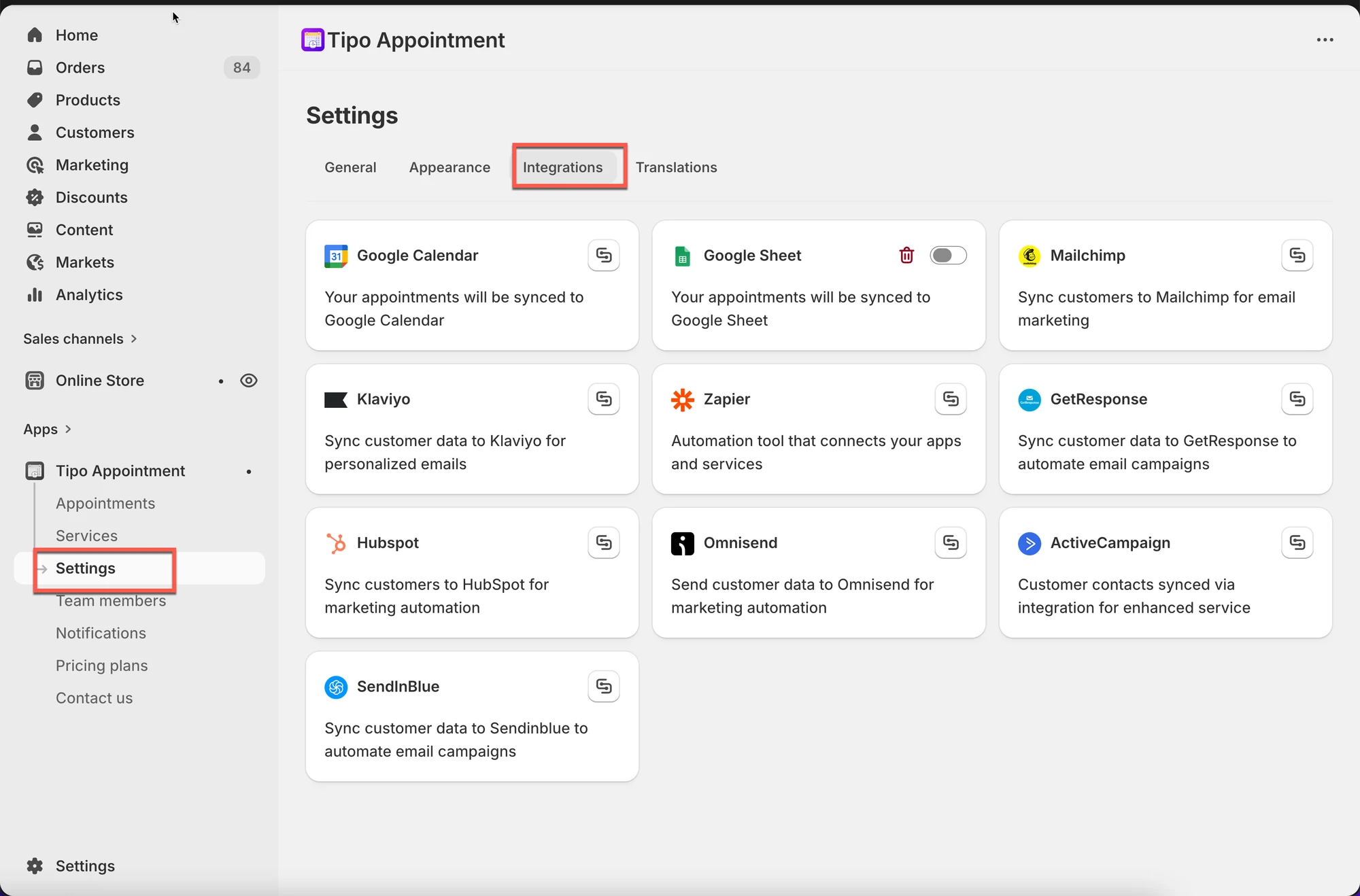
💡 Types of integrations
Section titled “💡 Types of integrations”Calendar & scheduling
Section titled “Calendar & scheduling”Use these to keep your team’s schedule in sync.
- Google Calendar
Reporting & exports
Section titled “Reporting & exports”Use these to track bookings and create reports.
- Google Sheets
Marketing & CRM
Section titled “Marketing & CRM”Use these to segment customers and trigger follow-up flows.
- Klaviyo, Mailchimp, HubSpot, Omnisend, Brevo (Sendinblue), GetResponse
Automation
Section titled “Automation”Use these to connect Tipo to other tools and build workflows.
- Zapier
✅ When you should use integrations
Section titled “✅ When you should use integrations”Integrations are helpful if you want to:
- avoid manually copying booking info to another tool
- keep staff schedules up to date
- build automated follow-ups (reminders, thank-you emails, review requests)
- track bookings in a spreadsheet for reporting
⚠️ Important notes
Section titled “⚠️ Important notes”- Some integrations require you to log in and grant permission (Google, CRM tools).
- If syncing stops, you may need to reconnect your account.
- Turning an integration on usually affects new or updated bookings going forward.
🙋 Still need support?
If you still need help, please feel free to contact us at hi@tipo.io. We’ll be happy to assist you further.