> For the complete documentation index, see [llms.txt](https://docs.tipo.io/llms.txt). Markdown versions of documentation pages are available by appending `.md` to page URLs; this page is available as [Markdown](https://docs.tipo.io/tipo-appointment-booking/faqs/how-to-limit-how-many-people-can-book.md).
# How to limit how many people can book
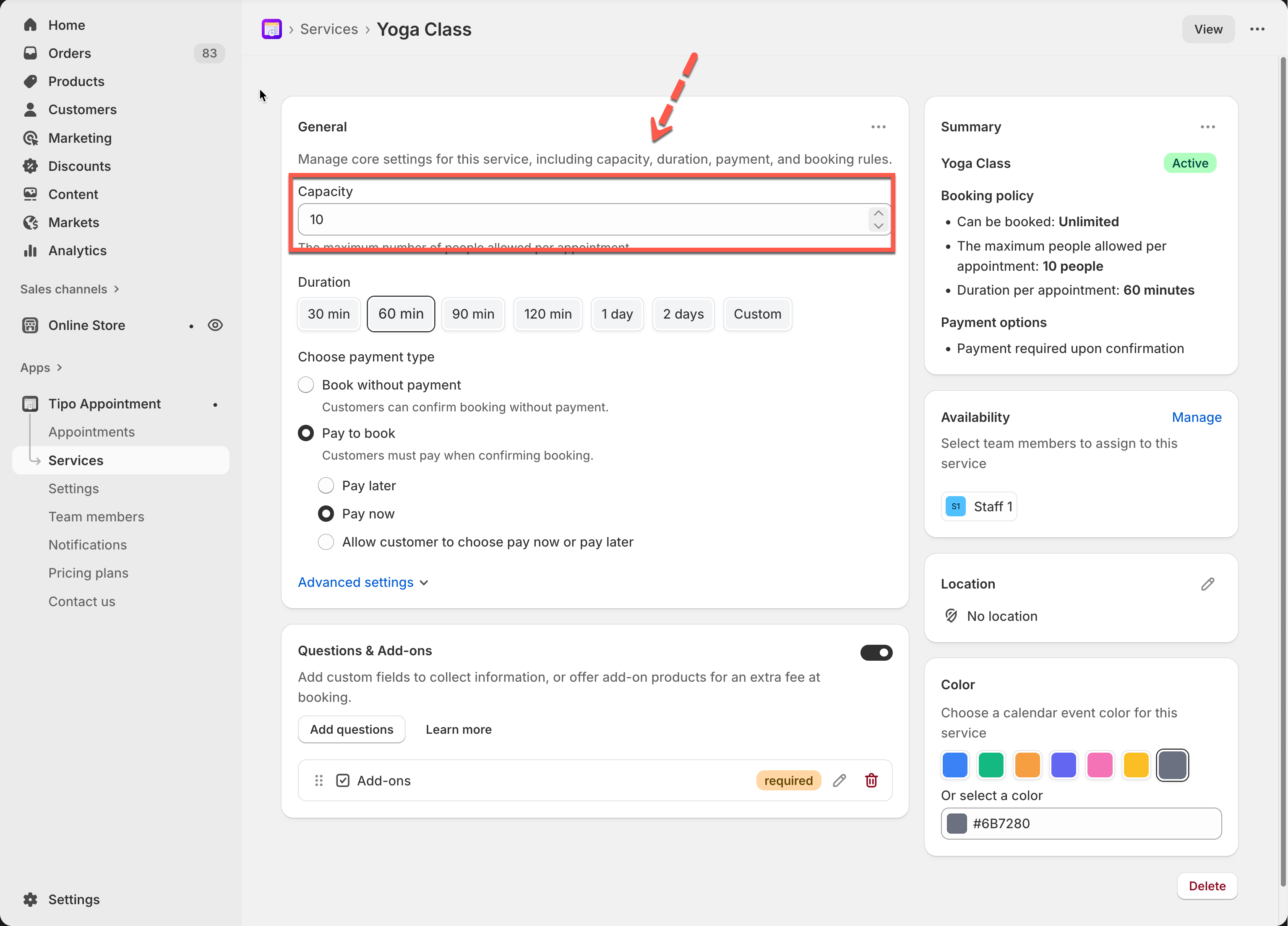
In Tipo Appointment Booking, the number of people who can book is controlled by **Service Capacity**.
This setting defines the maximum number of bookings allowed for the same time slot, regardless of how many team members you have.
***
### ⚙️ How to set service capacity
1. Open the app > click **Services** > open a service
2. Find **Capacity**
3. Enter the maximum number of people allowed
4. Save the service
***
### ✅ How service capacity works
* **Capacity** = how many bookings are allowed at the same time
* Capacity applies per time slot
* Once capacity is reached, that time slot becomes unavailable for customers
> Think of capacity as “how many people can attend this service at the same time”.
### 💡 Examples
#### Example 1: One employee, Capacity = 1
Capacity = 1, one employee (1-on-1 service)
**Setup**
* Service capacity: **1**
* Employees assigned: **1**
**What happens**
* 1 customer books a time slot
* No other customers can book that same time
**How it works**
```
Total capacity: 1
Booked: 1
Available spots: 0
```
* The employee is fully booked
* The time slot is closed automatically
✔️ Best for:
* Private appointments
* Consultations
* Personal services
***
#### Example 2: One employee, Capacity = 10 (group booking)
**Setup**
* Service capacity: **10**
* Employees: 1
**What happens**
* 4 customers book the same time slot
* Remaining spots: **6**
**How it works**
```
Total capacity: 10
Booked: 4
Available spots: 6
```
* Customers can continue booking until all 10 spots are filled
* When the 10th booking is made, the time slot becomes unavailable
#### Example 3: Capacity = 1, three employees
**Setup**
* Service capacity: **1**
* Employees assigned: **3**
**What happens**
* When capacity = 1, the capacity applies per employee, not across all employees.
* This means:
* Each employee can handle **1** booking per time slot
* Multiple customers can book at the same time as long as different employees are available
**How it works**
At **10:00 AM on Jan 1**:
* Customer A books **Employee 1**
* Customer B books **Employee 2**
* Customer C books **Employee 3**
✅ **3 customers can book at the same time**\
❌ No employee is double-booked
***
**🙋 Still need support?**
If you still need help, please feel free to contact us at . We’ll be happy to assist you further.