> For the complete documentation index, see [llms.txt](https://docs.tipo.io/llms.txt). Markdown versions of documentation pages are available by appending `.md` to page URLs; this page is available as [Markdown](https://docs.tipo.io/tipo-appointment-booking/mail-notification/customer-emails.md).
# Customer emails
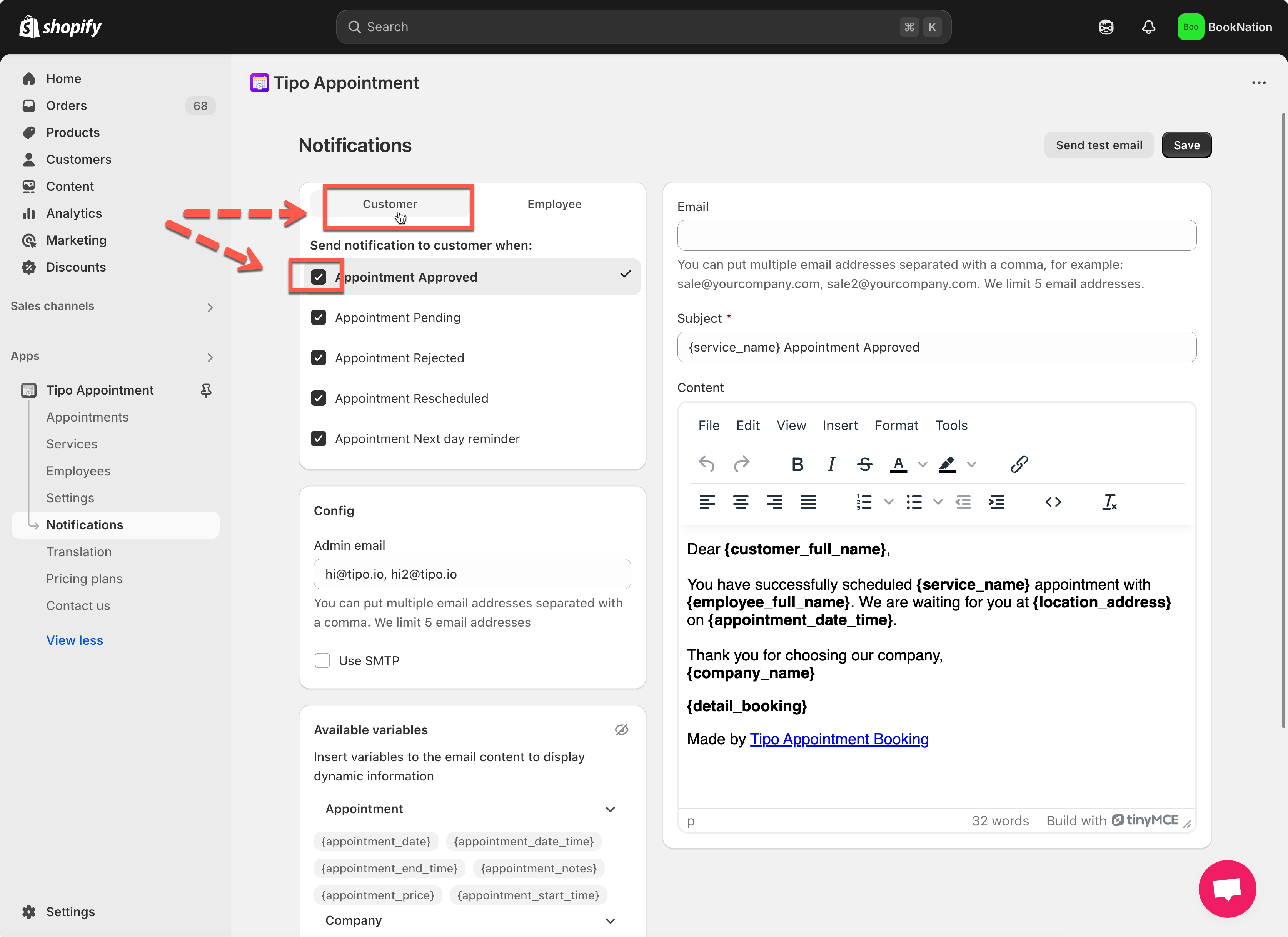
Customer emails are the messages your customers receive when a booking is created or its status changes. Tipo provides 5 ready-to-use email templates for customers.
* **Appointment Approved**\
\
**Appointment Pending**\
\
**Appointment Rejected**\
\
**Appointment Rescheduled**\
\
**Appointment Next Day Reminder**
***
#### 🛠️ How to set
1. Open the app > click **Notifications** > click **Customer** tab
2. In the list of triggers (e.g. “Appointment Approved,” “Appointment Pending”), make sure the checkbox next to the template is ticked
3. Click the template name to open its editor
* Update the **Subject** line.
* Modify the **Content:** you can add text, variables, links, or formatting as needed.
4. Save it.
***
**🙋 Still need support?**
If you still need help, please feel free to contact us at . We’ll be happy to assist you further.