
Limit how far ahead customers can book
AI Overview
Use Maximum days customers can book ahead in Tipo Appointment Booking to limit how far into the future customers can book a service. Dates beyond the limit cannot be selected in the booking calendar. Leaving the field blank keeps all future days open. A slot also needs staff availability and no blocks.
View moreView less
- Open the service, scroll to More options, and find Maximum days customers can book ahead.
- Enter a number of days, such as 14, and click Save.
- With 14 set on Dec 1, customers can book Dec 1 to Dec 15 only.
- If customers see no dates, check the value is not 0 or too small and that availability is set.
Summary generated by AI. It can make mistakes, so check the full guide below.
Use Maximum days customers can book ahead to control how far into the future customers can schedule appointments for a service.
This is the easiest way to prevent customers from booking too early (for example, months in advance).
✅ What this setting does
Section titled “✅ What this setting does”Maximum days customers can book ahead sets a booking window like:
- 7 days → customers can book today + the next 7 days
- 30 days → customers can book up to 30 days from today
- leave the field blank > all future days are available to be booked
If a date is beyond the limit, customers won’t be able to select it in the booking calendar.
🛠️ Steps to set date range
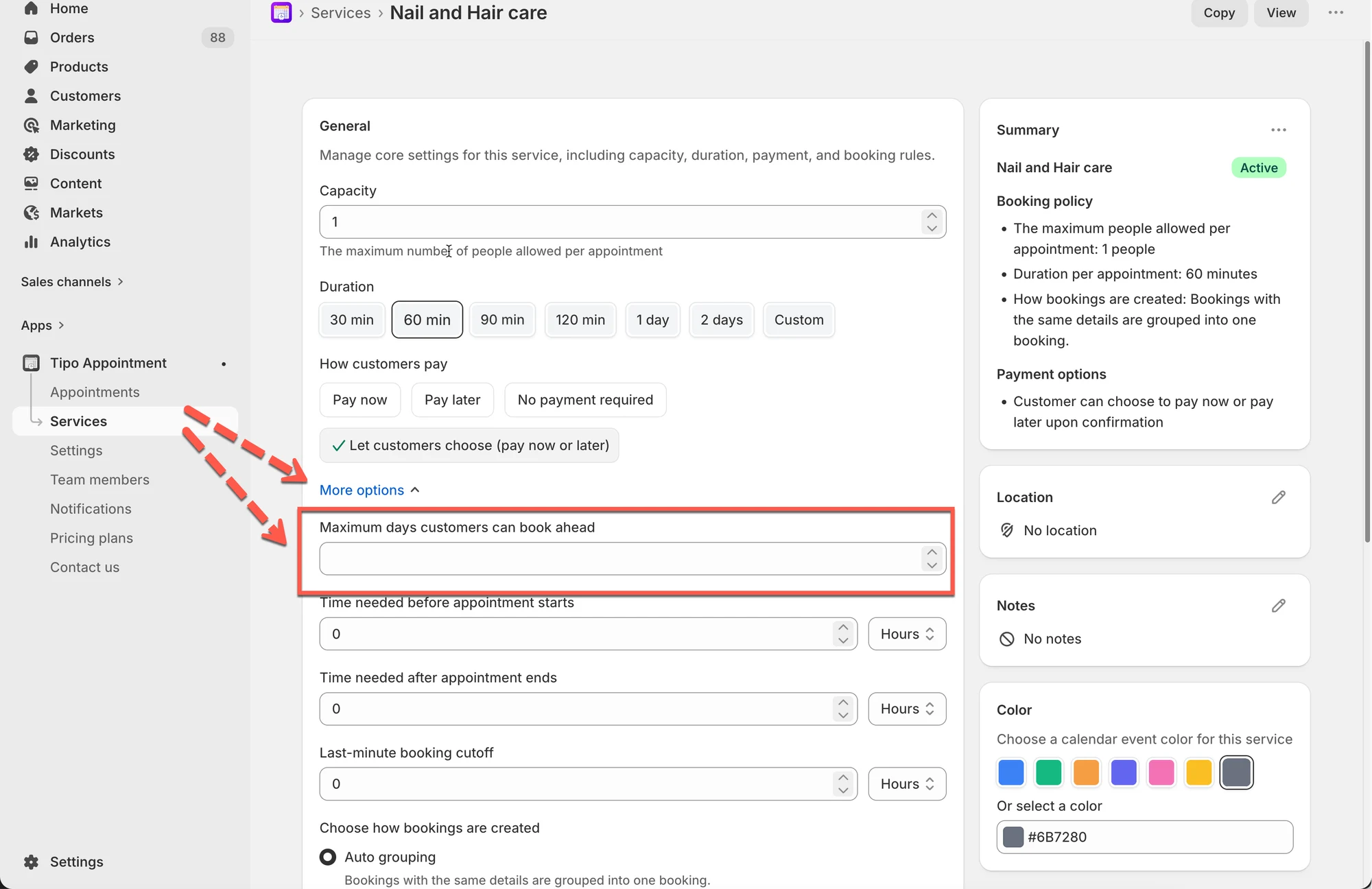
Section titled “🛠️ Steps to set date range”- Open the app > click Services > open the service you want to edit
- Scroll to More options
- Find Maximum days customers can book ahead
- Enter a number, example: 14
- Click Save
🧪 Example
Section titled “🧪 Example”If today is Dec 1 and you set:
- Maximum days customers can book ahead = 14
Customers can book from:
✅ Dec 1 → Dec 15
Customers cannot book:
🚫 Dec 16 and later
⚙️ How it works with other rules
Section titled “⚙️ How it works with other rules”A time slot will appear only if all of these allow it:
- The date is within the “book ahead” limit
- Staff availability exists for that time
- The time isn’t blocked (days off / blocked time)
- The service duration fits
So if customers can’t see any slots, this field might be too low or availability is missing.
⭐ Recommended values
Section titled “⭐ Recommended values”- 7–14 days: clinics, busy teams, short planning cycles
- 30 days: salons, classes, common services
- 60–90 days: weddings/events planning
🛠 Quick troubleshooting
Section titled “🛠 Quick troubleshooting”Customers say “no dates available”
- Check if the value is 0 or too small
- Make sure the service has availability set (team members + working hours)
🙋 Still need support?
If you still need help, please feel free to contact us at hi@tipo.io. We’ll be happy to assist you further.