
Change the app language
AI Overview
Explains how to switch Backup & Restore Tipo between its 10 supported languages from the top of the Home page. Your choice is remembered in the current browser only. Without a saved choice, the app uses your Shopify admin language if supported, otherwise English.
View moreView less
- Supported languages: English, Spanish, French, German, Italian, Japanese, Portuguese, Russian, Chinese and Vietnamese.
- Open Home, select the language button at the top right, then choose a language.
- Your choice is saved in this browser only, not across devices.
- The language button is on Home, not in Settings.
- Some newer messages may still appear in English.
Summary generated by AI. It can make mistakes, so check the full guide below.
Switch the app between 10 languages from the Home page; your choice is remembered in this browser.
You can use the app in 10 languages. Change the language from the top of the Home page.
Supported languages
Section titled “Supported languages”English, Spanish, French, German, Italian, Japanese, Portuguese, Russian, Chinese and Vietnamese.
How the app picks a language
Section titled “How the app picks a language”The app chooses a language in this order:
- The language you picked in this browser.
- The language of your Shopify admin, if the app supports it.
- English.
Change the language
Section titled “Change the language”Open Home
Section titled “Open Home”In your Shopify admin sidebar, select Backup & Restore Tipo. Home opens.
Open the language menu
Section titled “Open the language menu”At the top right of the page, select the language button. It shows the current language with its flag, for example English.
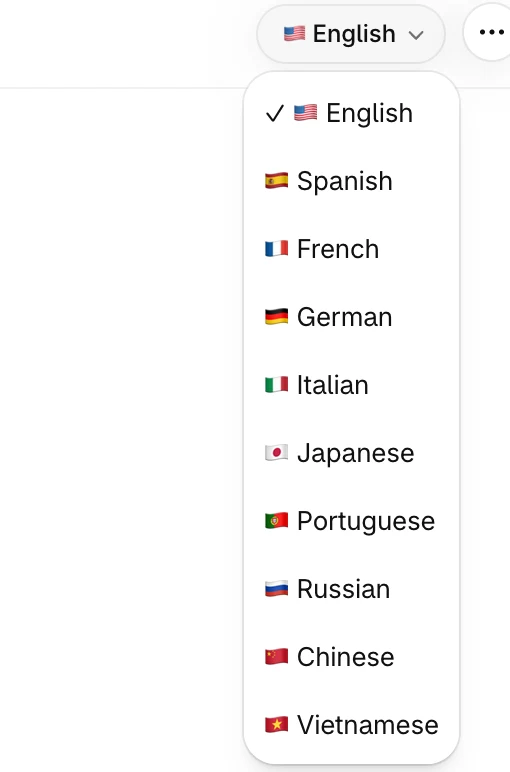
A check mark shows the language that is active now.
Choose a language
Section titled “Choose a language”Select a language in the list. The app switches straight away. Language names always appear in English so you can find yours.
Good to know
Section titled “Good to know”- Your choice is saved in this browser only. On another browser or device, the app starts with the language of your Shopify admin.
- If your Shopify admin uses a language the app doesn’t fully support, only the sidebar menu and Contact us are translated. The rest appears in English until you pick a language.
- Some newer messages may still appear in English in other languages.
- The language button is on Home. It isn’t in Settings.