> For the complete documentation index, see [llms.txt](https://docs.tipo.io/llms.txt). Markdown versions of documentation pages are available by appending `.md` to page URLs; this page is available as [Markdown](https://docs.tipo.io/settings-destination-store/view-detail-of-map-products.md).
# View detail of map products
This guide explains how to view **mapped products** in Tipo app, so you can confirm which Source product is linked to which Destination product, and quickly troubleshoot sync issues (wrong match, duplicates, missing updates).
### 📍 Where to find “Mapped products”
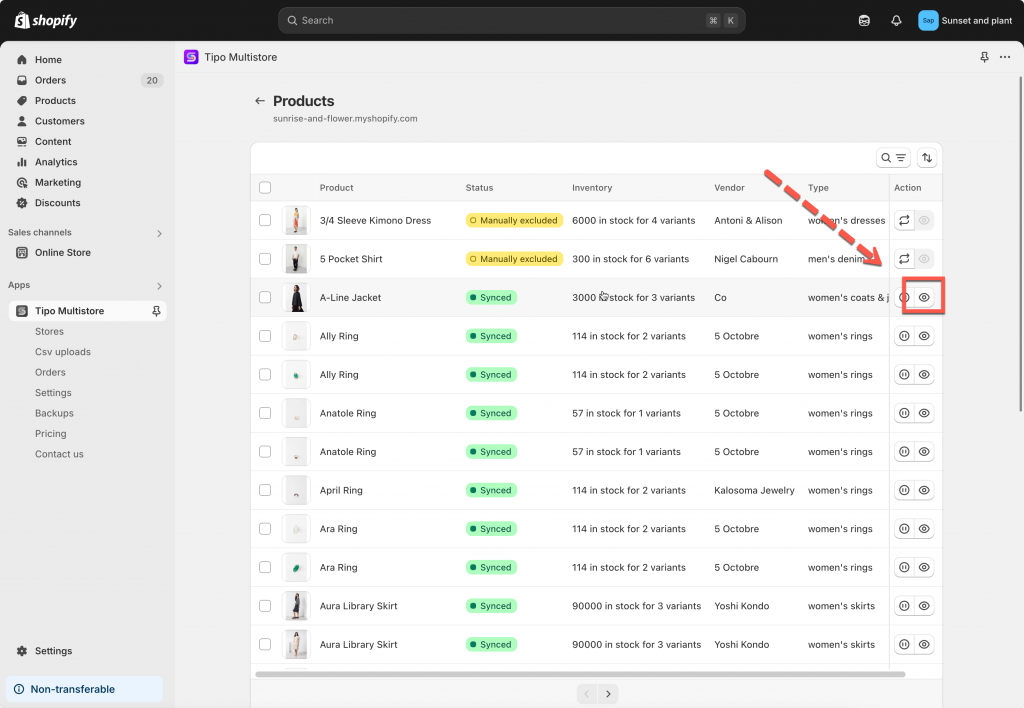
Go to the **Destinations** store, open the app > click **Stores** > click **Products** to see the synced product list of the connection
Click the eye icon to view the sync detail of the product
In the mapped products list, you can verify:
* Which Source product is linked to which Destination product
* Mapping status (mapped / not mapped / error)
* 🔎 Search specific products to confirm they are linked correctly
***
**🙋 Still need support?**
If you still need help, please feel free to contact us at . We’ll be happy to assist you further.