
# Small Planter Kit - Bundle Group

### Case

This scenario involves a main bundled product ("Small Planter Kit") whose inventory must be calculated based on the available stock of two component products ("Wooden Panel" and "Bag of Soil").

<figure><img src="https://2618001169-files.gitbook.io/~/files/v0/b/gitbook-x-prod.appspot.com/o/spaces%2FQFJLe0hkcyiradJOCgpx%2Fuploads%2FcYvm8amwbJ3S5E1BKHSf%2F2025-11-14_16-36-42.png?alt=media&#x26;token=b353c50d-2f1a-4ecb-8273-5053caf63837" alt=""><figcaption></figcaption></figure>

| Type          | Product Name          | SKU         | Current Stock  | Role in Bundle                                    |
| ------------- | --------------------- | ----------- | -------------- | ------------------------------------------------- |
| **Bundle**    | **Small Planter Kit** | `KIT-PLN01` | 0 (Calculated) | *Main Product (Inventory needs to be determined)* |
| **Component** | Wooden Panel          | `PNL-WOOD`  | 80             | *Required: 4 Panels per Kit*                      |
| **Component** | Bag of Soil           | `BAG-SOIL`  | 45             | *Required: 1 Bag per Kit*                         |

* **The Problem:** The **Small Planter Kit** is listed on your storefront, but you cannot manually track its inventory without constantly checking the stock of the individual Panel and Soil Bag components.
* **The Goal:** Create a **Bundle Group** that uses the stock of `PNL-WOOD` and `BAG-SOIL` to accurately calculate the maximum available inventory for the `KIT-PLN01` bundle.

### Solution: Create a Bundle Group

We will create a new Bundle Group in Tipo Sync to define the recipe for the `KIT-PLN01` product.

**Steps**

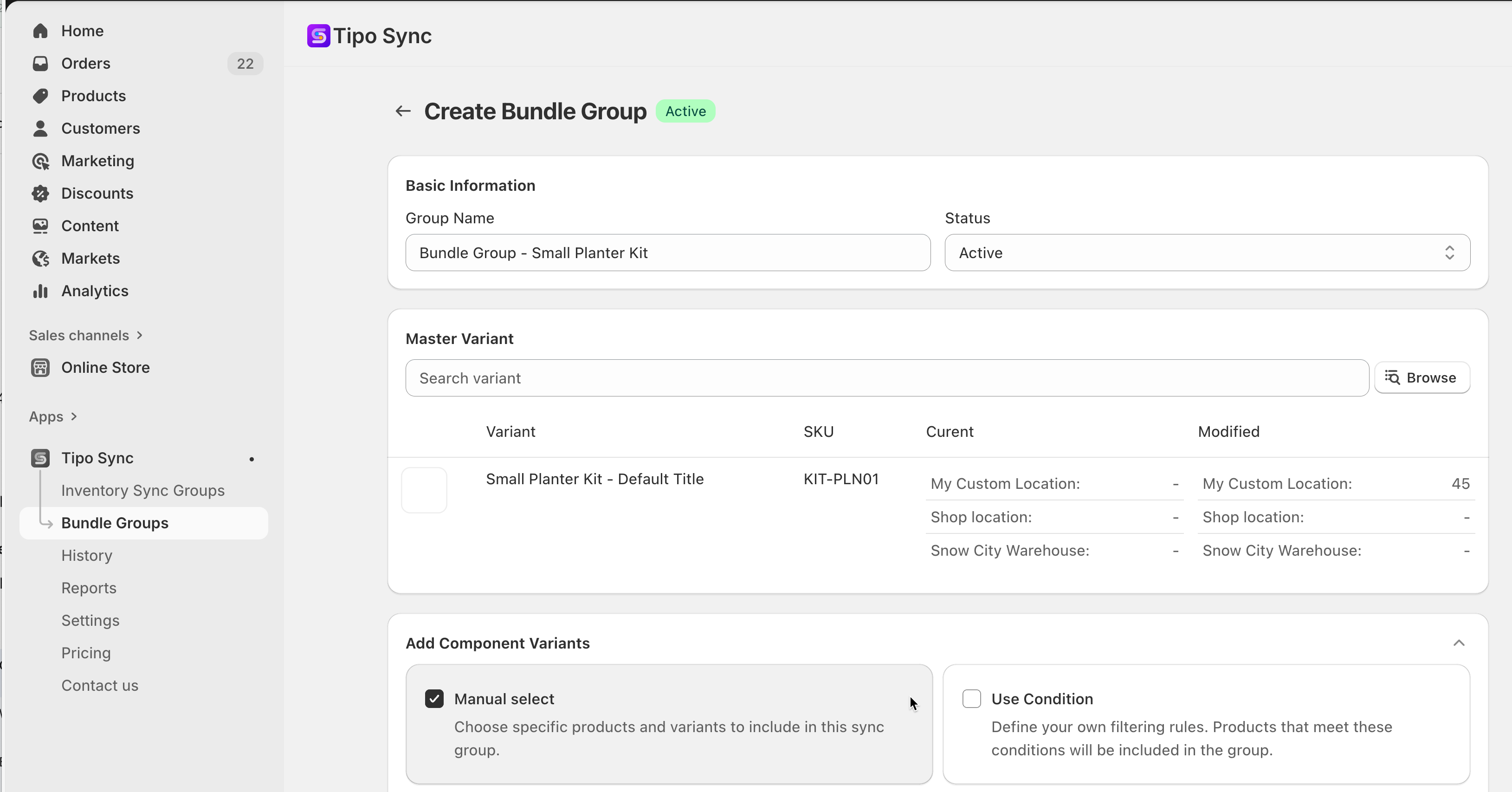
1. Open the app > click Bundle Groups > click **New** **Bundle Group** button
2. Enter a **Title** and select **Status** as **Active**
3. In **Master Variant** field, search and select the main product: **Small Planter Kit** (`KIT-PLN01`)

<figure><img src="https://2618001169-files.gitbook.io/~/files/v0/b/gitbook-x-prod.appspot.com/o/spaces%2FQFJLe0hkcyiradJOCgpx%2Fuploads%2FvQznBHDP20M94D2xLvf9%2F2025-11-14_16-42-55.png?alt=media&#x26;token=0424f68c-6605-4802-9bb4-b2ee81ec7cb8" alt=""><figcaption></figcaption></figure>

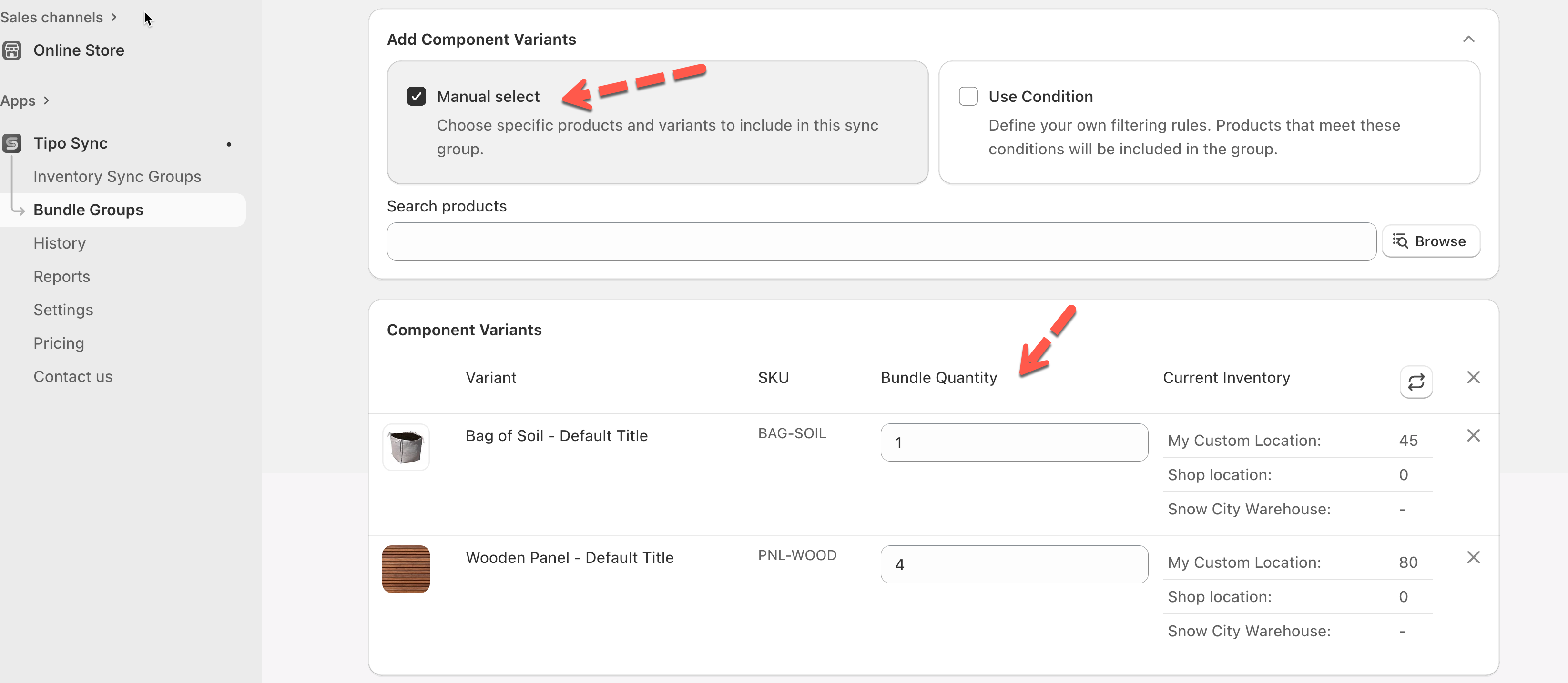
4. In Add Component Variants section, add **Component** products (The Recipe)

* **Component 1 (Wooden Panel):**
  * Search for and select: **Wooden Panel** (`PNL-WOOD`).
  * Set **Quantity Required:** Enter `4` (since the kit requires four panels).
* **Component 2 (Bag of Soil):**
  * Click **Add New Component** again.
  * Search for and select: **Bag of Soil** (`BAG-SOIL`).
  * Set **Quantity Required:** Enter `1` (since the kit requires one bag of soil).

<figure><img src="https://2618001169-files.gitbook.io/~/files/v0/b/gitbook-x-prod.appspot.com/o/spaces%2FQFJLe0hkcyiradJOCgpx%2Fuploads%2FdfFxHfkPdyF8ikMeUcJb%2F2025-11-14_16-44-52.png?alt=media&#x26;token=b5f875c9-0193-4bc6-8872-31c72243e857" alt=""><figcaption></figcaption></figure>

5. Save the bundle group.

Tipo Sync will now calculate the available inventory for `KIT-PLN01` and push that number to your storefront.

### Result: Inventory Calculation and Real-Time Update

Tipo Sync uses a limiting factor calculation: it checks how many complete sets can be built from the available components.

**1 - The Initial Calculation**

| Component                 | Current Stock | Quantity Required per Set | Available Sets (Stock / Required Qty) | Limiting Factor |
| ------------------------- | ------------- | ------------------------- | ------------------------------------- | --------------- |
| Wooden Panel (`PNL-WOOD`) | **80**        | 4                         | 80 / 4 = **20**                       | **Limit**       |
| Bag of Soil (`BAG-SOIL`)  | **45**        | 1                         | 45 / 1 = **45**                       |                 |
| **BUNDLE RESULT**         |               |                           | **Calculated Available Sets**         | **20**          |

**2- Real-Time Stock Update Example**

If a customer buys **5** Small Planter Kits:

<table data-header-hidden><thead><tr><th></th><th width="110.0242919921875"></th><th width="141.3134765625"></th><th></th><th></th></tr></thead><tbody><tr><td>Product</td><td>Before Sale</td><td>Sale Quantity</td><td>Stock Deduction</td><td>After Sync</td></tr><tr><td><strong>Small Planter Kit</strong> (<code>KIT-PLN01</code>)</td><td>20</td><td>5 Kits Sold</td><td>N/A (Calculated)</td><td><strong>15</strong> (New Calculated Inventory)</td></tr><tr><td>Wooden Panel (<code>PNL-WOOD</code>)</td><td>80</td><td>N/A</td><td>5 kits * 4 Panels = <strong>20</strong></td><td><strong>60</strong></td></tr><tr><td>Bag of Soil (<code>BAG-SOIL</code>)</td><td>45</td><td>N/A</td><td>5 kits * 1 Bag = <strong>5</strong></td><td><strong>40</strong></td></tr></tbody></table>

Tipo Sync instantly reduces the component inventory (Panels by 20, Soil Bags by 5) and then recalculates the new kit inventory (15) and pushes it to the storefront, ensuring your stock levels are always accurate.

**🙋 Still need support?**

If you still need help, please feel free to contact us at <hi@tipo.io>. We’ll be happy to assist you further.
