
Trial & Plan usage
AI Overview
Covers the Tipo Sync free trial and how plans are priced. You get a 7-day free trial with no variant limit, and plans are based on the total number of variants in the Destination store, not just the synced products. Only the Destination store pays. After the trial ends, you must choose a plan to keep syncing.
View moreView less
- The 7-day trial starts on install and reinstalling does not reset it; the Dashboard shows a countdown.
- Pricing depends on total variants in the Destination store; the Source store pays nothing.
- Check usage in Pricing → Store Variant Usage; an Exceeded status shows a recommended plan.
- To upgrade, open Current plan on the Dashboard, click Upgrade, choose a plan, then approve the Shopify charge.
- You can downgrade if your variant count fits a lower tier.
Summary generated by AI. It can make mistakes, so check the full guide below.
💰 How Plans Are Calculated
Section titled “💰 How Plans Are Calculated”Tipo Sync plans are based on the total number of product variants in your Destination store, not just the products being synced.
What counts as a variant?
Section titled “What counts as a variant?”A variant is a unique version of a product, such as:
- Size: Small, Medium, Large
- Color: Red, Blue, Black
- Material or Style options
For example:
| Product | Variants |
|---|---|
| T-Shirt | Small, Medium, Large = 3 variants |
| Hoodie | Black, Gray = 2 variants |
Total variants in the store: 5 variants
🤔 Why Are Plans Based on Total Store Variants?
Section titled “🤔 Why Are Plans Based on Total Store Variants?”Even if you only sync a portion of your catalog, Tipo Sync still needs to monitor and process product data across the entire Destination store.
This allows the app to:
- Monitor product changes and events
- Match products accurately between stores
- Process updates reliably
- Maintain fast and stable synchronization
Because of this, pricing is based on the overall size of the Destination store rather than the number of products currently being synced.
📊 Example
Section titled “📊 Example”| Destination Store | Variant Count |
|---|---|
| Total variants detected | 7,242 |
| Current plan limit | 5,000 |
| Recommended plan | 10,000 variants |
Result: Upgrade to the 10,000-variant plan to continue syncing products.
This helps users immediately understand the relationship.interruption.
⏳ 7-day trial & countdown on Dashboard
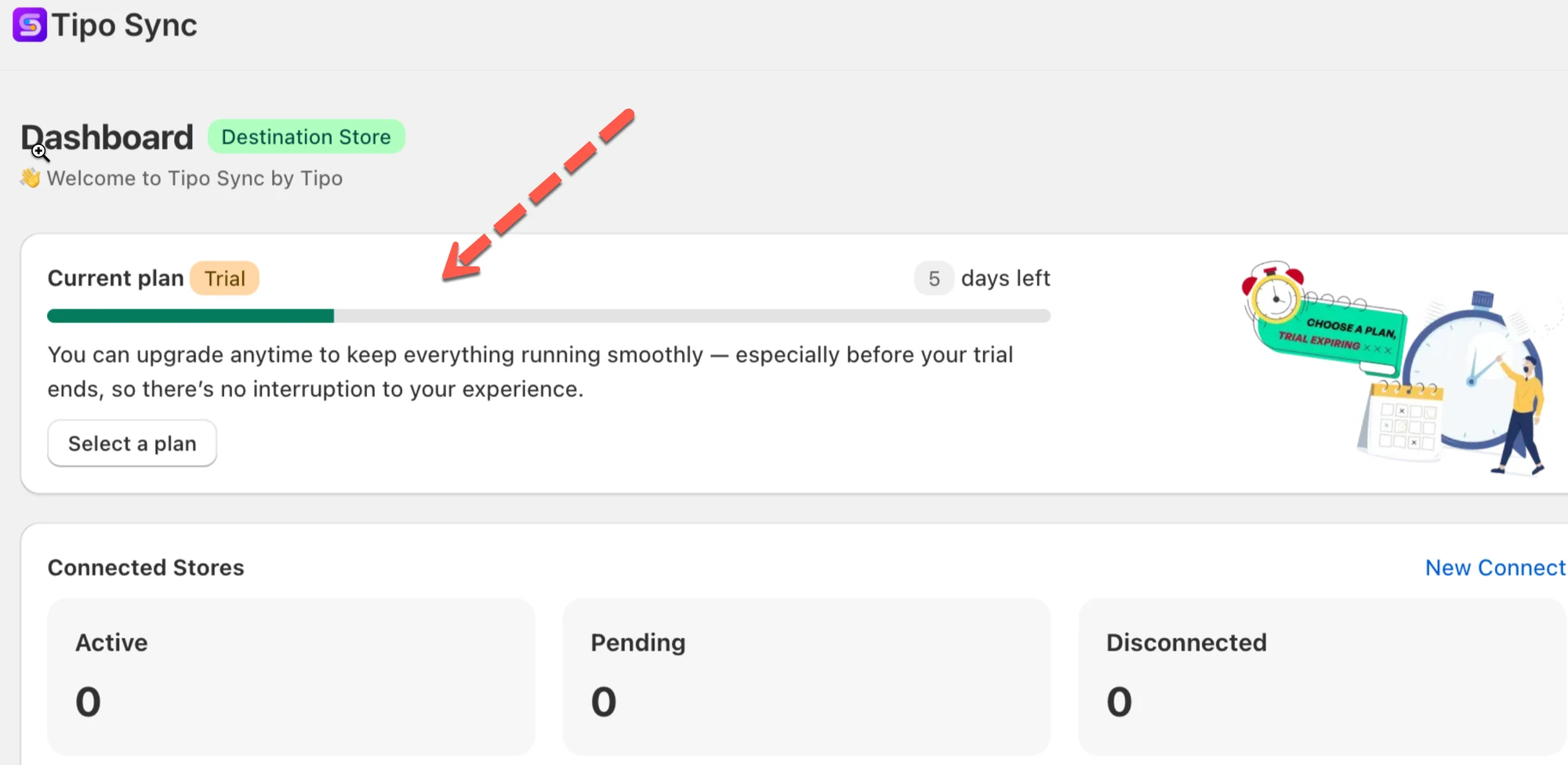
Section titled “⏳ 7-day trial & countdown on Dashboard”When you install the app, you will automatically start a free trial period. During this time, you can explore all features included in your selected plan without being charged.
You will not be billed during the active trial period.
On the Dashboard, you’ll see:
- Trial status (Trial / Days left / Trial ended)
- A countdown bar so you know exactly how many days remain
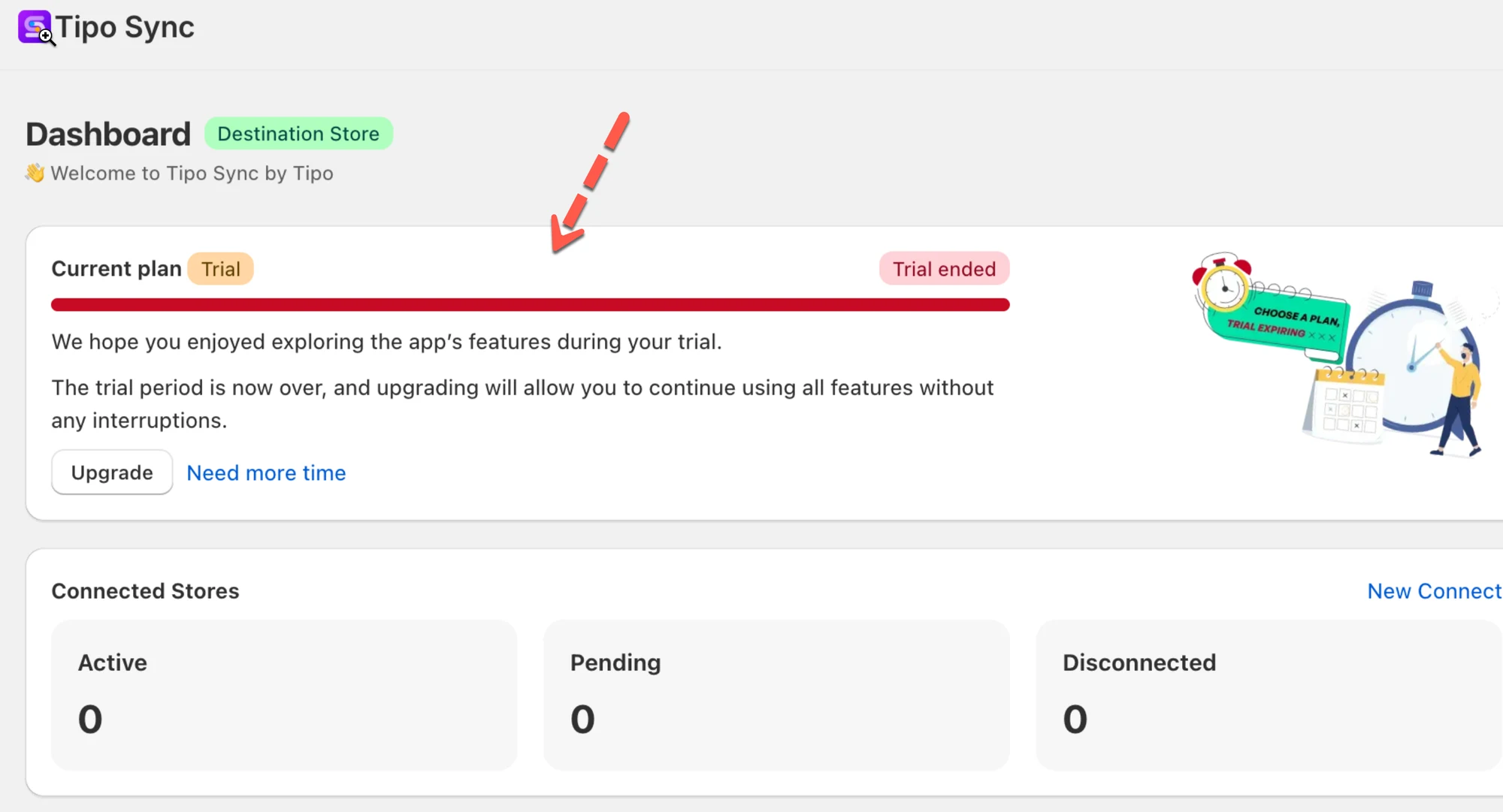
When the trial ends
- The dashboard shows “Trial ended”
- You’ll be prompted to Upgrade / Select a plan
- Sync will not continue until a plan is selected
📈 Understanding Store Variant Usage
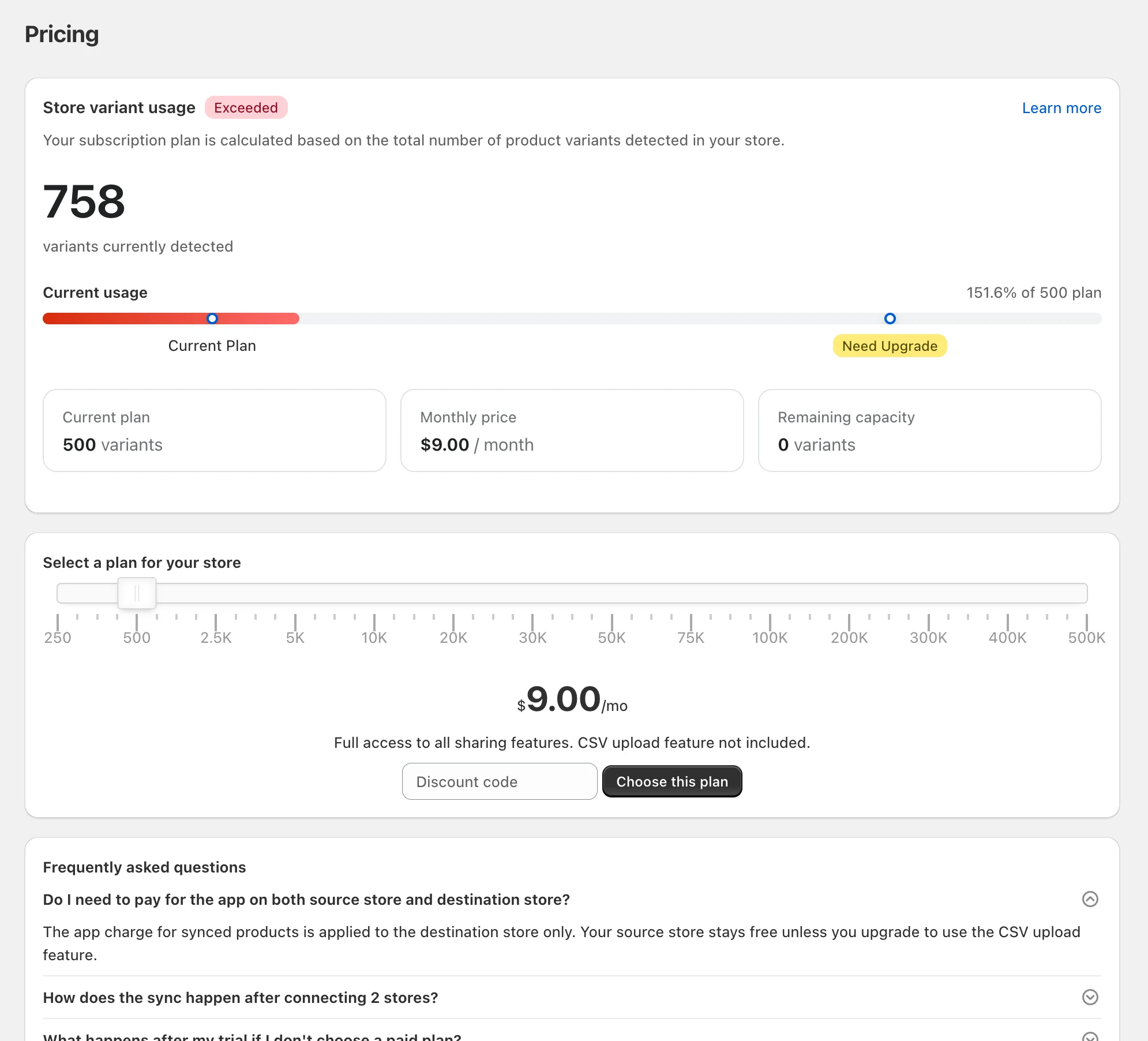
Section titled “📈 Understanding Store Variant Usage”Your subscription plan is based on the total number of product variants detected in your store.
You can view your current usage in the app > Pricing → Store Variant Usage.
The usage section shows:
| Item | Meaning |
|---|---|
| Current Plan | Your active subscription |
| Current Usage | Total variants detected |
| Exceeded | Usage is above your plan limit |
| Recommended Plan | Minimum plan required to support current usage |
⚠️ When Your Store Exceeds the Plan Limit
Section titled “⚠️ When Your Store Exceeds the Plan Limit”If the number of variants in your store exceeds your current plan limit, Tipo Sync will display an Exceeded status and highlight the recommended plan needed to support your store.
For example:
- Current plan: 500 variants
- Current usage: 758 variants
- Usage: 151.6% of plan capacity
Because the store contains more variants than the current plan allows, an upgrade is required to continue syncing products.
💳 How to upgrade your plan
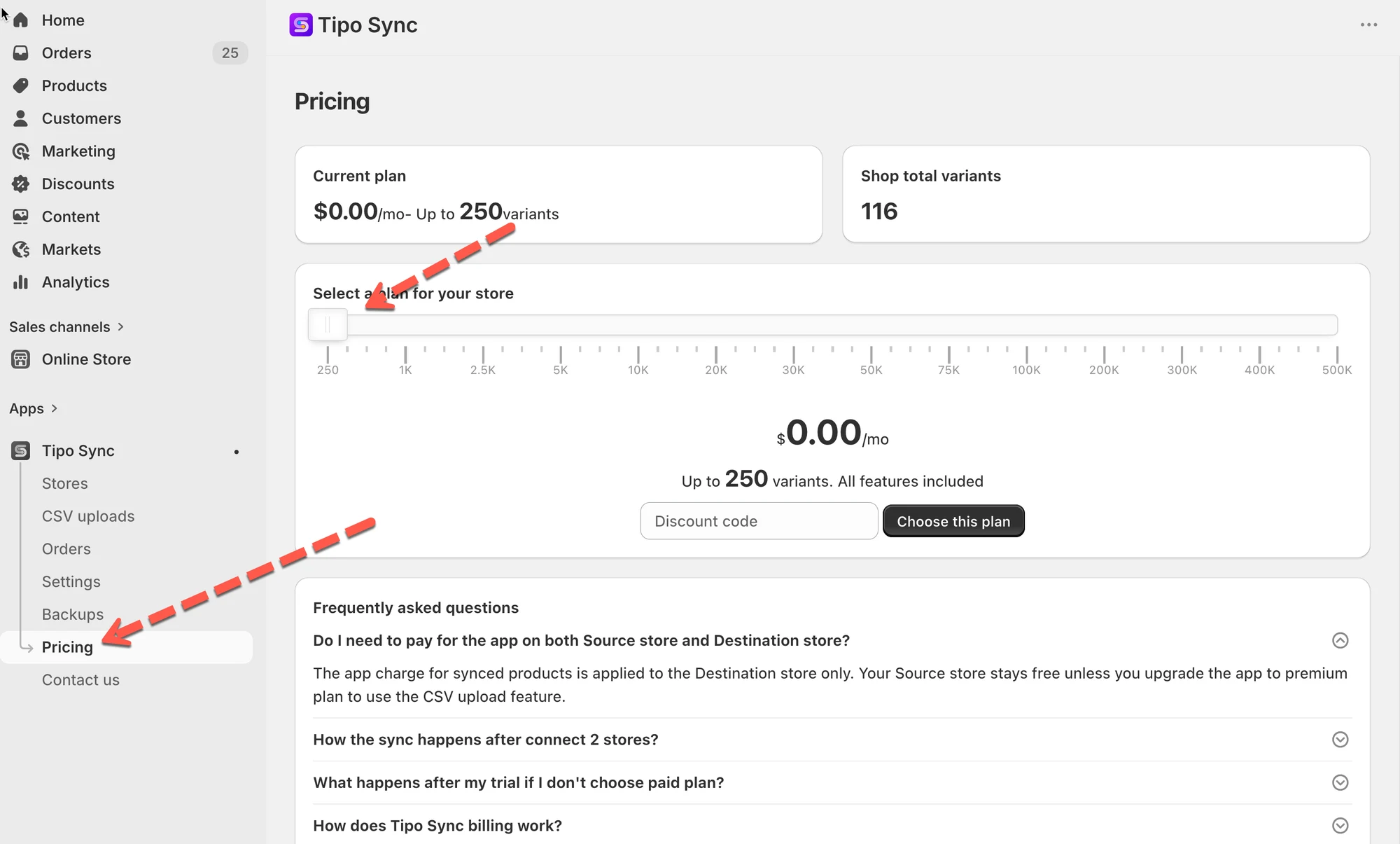
Section titled “💳 How to upgrade your plan”You can upgrade directly from the Dashboard.
- Open the Current plan section
- Click Upgrade > it directs you to the Pricing section of the app
- Select the plan that fits your store size > click Choose this plan
- Approve the Shopify subscription charge.
The new plan will be applied immediately after confirmation.
✅ Which store pays?
Section titled “✅ Which store pays?”You only subscribe on the Destination store.
- Destination store: choose a plan and pay here
- Source store: no payment needed
This makes setup simpler when you connect multiple stores.
Why is my usage higher than the number of synced products?
Section titled “Why is my usage higher than the number of synced products?”Your plan is calculated using the total number of variants detected in the Destination store, including products that are not currently being synced.
For example:
- Variants being synced: 500
- Total variants in Destination store: 7,242
Plan usage is calculated using 7,242 variants.
Do I need to pay for both the Source store and Destination store?
Section titled “Do I need to pay for both the Source store and Destination store?”No.
The subscription fee for product syncing is applied to the Destination store only.
Can I downgrade my plan later?
Section titled “Can I downgrade my plan later?”Yes.
If your store’s total variant count decreases and fits within a lower plan tier, you can select a smaller plan from the Pricing page.
Make sure your total variant count remains within the selected plan’s limit before downgrading.