
Inventory Sync Groups
AI Overview
Inventory Sync Groups keep stock consistent across related products in a single Shopify store. A group is a set of products or variants that share the same inventory, so when one sells or is restocked, the app updates the others. You can create groups automatically with Smart Scan or by hand.
View moreView less
- Use groups for the same product listed several times, such as duplicate listings for different channels or campaigns.
- Smart Scan groups products by SKU automatically and works best when SKUs are clean and consistent.
- Manual Group Creation lets you pick exact products or variants and does not need SKUs.
- Watch the risks: messy SKUs can create wrong groups with Smart Scan, and manual groups can miss items you forget to add.
Summary generated by AI. It can make mistakes, so check the full guide below.
Inventory Sync Groups help you keep stock consistent across related products in a single Shopify store. Instead of updating inventory in multiple places, you group items together and the app keeps their quantities aligned automatically.
ℹ️ What is an Inventory Sync Group?
Section titled “ℹ️ What is an Inventory Sync Group?”An Inventory Sync Group is a set of products/variants that should share the same inventory.
When inventory changes for one item in the group (sale, restock, manual adjustment), the app updates the other items in that group so everything stays accurate.
Common use cases
- Same product listed multiple times (different titles, colors, collections)
- Duplicate listings for different channels or campaigns
- “Same stock, different product pages” setups
🧪 Quick example (easy)
Section titled “🧪 Quick example (easy)”You have 3 listings that all use the same physical stock:
- “Classic Hoodie - Blue”
- “Classic Hoodie - Promo Listing”
- “Classic Hoodie - Bundle Page”
If they are in the same Inventory Sync Group:
- Sell 1 hoodie → inventory updates across all 3 listings automatically.
🛠️ 2 ways to create Inventory Sync Groups
Section titled “🛠️ 2 ways to create Inventory Sync Groups”1) Smart Scan (Auto-group by SKU)
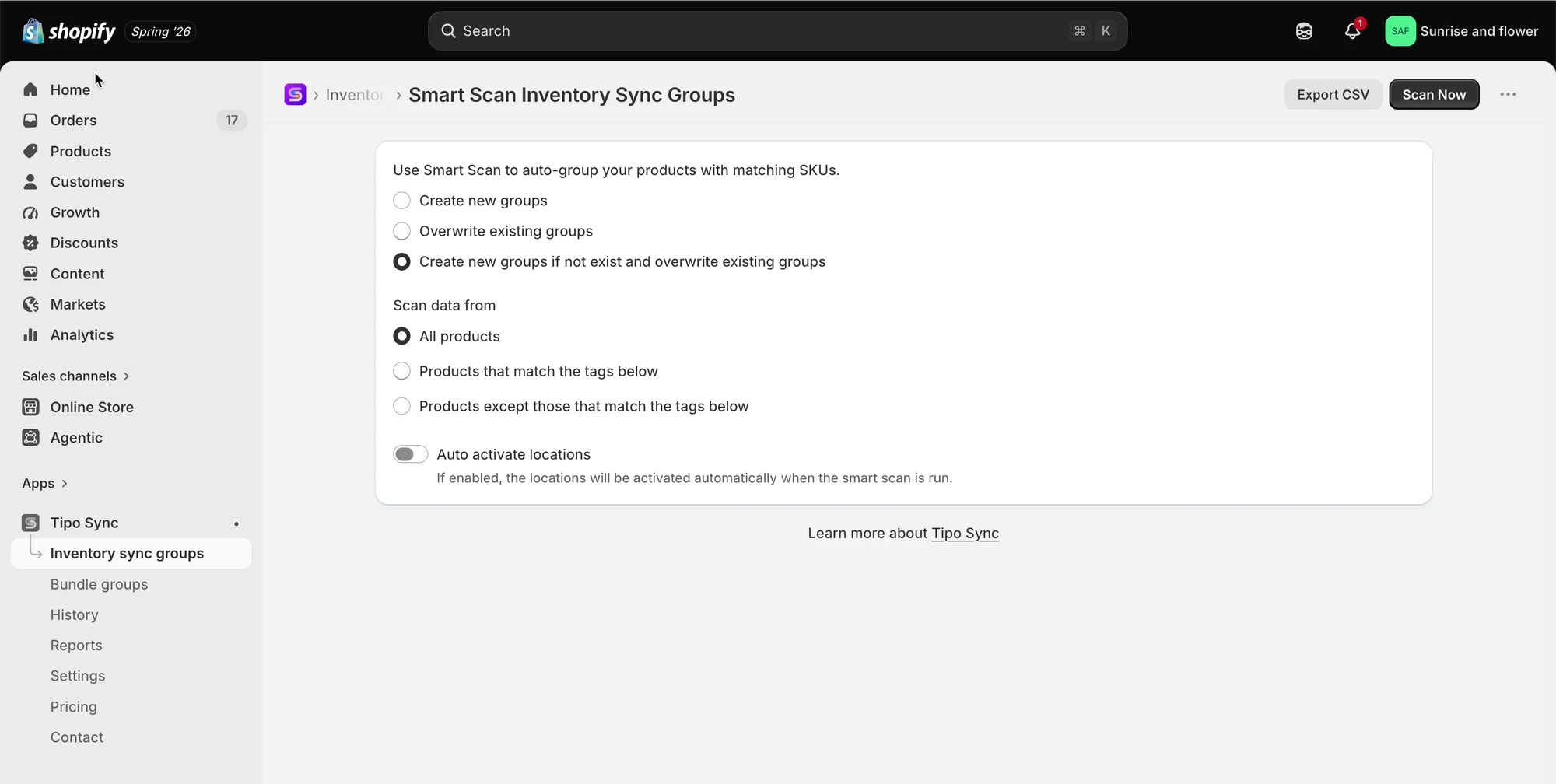
Section titled “1) Smart Scan (Auto-group by SKU)”Smart Scan automatically finds products/variants that match by SKU and groups them for you.
Best when
- Your store already has clean, consistent SKUs
- You have many products and want fast setup
- Variants that should share inventory use the same SKU pattern
How it works
- The app scans your catalog
- It detects variants with matching SKUs (based on the rules you choose)
- It creates Inventory Sync Groups automatically
Learn more here
2) Manual Group Creation
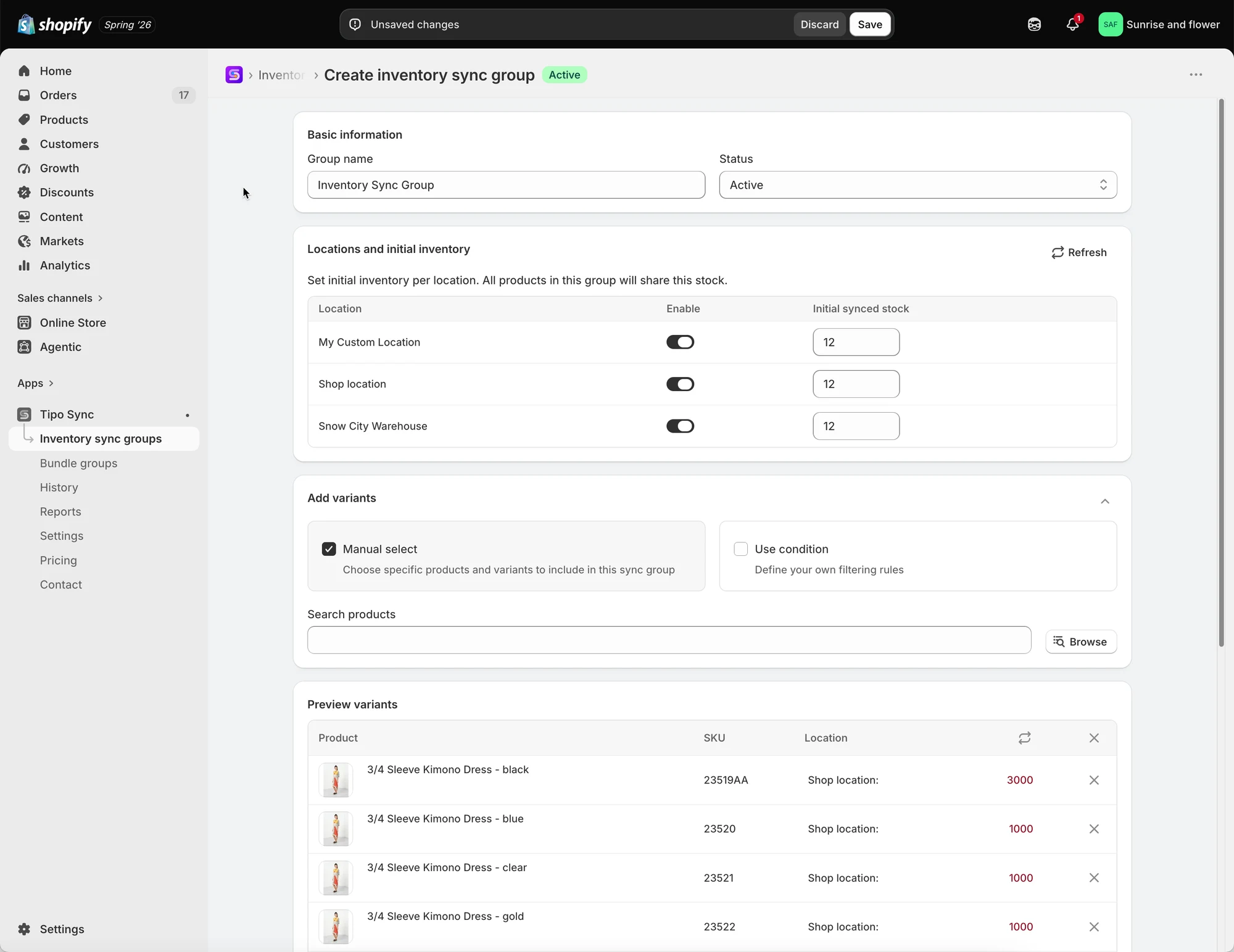
Section titled “2) Manual Group Creation”Manual creation lets you choose exactly which products/variants go into a group.
Best when
- Your SKUs are missing or inconsistent
- Only specific items should be grouped
- You want full control over group logic
How it works
- You create a new Inventory Sync Group
- Select the products/variants you want inside the group
- Save → the app keeps inventory aligned for that group
Learn more here
Compare table:
Section titled “Compare table:”| Feature | Smart Scan (Auto-group by SKU) | Manual Group Creation |
|---|---|---|
| Best for | Fast setup for many products | Full control for specific products |
| How it groups | Automatically groups by SKU rules | You pick products/variants yourself |
| Setup time | Very fast | Slower (depends on how many items) |
| Needs SKUs? | ✅ Yes (SKUs should be consistent) | ❌ Not required |
| Control level | Medium | High |
| Good for beginners | Yes (if SKUs are clean) | Yes (easy but manual) |
| Common risk | Wrong groups if SKUs are messy | Missing items if you forget to add them |
🙋 Still need support?
If you still need help, please feel free to contact us at hi@tipo.io. We’ll be happy to assist you further.