
Update Master Inventory
AI Overview
Update Master Inventory forces Tipo to recalculate how many bundles are available, based on the current stock of the component products in selected Bundle Groups. Tipo normally updates this automatically, but you can run it after creating, editing, or importing groups, or after bulk component changes. The result follows the Sync Master with Component inventory setting.
View moreView less
- Open Bundle Groups and tick the boxes beside the bundle groups to update.
- Click Update Master Inventory.
- Tipo reads component inventory, recalculates possible bundles from the quantity rules, and updates the Master stock.
- Example: 2 x Product A (6 in stock) and 1 x Product B (5 in stock) gives 3 bundles available.
Summary generated by AI. It can make mistakes, so check the full guide below.
This guide explains how Update Master Inventory works in Bundle Groups, when to use it, and what happens after you run it.
✅ What is “Master inventory”?
Section titled “✅ What is “Master inventory”?”The Master product is the bundle product your customers buy (example: Gift Box Set).
The Master inventory represents how many bundles are available to sell, based on the inventory of the component products.
🎯 Why you might need to “Update Master Inventory”
Section titled “🎯 Why you might need to “Update Master Inventory””Normally, Tipo app updates bundle availability automatically when components change.
But sometimes you may want to force a recalculation, for example:
- You just created or edited a Bundle Group
- You imported bundle groups via CSV
- Component inventory was updated in bulk (import/another app)
- Master availability looks out of date and you want to refresh it
🔄 What happens when you update Master inventory?
Section titled “🔄 What happens when you update Master inventory?”When you run Update Master Inventory, Tipo app will:
- Read the latest inventory of all components
- Recalculate how many bundles can be created (based on quantity rules)
- Update the Master product inventory to match the calculated result
✅ This helps keep your bundle availability accurate.
🛠️ Steps
Section titled “🛠️ Steps”- Open the app > go to Bundle Groups > select the bundle groups you want to update by checking the boxes beside their names.
- Click Update Master Inventory button
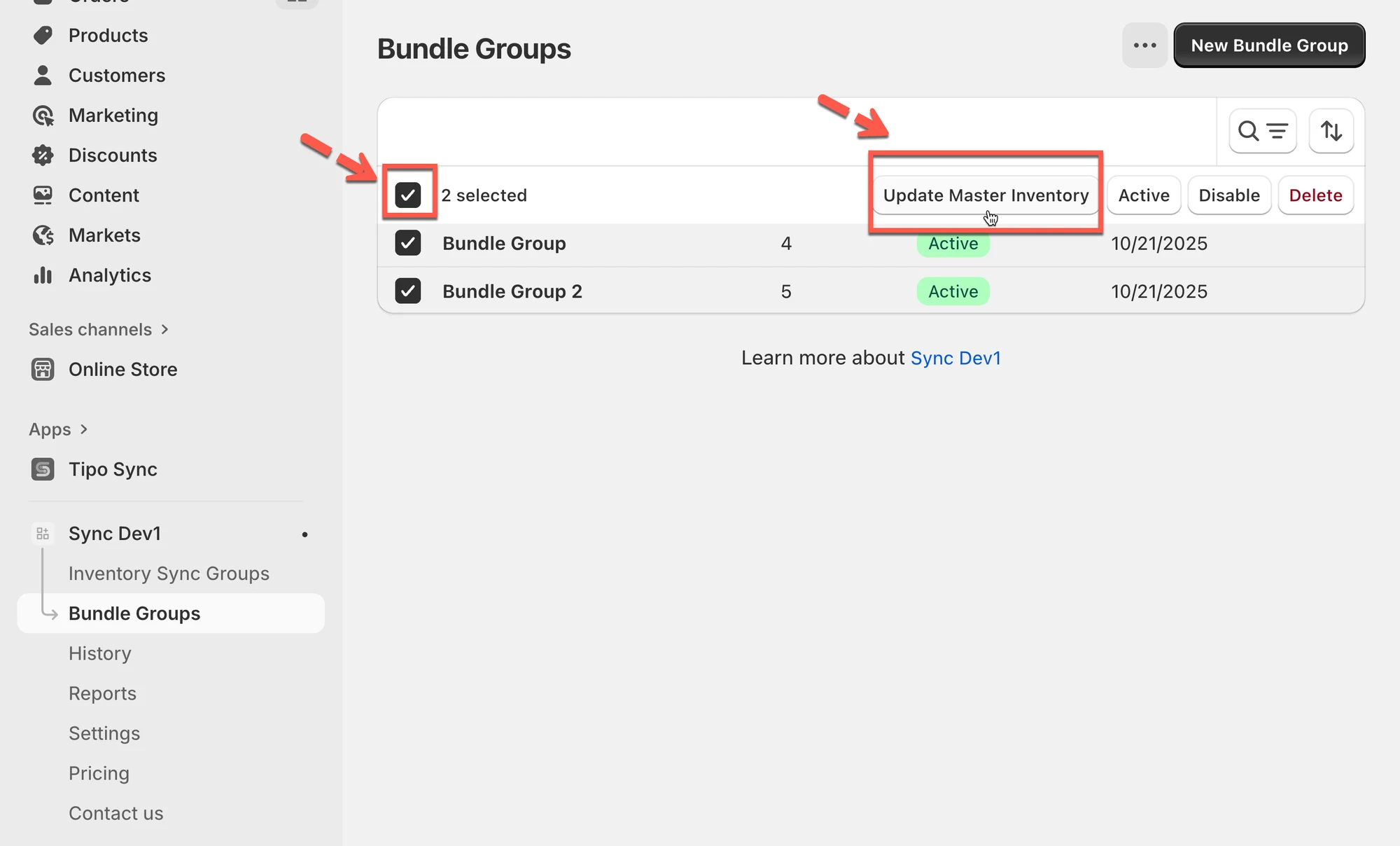
The system will automatically:
- Recalculate the Master Product quantities based on the current inventory levels of their Component Products.
- Update the Master Product stock across all linked bundles.
Example:
Suppose your Master variant (a gift set) includes:
- 2 × Product A
- 1 × Product B
If Product A now has 6 units in stock and Product B has 5, then the Master variant will be recalculated as min(6 ÷ 2, 5 ÷ 1) = 3 units available.
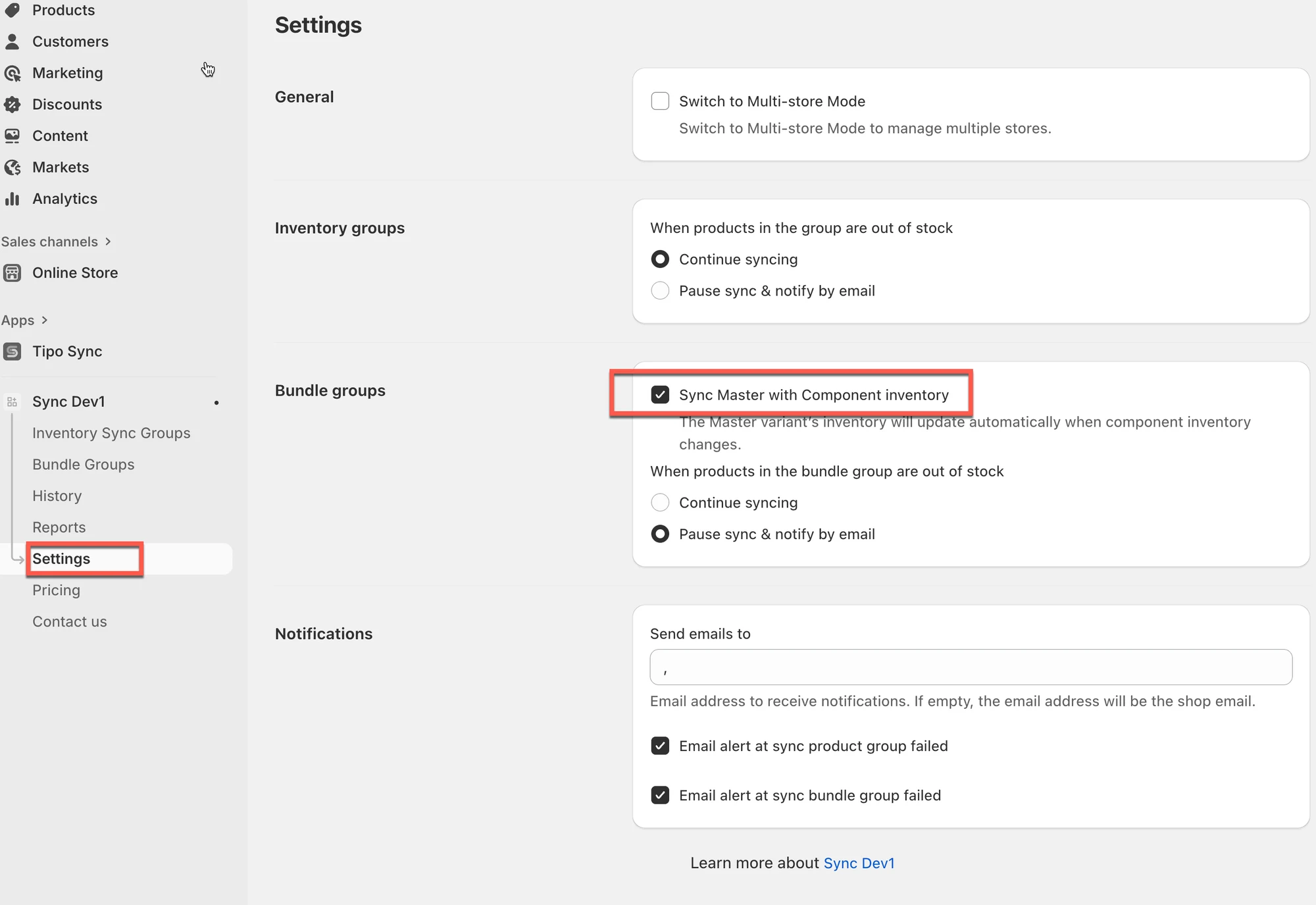
This action recalculates the master variant’s inventory based on the component inventory, following the setting “Sync Master with Component inventory” in the app’s settings.
🙋 Still need support?
If you still need help, please feel free to contact us at hi@tipo.io. We’ll be happy to assist you further.