> For the complete documentation index, see [llms.txt](https://docs.tipo.io/llms.txt). Markdown versions of documentation pages are available by appending `.md` to page URLs; this page is available as [Markdown](https://docs.tipo.io/tipo-auction/winner-and-checkout-flow/choose-a-winner-manually.md).
# Choose a winner manually
By default, Tipo Auction selects the **highest bidder** as the winner when an auction ends.\
In some cases, you may want to manually choose a different winner.
This guide shows you how to manually select a winner and what happens after.
### ✅ When should you choose a winner manually?
You may want to manually choose a winner if:
* You need to remove invalid or test bids
* There is a dispute between bidders
* You stopped an auction early
* You want to override the automatic result
***
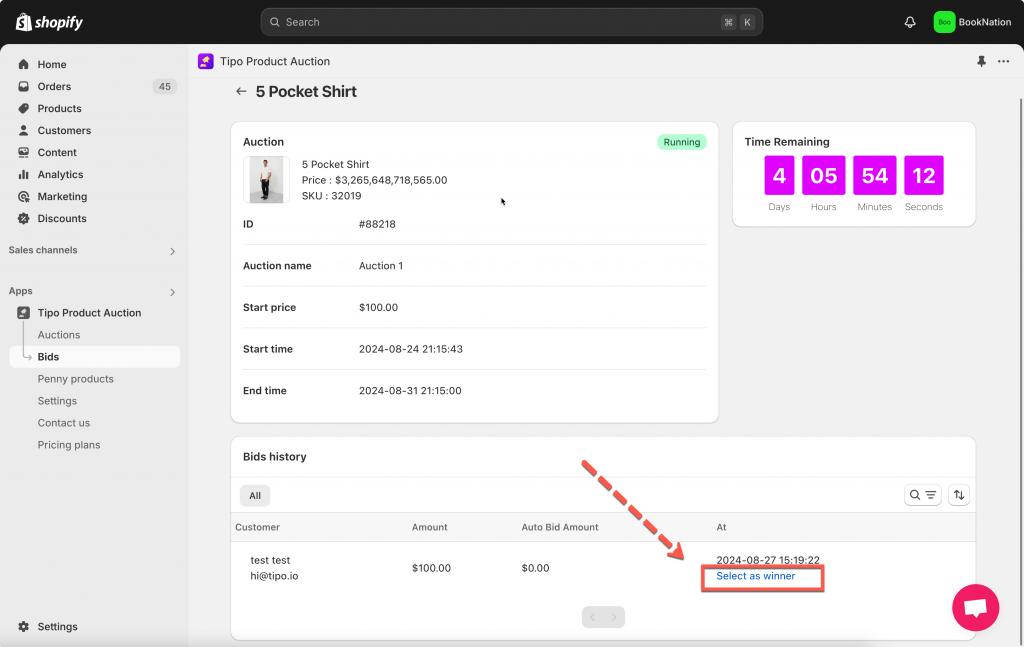
### 🛠️ Step-by-step: Choose a winner manually
1\. Open the app > click **Auctions** > **Products**
2\. From the filter field, search and select the auction product you want to select a winner
Another way: Click **Bids** of the app > go to the bid list
3\. Scroll down to **Bid history** session, a bidder list will show up > click **Select as winner** on the same line with the bidder you want
***
### ✅ What happens after selecting a winner?
Once a winner is selected:
* That customer becomes the official winner
* Only that customer can place an order
* Checkout access is enabled for the winner
* Other bidders lose purchase access
The winner can now complete payment within the allowed time.
***
**🙋 Still need support?**
If you still need help, please feel free to contact us at . We’ll be happy to assist you further.