
Checkout deadline for auction winners
AI Overview
Set a time limit for auction winners to pay in Tipo Product Auction, or let them pay at any time. A deadline stops winners from holding items without paying and lets the item move to the next bidder. If the winner misses it, checkout access and the unpaid winner order are removed.
View moreView less
- Open Settings > General and scroll to Winners > Payment deadline for winners.
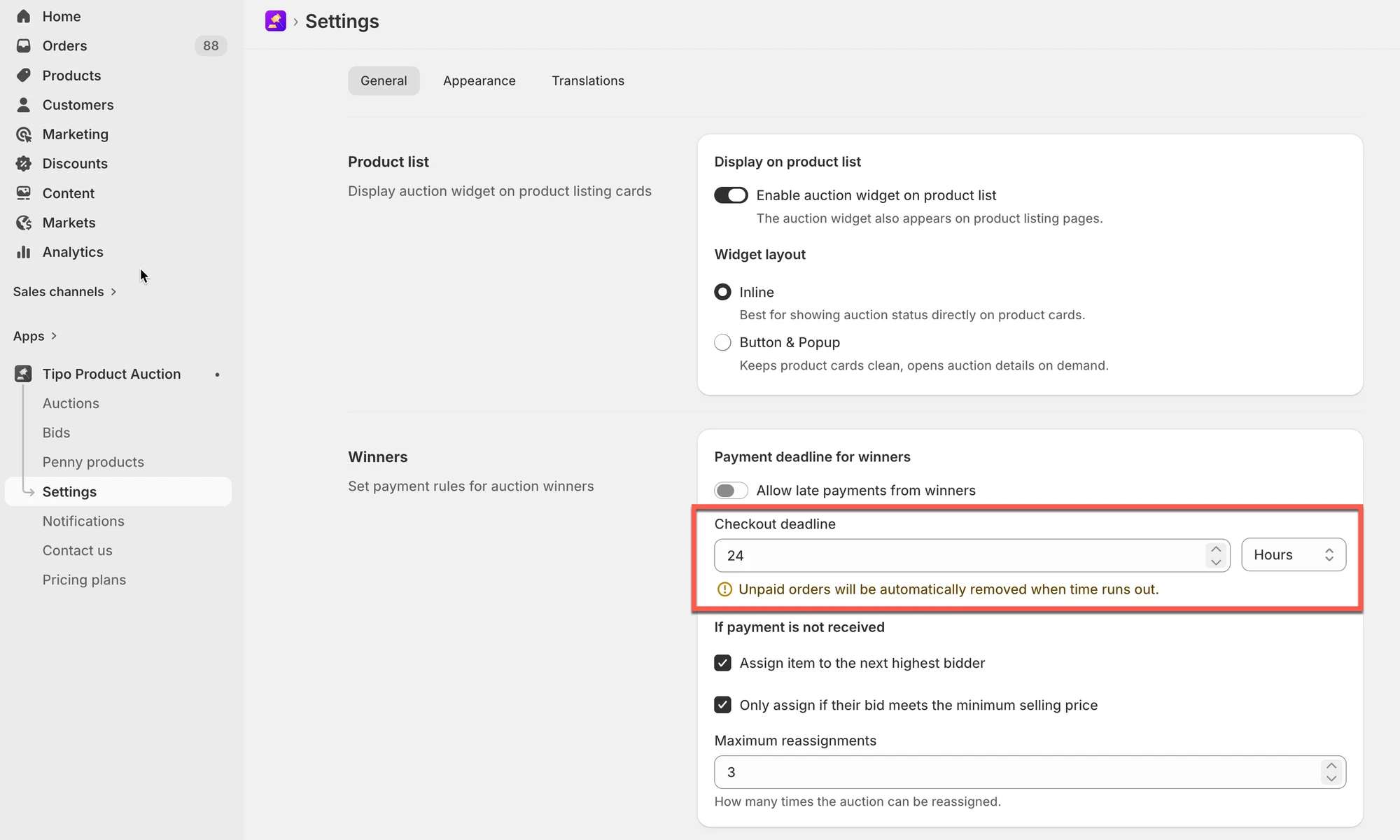
- Under Checkout deadline, enter a number and choose Hours or Days, then click Save.
- When the deadline expires, checkout access and the unpaid winner order are removed, and the item can be reassigned.
- Use it together with Assign item to the next highest bidder so the item is offered onward automatically.
Summary generated by AI. It can make mistakes, so check the full guide below.
After an auction ends, the winner is given access to checkout and can purchase the item.
You can choose whether winners must complete payment within a specific time limit or allow them to pay at any time.
🎯 Why set a Checkout deadline?
Section titled “🎯 Why set a Checkout deadline?”- Prevent winners from holding the item without paying
- Automatically move to the next bidder if payment is not completed
- Speed up order completion after auctions end
- Reduce manual follow-ups with winners
🛠️ Step-by-step: Set Checkout deadline for winners
Section titled “🛠️ Step-by-step: Set Checkout deadline for winners”- Open the app > go to Settings > General
- Scroll down to Winners > Payment deadline for winners
- Find Checkout deadline > Enter a number (for example:
24)
Select the time unit:
- Hours
- Days
- Click Save
✅ What happens when the deadline expires?
Section titled “✅ What happens when the deadline expires?”If the winner does not complete payment before the checkout deadline:
- Checkout access is removed.
- The unpaid winner order is removed.
- The item can be reassigned to another bidder.
Example 1: Checkout deadline = 24-hour
Section titled “Example 1: Checkout deadline = 24-hour”Settings:
- Checkout deadline: 24 hours
Result:
- Winner has 24 hours to complete checkout
- If unpaid after 24 hours, the winner loses checkout access
Example 2: Short Checkout deadline (high-demand items)
Section titled “Example 2: Short Checkout deadline (high-demand items)”Settings:
- Checkout deadline: 2 hours
Result:
- Fast checkout required
- Auction moves quickly to the next winner if unpaid
🔄 Combine with Assign item to the next highest bidder
Section titled “🔄 Combine with Assign item to the next highest bidder”For best results, use this setting together with setting Assign item to the next highest bidder
This ensures:
- Auctions continue smoothly
- The item is offered to the next highest bidder automatically
- No manual admin action is needed
🙋 Still need support?
If you still need help, please feel free to contact us at hi@tipo.io. We’ll be happy to assist you further.