
Auto-extend end time
AI Overview
Auto-extend end time (popcorn bidding) in Tipo Product Auction prevents last-second bidding by extending the auction when a bid arrives near the end. If a bid is placed when remaining time is below your trigger value, the end time extends by your set amount. This can repeat several times.
View moreView less
- Open Auctions, create or open an auction, and turn on Auto-extend end time in Additional options.
- Set Extend by, the time added each time the rule triggers.
- Set Trigger when time remaining is less than, the threshold that activates the extension on a new bid.
- Click Save.
- Example: with a 5-minute trigger and 2-minute extension, a bid at 4 minutes remaining leaves 6 minutes.
Summary generated by AI. It can make mistakes, so check the full guide below.
ℹ️ What is “Auto-extend end time” option?
Section titled “ℹ️ What is “Auto-extend end time” option?”Auto-extend end time, as known as Popcorn bidding feature helps prevent last-second bidding by automatically extending the auction when a new bid is placed near the end time.
When enabled:
If a bid is placed while the remaining auction time is less than the Trigger when time remaining is less than value, the auction end time will automatically be extended by the Extend by value.
This can happen multiple times during the auction.
🛠️ Set up “Auto-extend end time” option
Section titled “🛠️ Set up “Auto-extend end time” option”- Open the app > click Auctions > create a new auction or open an existing auction
- In Additional options session, turn on Auto-extend end time
- After enabling the option, 2 settings will appear:
- Extend by
The amount of time added to the auction each time the auto-extend rule is triggered. - Trigger when time remaining is less than
The remaining time threshold that activates the extension when a new bid is placed.
4. Click Save.
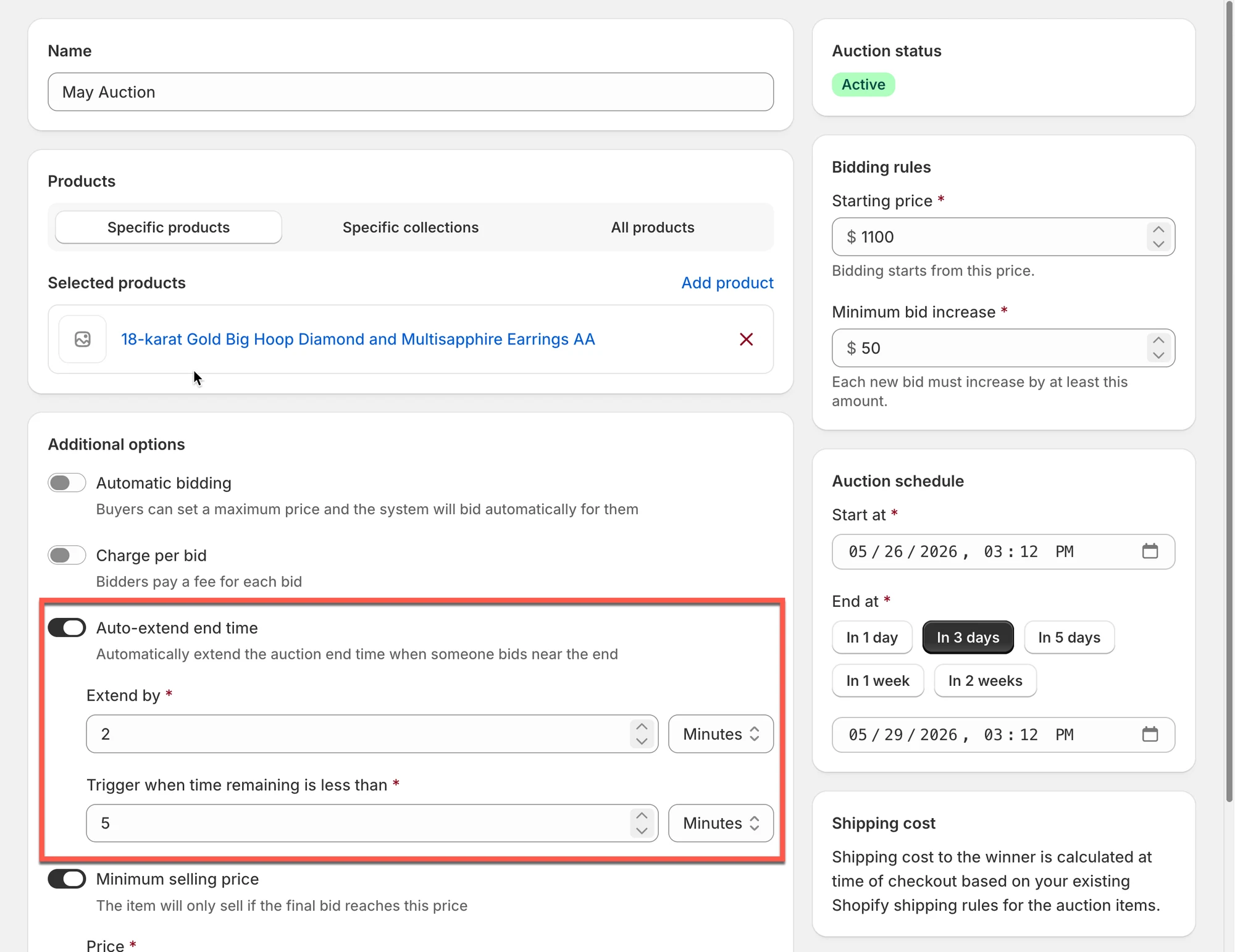
💡 Example of how it works
Section titled “💡 Example of how it works”Example
Section titled “Example”- Auction end time: 4:40 PM
- Trigger when remaining time is less than: 5 minutes
- Extend by: 2 minutes
Scenario
Section titled “Scenario”At 4:36 PM, the remaining auction time is only 4 minutes.
A new bid is placed
→ The auto-extend rule is triggered
→ The auction time is extended by 2 more minutes
So instead of ending in 4 minutes, the auction will now end in 6 minutes from the current moment.
If another bid is placed again while the remaining time is less than 5 minutes, the auction will continue extending by 2 minutes each time.
✅ Benefits of Auto-extend End Time
Section titled “✅ Benefits of Auto-extend End Time”- Prevents last-second bid sniping
- Gives all bidders a fair chance
- Encourages more competitive bidding
- Can help increase final auction prices
🙋 Still need support?
If you still need help, please feel free to contact us at hi@tipo.io. We’ll be happy to assist you further.