
僅同步商品庫存
AI 概覽
瞭解如何在 Tipo Sync 中只將庫存數量從 Source store 同步到 Destination store,而不動價格、圖片與描述等商品資料。適合銷售相同商品、只需要庫存量一致的商店。庫存會依照您的地點對應進行同步。
查看更多收合
- 在 Destination store 中,於 Product Fields to Synchronize 下將不需要的欄位設為 Ignore,並讓商品名稱與款式名稱保持 Create only。
- 在 Source store 中開啟 Settings,選擇 One-Way 或 Two-Way Inventory Sync,然後點選 Save。
- 在 Destination store 中,於 Matching & Imports 下選擇商品同步規則:Create & Update、Update Only 或 Create Only。
- 在 Products sync 中選擇要同步的商品,完成連線並儲存。
- 只有庫存量會變動;商品詳細資料不會同步,且範例中不會建立新商品。
由 AI 產生的摘要,可能有錯誤,請參閱下方的完整指南。
本指南說明如何僅將庫存數量從 Source store 同步至 Destination store,而不變更價格、圖片或描述等其他商品資料。
✅ 「僅庫存同步」是什麼意思?
Section titled “✅ 「僅庫存同步」是什麼意思?”Tipo Sync 會:
- 更新您商店中的庫存數量(可用件數)
- 依據您的地點對應來同步庫存
- ❌ 不更新商品內容 (描述、圖片)
- ❌ 不更新價格(除非您另外啟用價格同步)
如果您的商店共用相同的商品,而您只想讓庫存水準保持一致,這是理想的做法。
🛠️ 選擇要同步的商品資訊
Section titled “🛠️ 選擇要同步的商品資訊”- 在 Destination store 開啟應用程式 Settings > Product Fields to Synchronize
- 針對您不想同步的商品資料,選擇 Ignore 選項
Ignore:該欄位不會被同步;它在 Destination Store 中保持獨立。
- 點選 Save
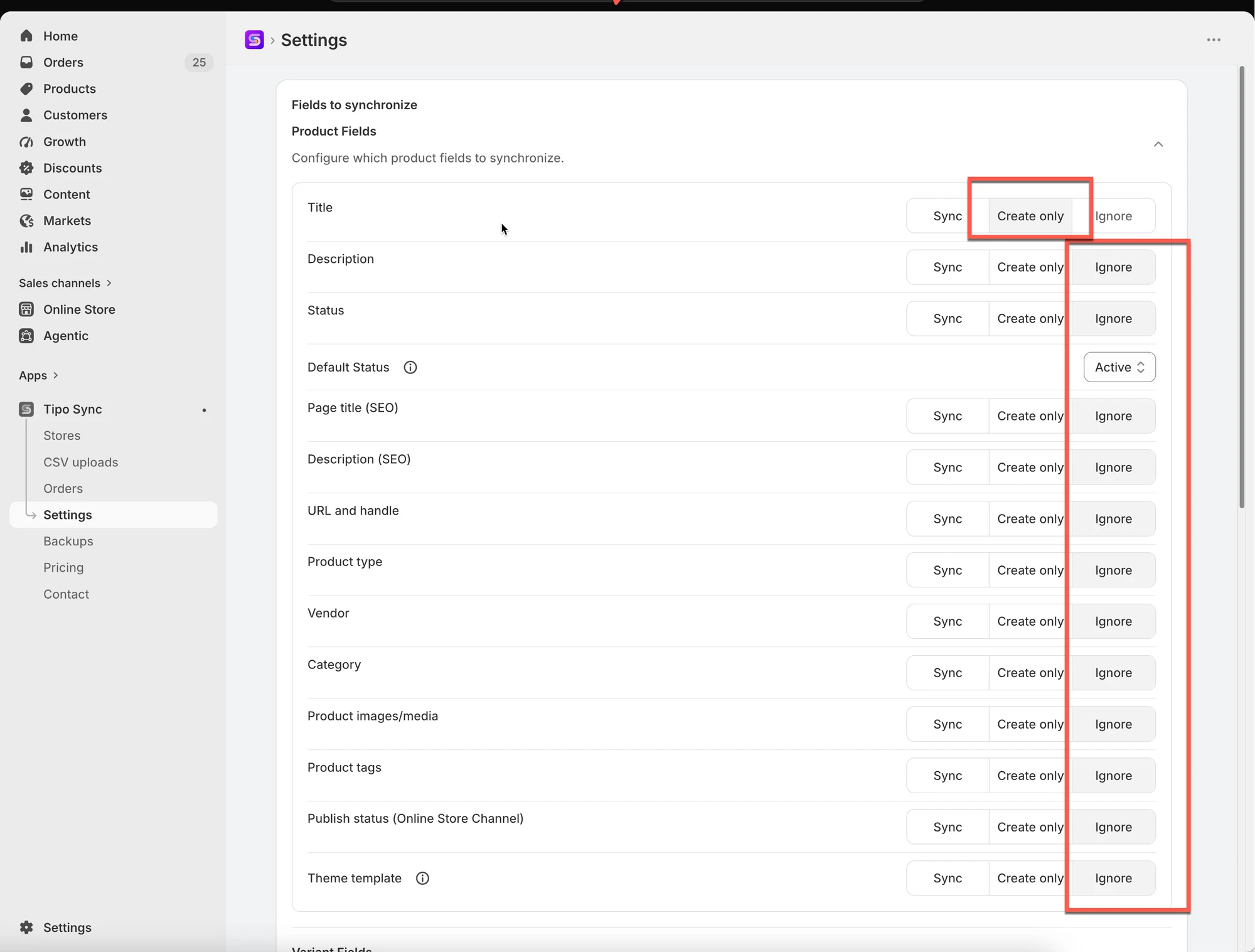
針對商品名稱與款式名稱,請選擇 Create only 選項
原因:首次將新商品從 Source Store 同步至 Destination Store 時,需要商品名稱與款式名稱。
🛠️ 啟用庫存同步
Section titled “🛠️ 啟用庫存同步”在 Source store 中:
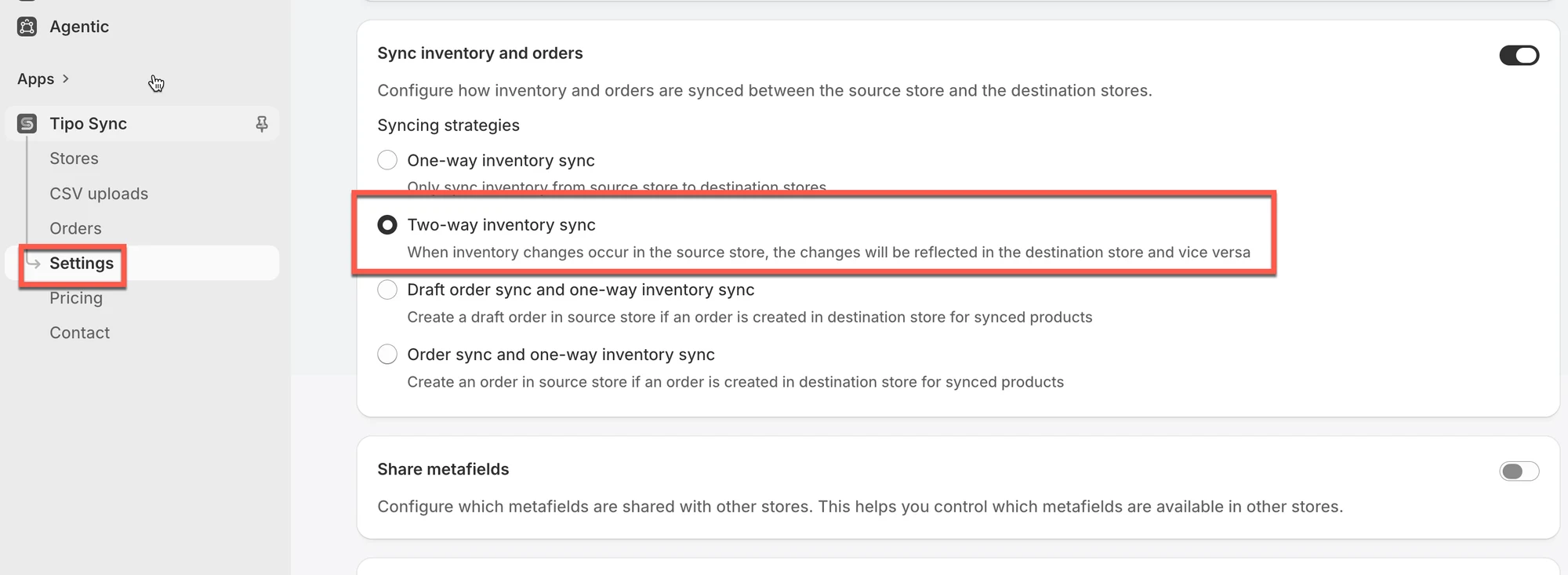
Section titled “在 Source store 中: ”在 Source store 中開啟應用程式 > 點選 Settings > 選擇 2 個庫存設定之一 > Save
- One-Way Inventory Sync:僅將庫存變動從 Source Store 同步至 Destination Store。
- Two-Way Inventory Sync:允許兩間商店的庫存變動互相同步。
在 Destination store 中:
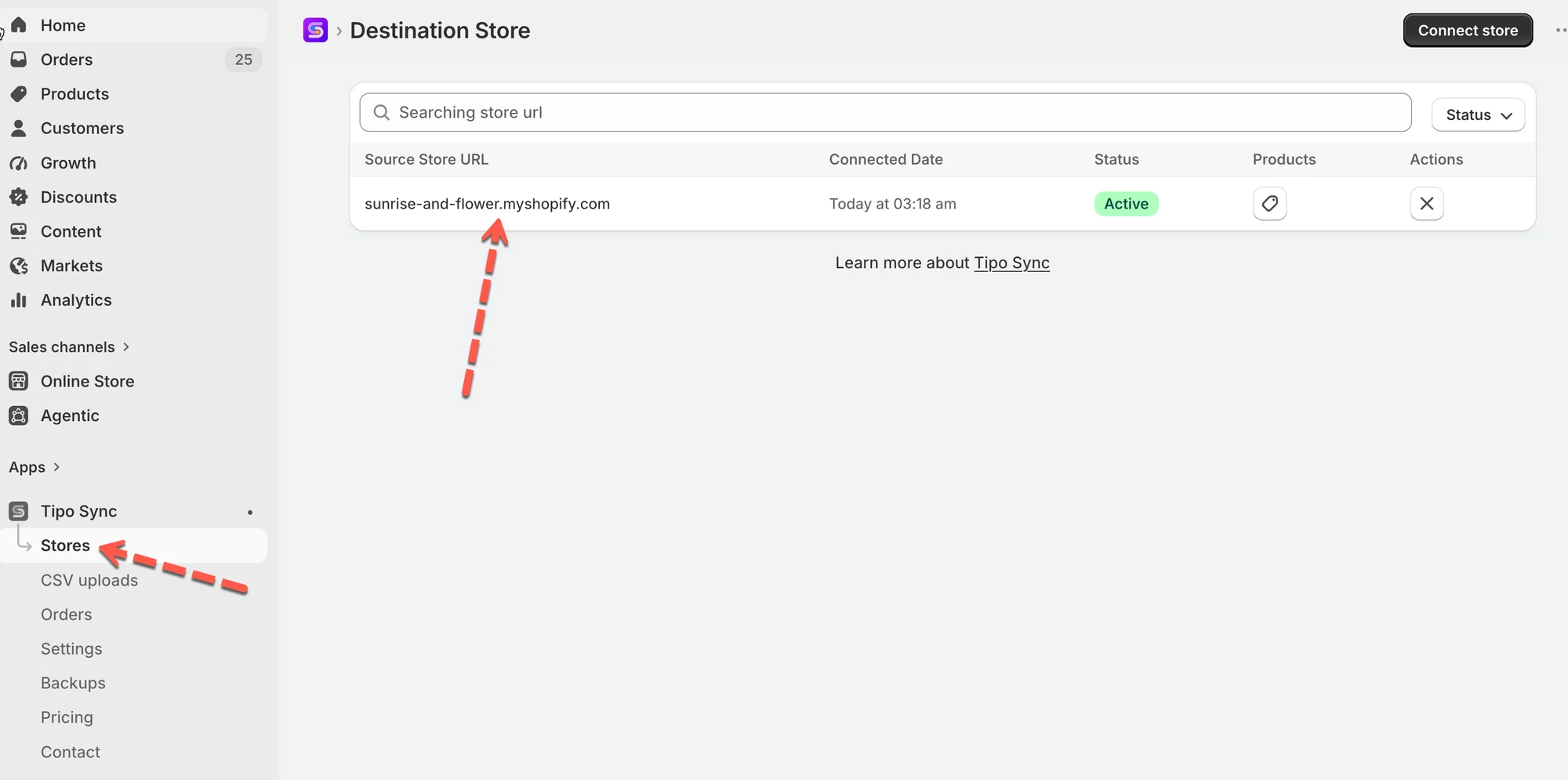
Section titled “在 Destination store 中:”1. 在 Destination store 中開啟應用程式 > 建立新連線,或檢查目前的連線
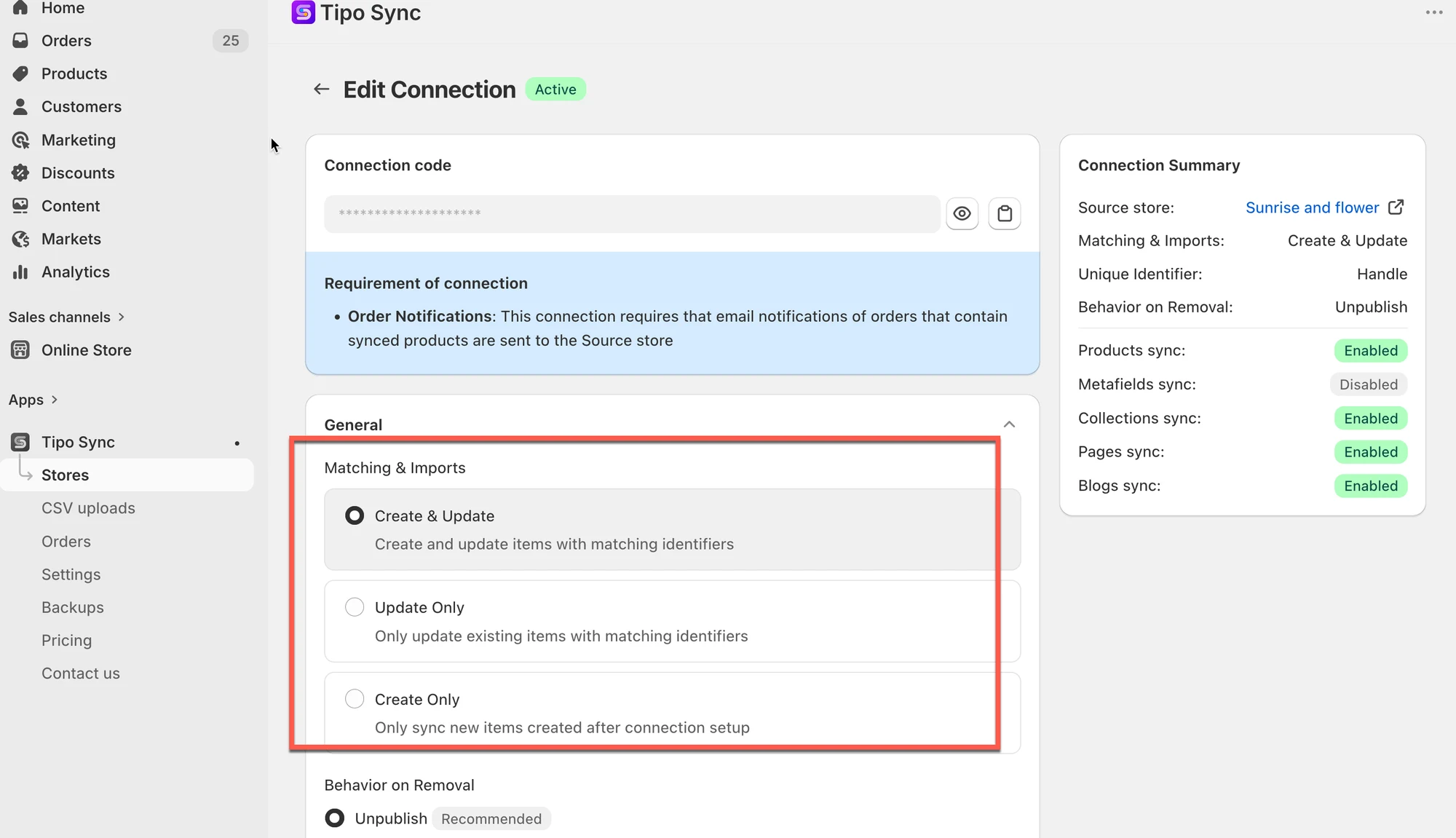
2. 在 Matching & Imports 部分,選擇其中一個商品同步規則
| 如果您想要… | 建議選項 |
|---|---|
| 讓兩間商店完全同步 | 🔄 Create & Update |
| 僅更新現有商品 | 🔁 Update Only |
| 僅匯入新商品 | ➕ Create Only |
3. 前往連線詳細資料中的 Products sync 設定,選擇需要同步庫存的商品並完成連線。
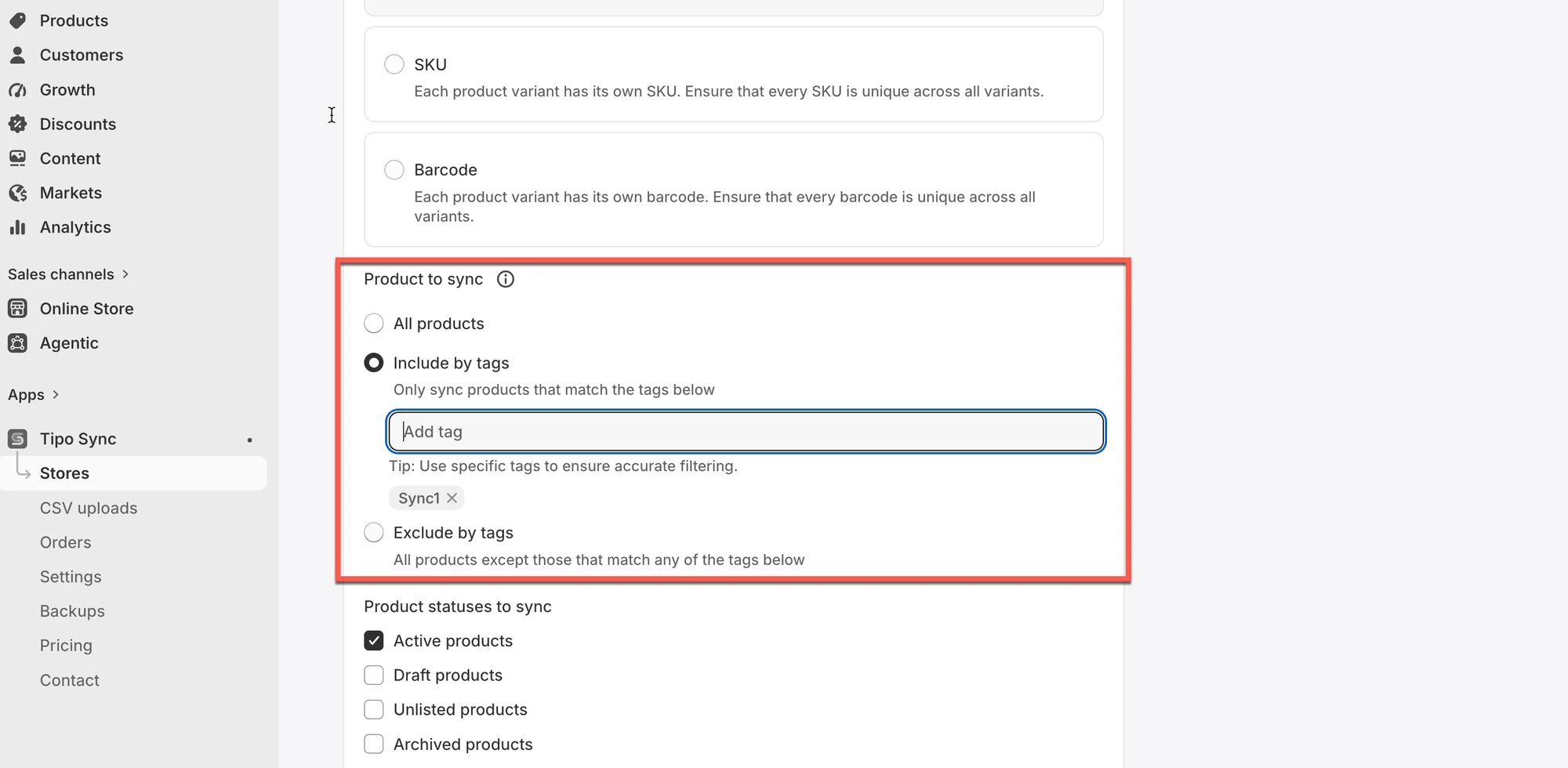
- 點選 Save
🧪 範例:僅同步商品庫存
Section titled “🧪 範例:僅同步商品庫存”商店:
- Source Store:
https://urbanwear-eu.myshopify.com - Destination Store:
https://urbanwear-us.myshopify.com
要同步的商品:
- 商品名稱:
Slim Fit Denim Jacket - Handle:
slim-fit-denim-jacket - 此商品在兩間商店中都已存在,且 handle 與款式相同。
同步的內容是什麼?
✅ 只會同步庫存水準。
❌ 商品名稱、描述、價格、圖片等商品詳細資料不會被同步。
❌ 不會建立新商品。
同步前
| 商店 | 商品 Handle | 庫存水準 |
|---|---|---|
| Source Store | slim-fit-denim-jacket | 50 |
| Destination Store | slim-fit-denim-jacket | 30 |
Source Store 有訂單後
- 顧客從 Source Store 購買了 5 件夾克
- Source Store 的新庫存:45
同步執行後:
| 商店 | 庫存水準 |
|---|---|
| Source Store | 45 |
| Destination Store | 45 ✅ |
Destination Store 的庫存已更新,與 Source 一致。
🎬 教學影片
Section titled “🎬 教學影片”🙋 還需要協助嗎?
如果您仍需要協助,歡迎隨時寄信至 hi@tipo.io 與我們聯繫,我們很樂意為您提供進一步的協助。