
單向庫存同步
AI 概覽
說明 Tipo 中的 One-Way Inventory Sync:由 Source store 控制庫存,Destination store 隨之更新。當由一間主商店管理庫存時,這是最安全的選擇。在 Destination store 所做的變更絕不會更新 Source store。
查看更多收合
- 當您在一間主商店管理庫存,並希望 Destination 始終與其一致時使用。
- 在 Source store 中,開啟 Settings 並開啟 Sync inventory and orders。
- 選擇 One-Way Inventory Sync 並點選 Save。
- 應用程式會依 handle、SKU 或條碼在 Destination 找到相同商品,並更新已對應的地點。
- Destination 的銷售或調整不會同步回 Source。
由 AI 產生的摘要,可能有錯誤,請參閱下方的完整指南。
單向庫存同步只會朝單一方向更新庫存:
Source store 控制庫存 → Destination store 跟隨
如果您希望由一間「主」商店管理庫存,這是最安全的選項。
✅ 什麼時候應該使用單向同步?
Section titled “✅ 什麼時候應該使用單向同步?”在以下情況使用此模式:
- 您在一間主要商店(Source)中管理庫存
- 您希望 Destination 商店的庫存始終與 Source 一致
- 您不希望 Destination store 的銷售/調整影響 Source 的庫存
⚙️ 設定單向庫存同步的步驟
Section titled “⚙️ 設定單向庫存同步的步驟”在 Source store 中
Section titled “在 Source store 中”1. 在 Source store 中開啟應用程式 > 點選 Settings > 開啟 Sync inventory and orders
- 選擇 One-Way Inventory Sync
3. 點選 Save
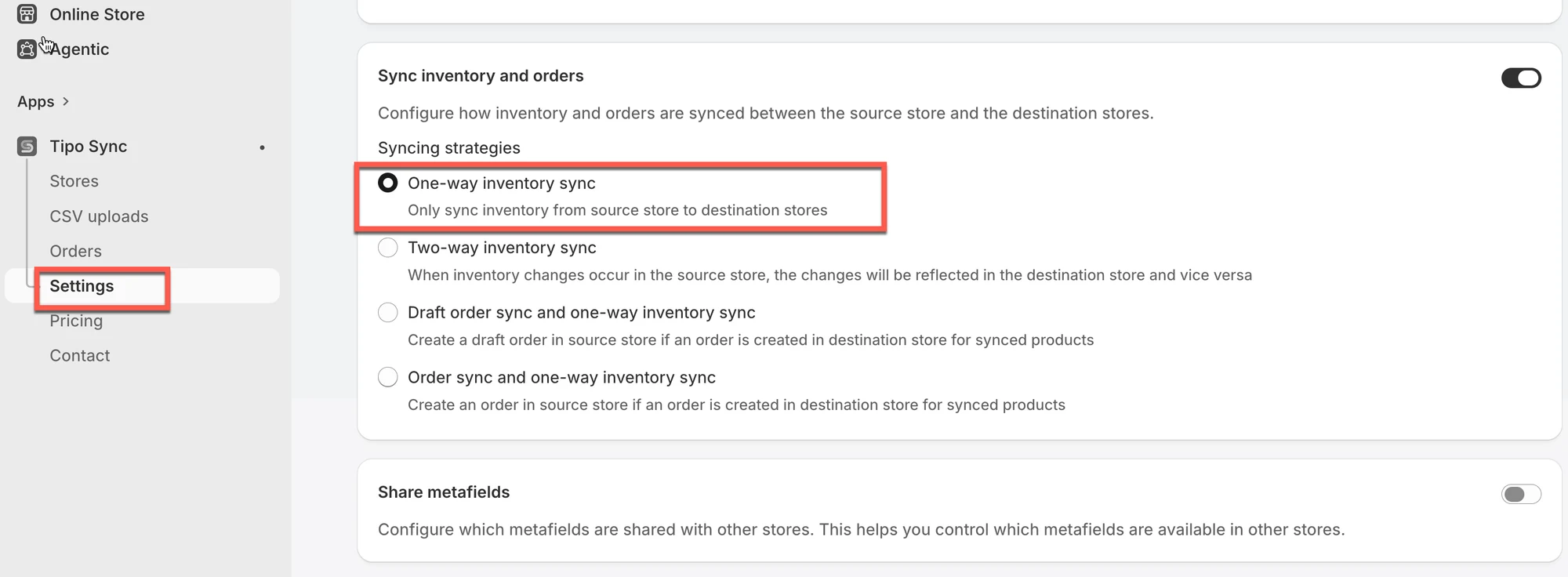
✅ 單向庫存同步的運作方式
Section titled “✅ 單向庫存同步的運作方式”當 Source store 的庫存發生變動(銷售、補貨、手動調整)時,應用程式會:
- 在 Destination 中找到相同的商品(以 handle、SKU 或 barcode 比對)
- 將庫存更新套用至已對應的 Destination 地點
- 更新 Destination 的庫存,使其與 Source 一致
⇒ Destination 可以接收更新
⇒ Destination 的變更不會更新 Source
🧪 範例:Source 更新 Destination
Section titled “🧪 範例:Source 更新 Destination”單向庫存同步(以商品 Handle 為基準)
假設您已連線兩間 Shopify 商店:
-
Source Store: https://furniture-eu.myshopify.com
-
Destination Store: https://furniture-us.myshopify.com
您要同步的商品為:
商品名稱:Modern Oak Bookshelf
Handle:modern-oak-bookshelf
| 商店 | 變動前庫存 | 變動後庫存 |
|---|---|---|
| Source Store | 20 | 15 |
| Destination Store | 20 | 15 ✅ |
當有人在 Source Store 購買 5 件時,Destination Store 的庫存會自動更新為一致(剩餘 15 件)。
✅ 這是因為兩個商品具有相同的 handle:modern-oak-bookshelf。
如果 Destination Store 的庫存發生變動會怎樣?
假設有顧客在 Destination Store 購買了 2 件。
| 商店 | 變動前庫存 | 變動後庫存 |
|---|---|---|
| Destination Store | 15 | 13 |
| Source Store | 15 | 15 ❌ |
在單向同步中,Source Store 不會受到影響。Destination Store 的庫存變動不會同步回去。
🙋 還需要協助嗎?
如果您仍需要協助,歡迎隨時寄信至 hi@tipo.io 與我們聯繫,我們很樂意為您提供進一步的協助。