
同步頁面與部落格
AI 概覽
說明如何讓 Destination store 從 Source store 同步頁面、部落格與部落格文章,使各商店的店面內容保持一致。內容通常依 handle 比對,並由 Matching & Imports 選項控制項目是建立、更新或兩者皆做。
查看更多收合
- 在 Source store 中開啟 Settings,捲動到底部,開啟 Pages sync 與 Blogs sync,然後儲存。
- Create & Update 會新增項目並更新相符的項目。
- Update Only 只會變更 Destination 中已存在的項目。
- Create Only 只同步連線後建立的項目,並讓既有內容維持不變。
- 佈景主題的版面與樣式可能不會同步,且 Destination 中 handle 相同的項目可能會被更新;請保持 handle 一致。
由 AI 產生的摘要,可能有錯誤,請參閱下方的完整指南。
本指南說明如何允許 Destination store 從您的 Source store 同步內容,包括:
- 📄 頁面 (Pages)
- ✍️ 部落格文章 (Articles)
- 🗂️ 部落格 (Blogs)
✅ 此設定的作用
Section titled “✅ 此設定的作用”啟用後,Destination store 可以從 Source store 拉取內容,讓您各店面的內容保持一致。
您可能想同步的內容範例:
- 關於我們頁面
- 運送/退貨頁面
- 部落格文章與公告
⚙️ 在 Source store 中啟用同步設定
Section titled “⚙️ 在 Source store 中啟用同步設定”- 在 Source store 中開啟應用程式 > 點選 Settings
- 向下捲動到底部 > 開啟 Pages sync 和 Blogs sync
- 點選 Save
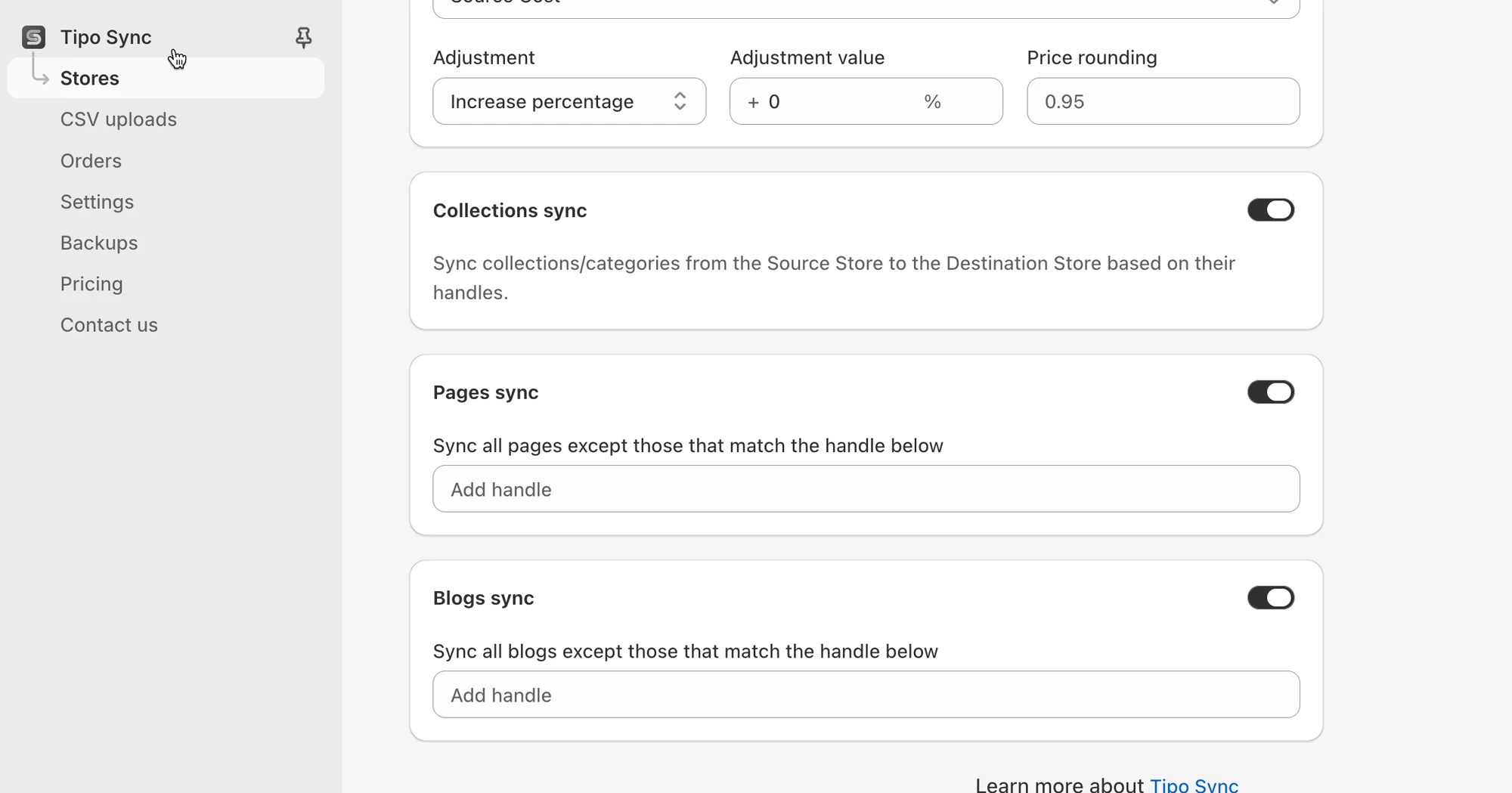
儲存後,Destination store 就可以開始同步所選的內容類型(依據您的連線/設定)。
🔄 運作方式
Section titled “🔄 運作方式 ”- 應用程式會將所選內容從 Source store 複製到 Destination store
- 已同步的內容通常會依唯一識別碼(例如 handle)進行比對,以便正確套用更新
- 如果 Destination store 尚未有該內容,可能會自動建立(依據同步規則)
Matching & Imports
Section titled “Matching & Imports”此設定控制頁面、部落格和文章在已連線的商店之間如何匯入與更新。
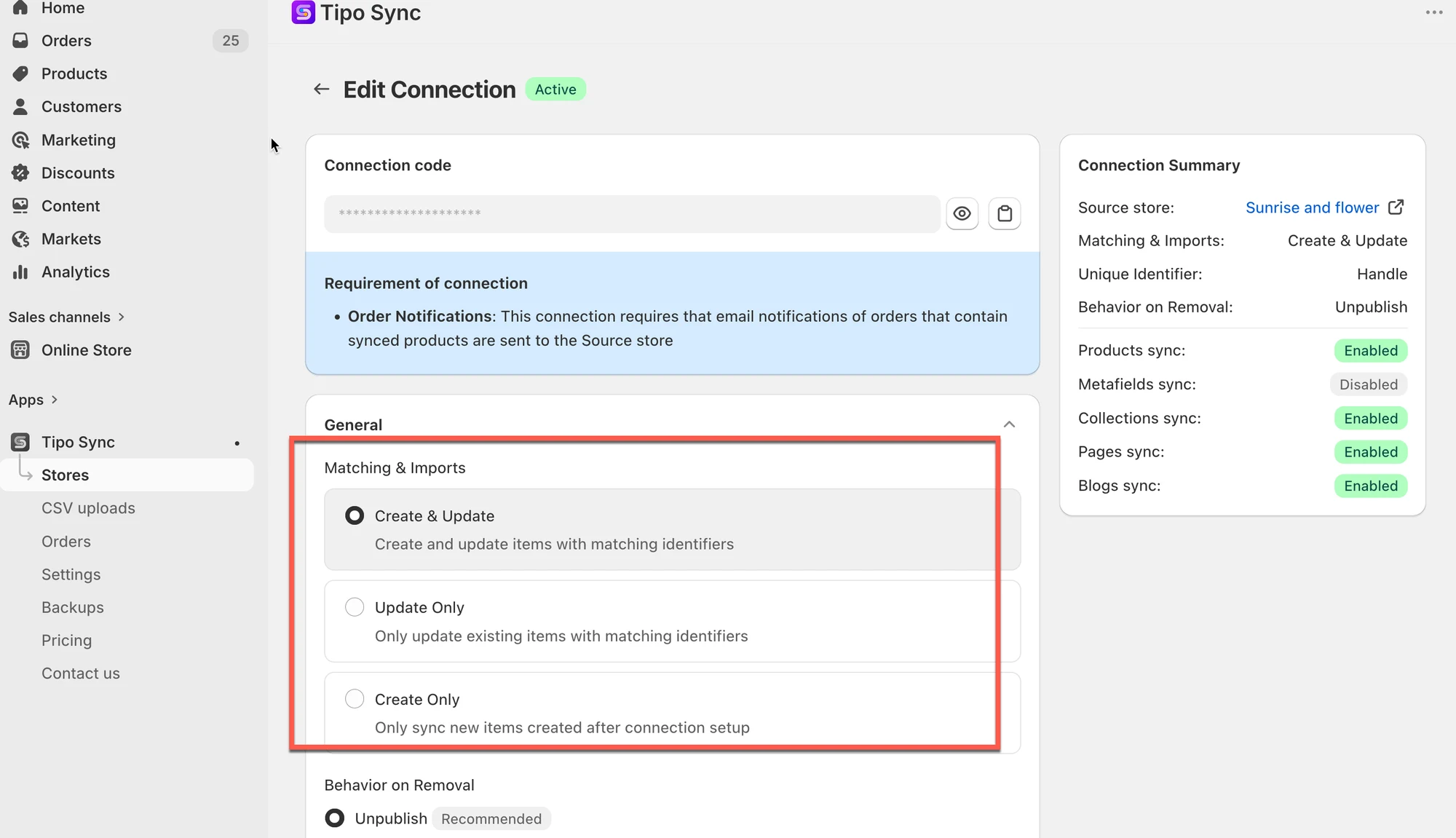
選項 1:Create & Update
Section titled “選項 1:Create & Update”建立新項目,並更新具有相符識別碼的現有項目。
當您想要執行下列操作時,請使用此選項:
- 將新的頁面、部落格和文章同步到 Destination store。
- 讓先前已同步的項目保持最新。
範例
Source Store:
- About Us
- Contact Us
Destination Store:
- About Us
結果:
- About Us 會被更新。
- Contact Us 會被建立。
選項 2:Update Only
Section titled “選項 2:Update Only”僅更新具有相符識別碼的現有項目。
當您想要執行下列操作時,請使用此選項:
- 更新 Destination store 中已存在的內容。
- 防止建立新的頁面、部落格或文章。
範例
Source Store:
- About Us
- Contact Us
Destination Store:
- About Us
結果:
- About Us 會被更新。
- Contact Us 會被忽略,因為它尚不存在於 Destination store 中。
Create Only
Section titled “Create Only”僅同步連線設定完成後新建立的項目。
當您想要執行下列操作時,請使用此選項:
- 自動同步新建立的頁面、部落格和文章。
- 現有內容維持不變。
範例
連線建立於 1 月 1 日。
Source Store:
- About Us(1 月 1 日前建立)
- Summer Collection(1 月 1 日後建立)
結果:
- Summer Collection 會被同步。
- About Us 會被忽略。
- 已同步的現有項目不會更新。
⚠️ 重要注意事項
Section titled “⚠️ 重要注意事項”- 內容同步不一定包含佈景主題的版面配置或樣式,這取決於 Shopify 佈景主題的設定。
- 如果 Destination store 已有相同 handle 的頁面/部落格/文章,應用程式可能會將其更新為與 Source 一致(視同步設定而定)。
- 為獲得最佳效果,請讓各商店之間的 handle 保持一致。
🙋 還需要協助嗎?
如果您仍需要協助,歡迎隨時透過 hi@tipo.io 與我們聯絡,我們很樂意為您提供進一步的協助。