
集合同步
AI 概览
说明如何开启集合同步,让 Destination store 在 Tipo 应用中接收来自 Source store 的集合。它同步的是集合本身,而不是集合中的商品;只有已同步或已匹配的商品才会包含在内。Matching & Imports 选项决定是创建集合、更新集合还是两者兼有。
查看更多收起
- 在 Source store 中,打开 Settings,开启 Share collections,选择 All collections 或 Specific collections,然后点击 Save。
- 在 Destination store 中创建连接。
- Create & Update 会创建缺失的集合,并更新 handle 相同的集合。
- Update Only 会更新匹配的集合但不创建任何集合;Create Only 只同步连接之后添加的集合。
由 AI 生成的摘要,可能存在错误,请查看下方的完整指南。
本指南介绍如何启用 Collection Sync,让您的 Destination store 能够接收来自 Source store 的集合。
✅ Collection Sync 的作用
Section titled “✅ Collection Sync 的作用”注意:此设置同步的是集合本身,而不是集合中的商品
- 创建 Destination store 中尚不存在的集合
- 更新集合,使其与 Source store 保持一致
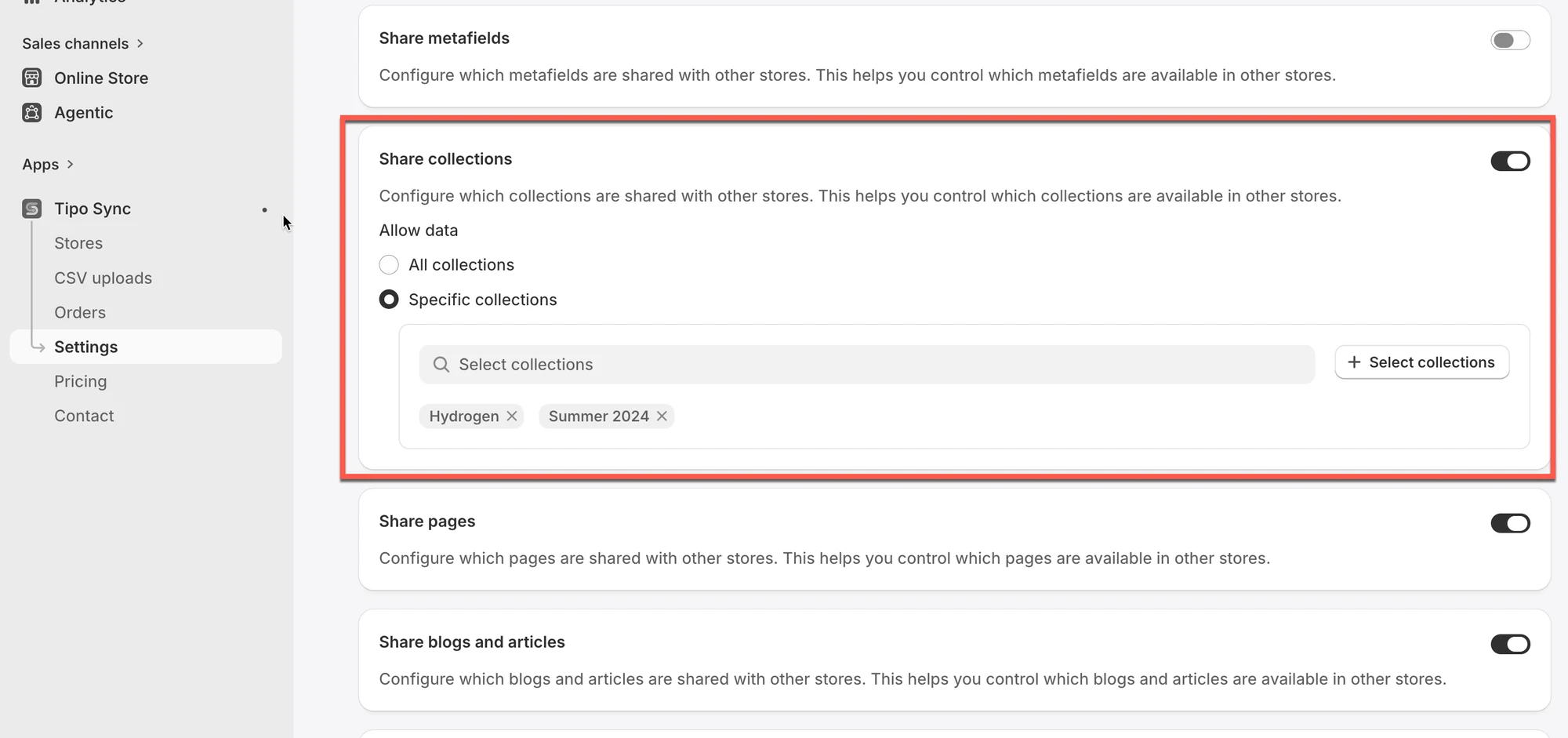
⚙️ 在应用 Settings 中启用集合同步
Section titled “⚙️ 在应用 Settings 中启用集合同步”1. 在 Source store 中打开应用 > 点击 Settings
2. 开启 Share collections
3. 选择您要同步的集合
- All collections:您商店中所有集合的所有商品都将同步到 Destination store
- Specific collections:只有所选集合的商品会同步到 Destination store
4. 点击 Save
⚙️ 在 Destination store 中创建连接
Section titled “⚙️ 在 Destination store 中创建连接”指南见此处
✅ 同步如何运作?
Section titled “✅ 同步如何运作?”Collection Sync 遵循与商品同步相同的逻辑:
- 应用检查 Source store 中的集合
- 将这些集合同步到 Destination store
- 仅当集合中的商品已同步/匹配(根据您的连接设置)时,才会包含这些商品
Matching & Imports
Section titled “Matching & Imports”此设置控制集合如何在 Source Store 与 Destination Store 之间同步。
| 选项 | 创建新集合 | 更新现有集合 |
|---|---|---|
| Create & Update | ✅ | ✅ |
| Update Only | ❌ | ✅ |
| Create Only | ✅(仅限新集合) | ❌ |
选项 1:Create & Update
Section titled “选项 1:Create & Update”应用将:
- 如果 Destination store 上尚不存在这些集合,则创建它们。
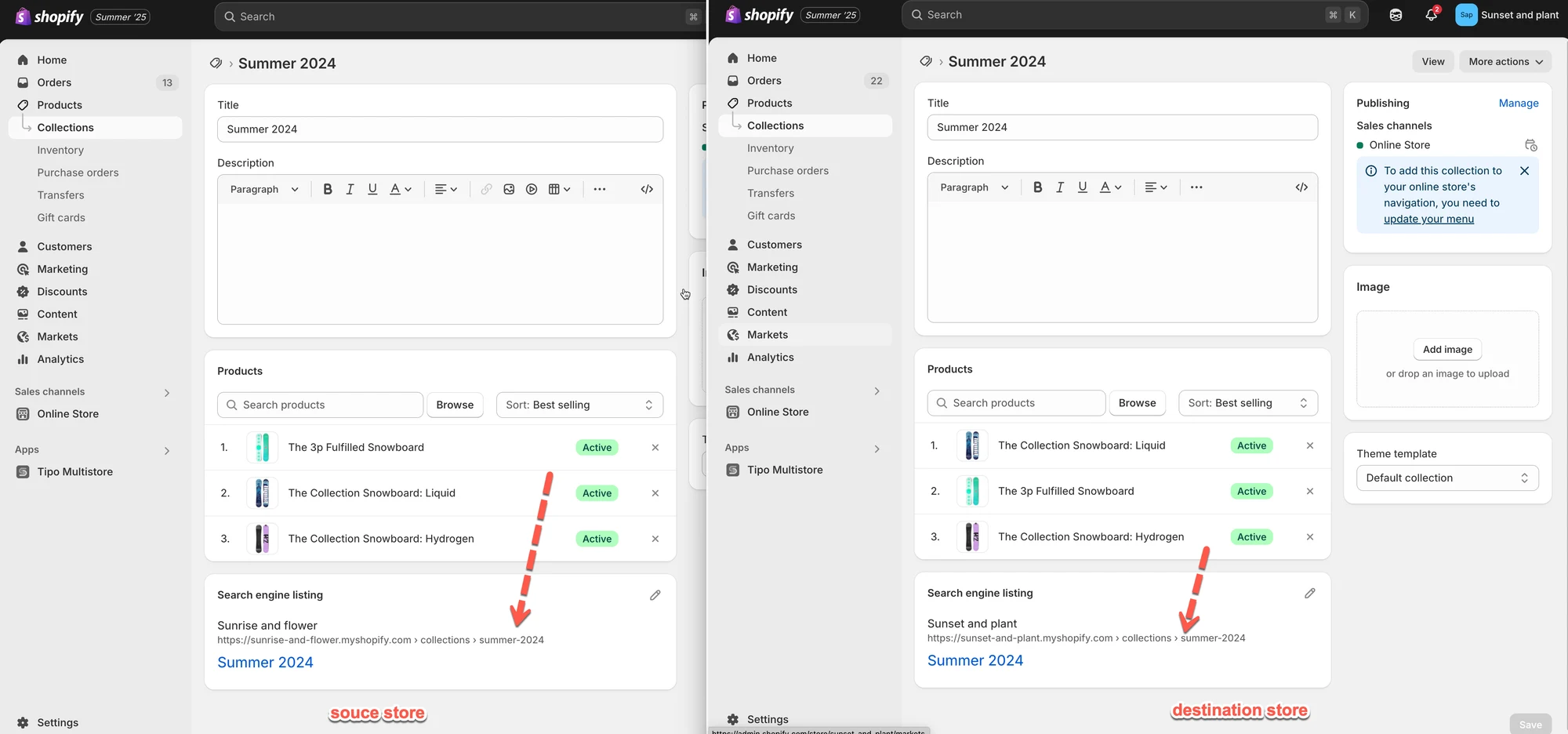
- 自动更新与 Source 具有相同 handle(URL 路径)的现有集合。
示例
- Source 集合:Summer 2024
Handle:/collections/summer-2024 - 应用将:
- 在 Destination store 上创建 Summer 2024 集合。
- 持续将更改(例如标题、描述、集合内的商品)从 Source 自动同步到 Destination。
注意:您今后在 Source store 中对“Summer 2024”集合所做的任何更新,也会出现在 Destination store 中。
选项 2:Update Only
Section titled “选项 2:Update Only”应用将:
- 不创建新集合。
- 仅更新 Destination store 中与 Source 具有相同 handle 的现有集合。
示例
- Source 集合:
/collections/summer-2024 - Destination 也有
/collections/summer-2024
→ 更新将会同步。 - Source 有
/collections/spring-2025,但 Destination 没有
→ 不会创建或同步任何集合。
选项 3:Create Only
Section titled “选项 3:Create Only”应用将:
- 仅创建并同步在建立商店连接之后添加到 Source 的新集合。
- Destination store 中已有的集合不会被同步。
示例
| 集合 | 是否存在于 Destination Store | 同步结果 |
|---|---|---|
| Summer Collection | 是 | 已忽略 |
🙋 还需要支持吗?
如果您仍需要帮助,请随时通过 hi@tipo.io 联系我们。我们很乐意为您提供进一步协助。