> For the complete documentation index, see [llms.txt](https://docs.tipo.io/llms.txt). Markdown versions of documentation pages are available by appending `.md` to page URLs; this page is available as [Markdown](https://docs.tipo.io/tipo-auction/~/revisions/PEkBh9esJi9c1nGTtNyz/auction-rules-and-bidding-features/buyout-price.md).
# Buyout price
### ℹ️ What is Buyout price?
The **Buyout** **price** lets a customer instantly win an auction by paying a fixed price, without waiting for the auction to end.
It’s useful when you want to offer bidders a fast purchase option while still running an auction.
When a customer chooses the buyout price:
* The auction ends immediately
* That customer becomes the winner
* Other bidders can no longer place bids
### 🛠️ Set up Buyout price
In the Auction you are creating/ editing:
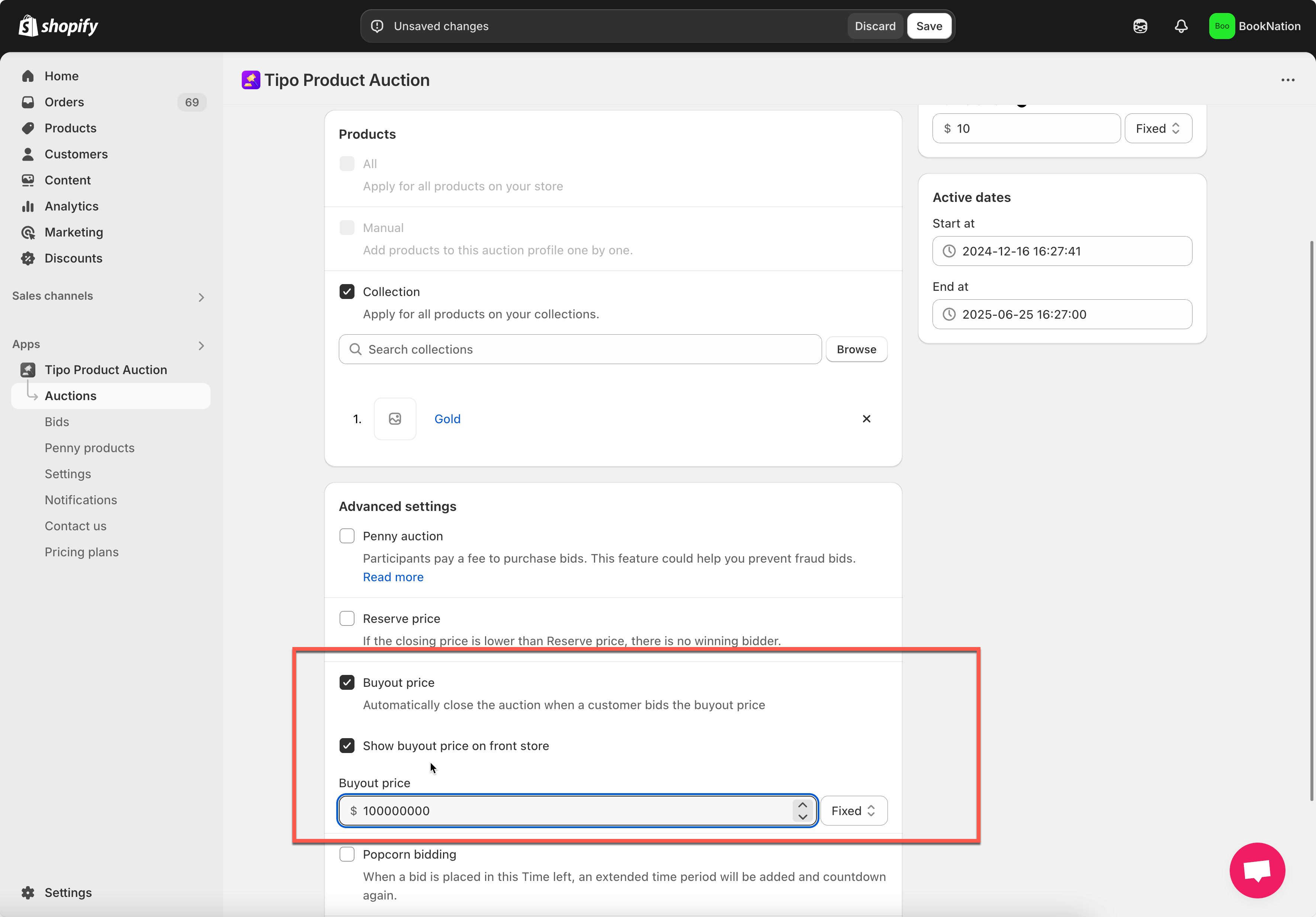
* Tick to the check box **Automatically close the auction when a customer bids the buyout price** if you want to enable this feature.
* Tick to checkbox **Show buyout price on front store** if you want to show the buyout price on the front end**.**
* Enter the price amount: there are 2 ways to place the buy out price:
– Fixed: you place a price you want.\
– Percentage: The buyout price will be calculated based on the product price
#### What Customers See on the Storefront
When a buyout price is enabled:
* Customers see both:
* **Current bid**
* **Buyout price**
* Customers can choose to:
* Keep bidding, or
* Pay the buyout price to win immediately
***
### ✅ How it works
* You set a **Buyout price** when creating the auction
* The auction starts and customers place bids
* A customer clicks **Buyout** (or equivalent button)
* If someone clicks it and completes the checkout:
* The auction will end immediately.
* The product will be sold to that customer at the buyout price.
* Other bidders will no longer be able to place bids.
Example:
**Auction settings**
* Starting price: **$100**
* Bid increment: **$10**
* Buyout price: **$300**
**Bidding flow**
* Current bid reaches **$180**
* A customer clicks **Buyout $300**
**Result**
* Auction ends immediately
* Customer wins the auction for **$300**
* No further bids are allowed