> For the complete documentation index, see [llms.txt](https://docs.tipo.io/llms.txt). Markdown versions of documentation pages are available by appending `.md` to page URLs; this page is available as [Markdown](https://docs.tipo.io/tipo-auction/~/revisions/3uOn584ZFy41DoorDGbA/winner-and-checkout-flow/choose-a-winner-manually.md).
# Choose a winner manually
**Steps to manage**
1\. Open the app > click **Auctions** > **Products**
2\. From the filter field, search and select the auction product you want to select a winner
Another way: Click **Bids** of the app > go to the bid list
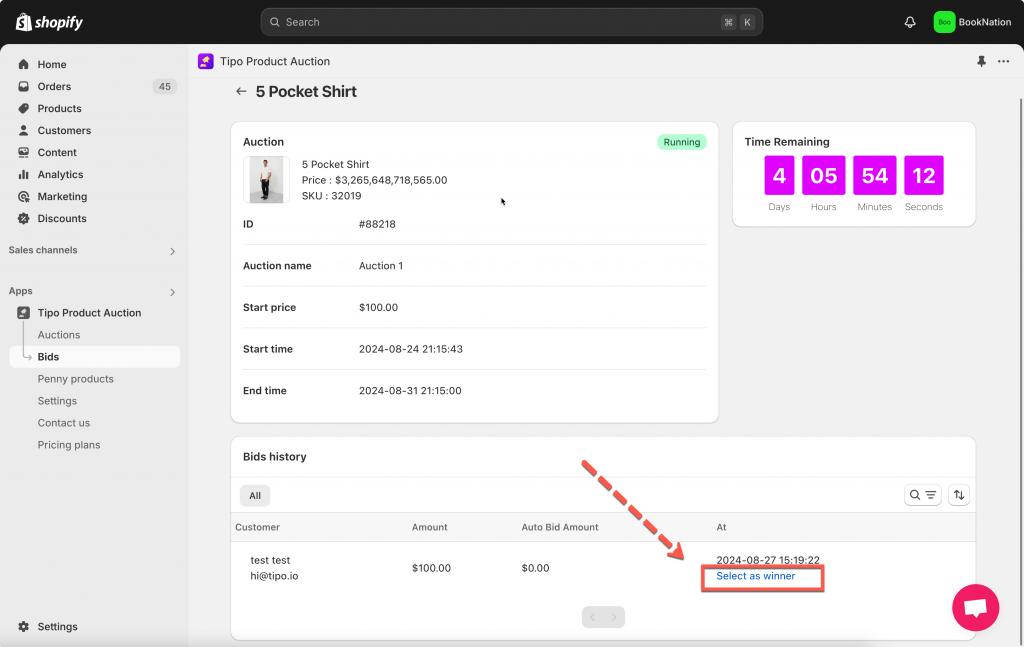
3\. Scroll down to **Bid history** session, a bidder list will show up > click **Select as winner** button on the same line with the bidder you want
After manually assign the winner of the auction, you can see the draft order detail of the auction item by click **View draft order.**
The auction is stopped on this product immediately after the winner is selected directly.