envelopesSet up SMTP

By default, Tipo Product Auction can send emails using Tipo Email. If you want better deliverability, branded sender emails, or your own email domain, you can set up SMTP.

💡 What Is SMTP?

SMTP (Simple Mail Transfer Protocol) allows your store to send emails using your own email service, such as:

  • Gmail / Google Workspace

  • Outlook / Microsoft 365

  • Zoho Mail

  • Custom business email servers

Using SMTP helps:

  • Improve email delivery

  • Avoid spam filters

  • Send emails from your own domain

If you choose to enable it, you’ll need to set up your own SMTP server. This usually requires:

  • SMTP Host (e.g. smtp.yourdomain.com)

  • SMTP Port

  • Your email username and password

⚠️ Important: If you’re unsure how to set this up, it’s best to ask your email provider or IT support team. Incorrect settings may prevent emails from being sent.

Option
Use Default Email Function
Use Custom SMTP

Setup Required

No setup required

Requires SMTP setup (host, port, login info)

Sender

Your own email address

Ideal For

Quick setup, testing, small stores

Established stores that want full control and branding

Risk of Spam Folder

Higher (generic sender email)

Lower (trusted domain sender)


🛠️ Step-by-step: Set Up SMTP

  1. Open the app > click Notifications > Admin

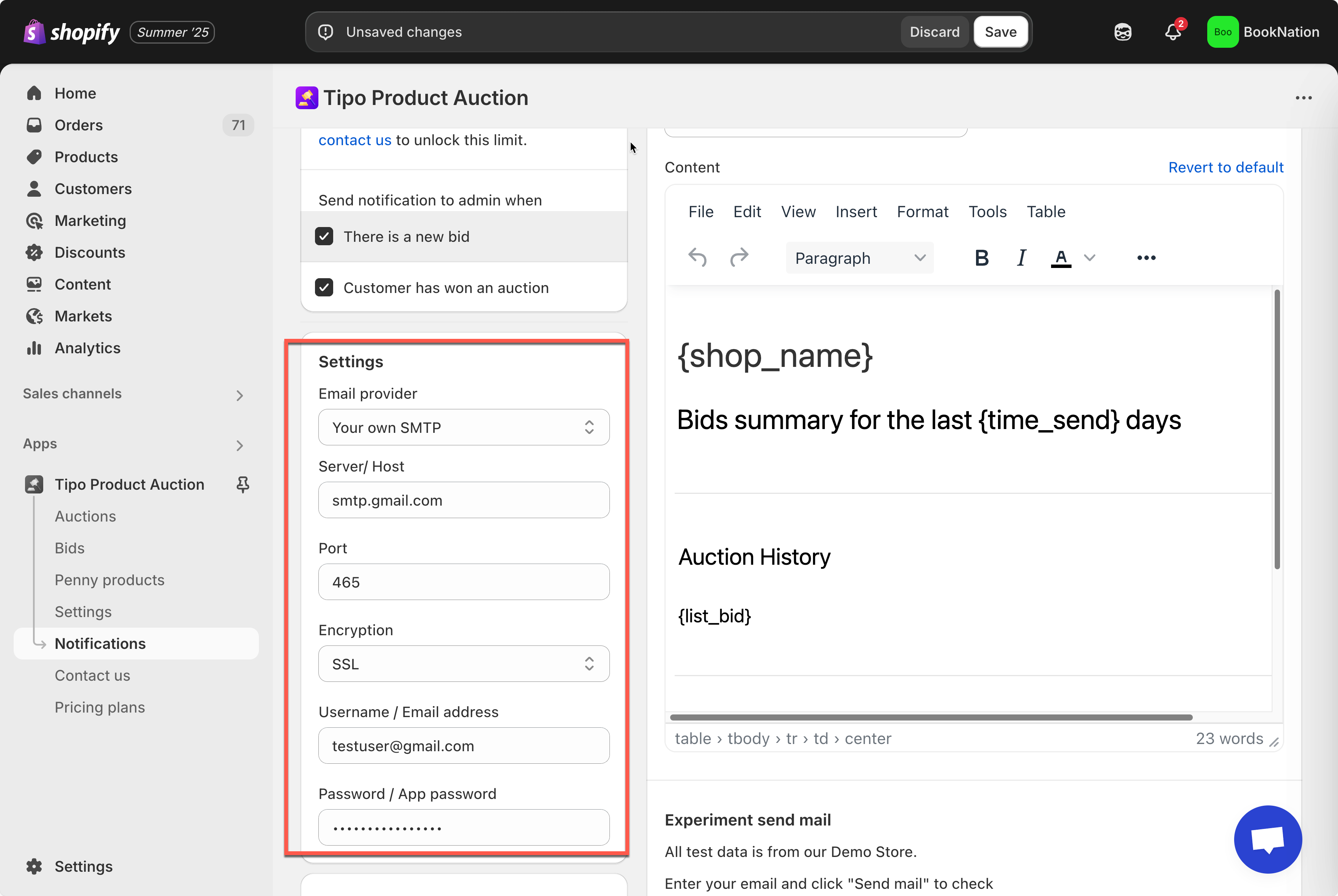
  2. In Settings part > Email provider > select Use custom SMTP

  3. Enter the data of the SMTP config based on your email provider

  4. Click Save

  5. Click Send test emails to check the result

For example: You are using Google SMTP, you need to below information

Enter SMTP connection details

Fill in the following fields using your email provider’s information:

Field

Description

Google (Gmail) Example

Outlook / Microsoft 365 Example

Server / Host

SMTP server address

smtp.gmail.com

smtp.office365.com

Port

Port used to send emails

465

587

Encryption

Security method

SSL

TLS

Username / Email address

Email account used to send emails

Password / App password

Email password or app-specific password

Email password or app password

Last updated