# Create & Update Products
### ⚙️ 如何啟用 Create & Update
**Create & Update** 選項可讓商品在您的 Source store 與 Destination store 之間保持同步。
啟用後,Tipo Sync 會:
✅ 建立 Destination store 中尚未存在的商品
✅ 更新 Destination store 中已存在的商品
✅ 自動同步新增到 Source store 的新商品
這是大多數商店的建議選項。
***
### ⚙️ 如何啟用 Create & Update
#### 新連線
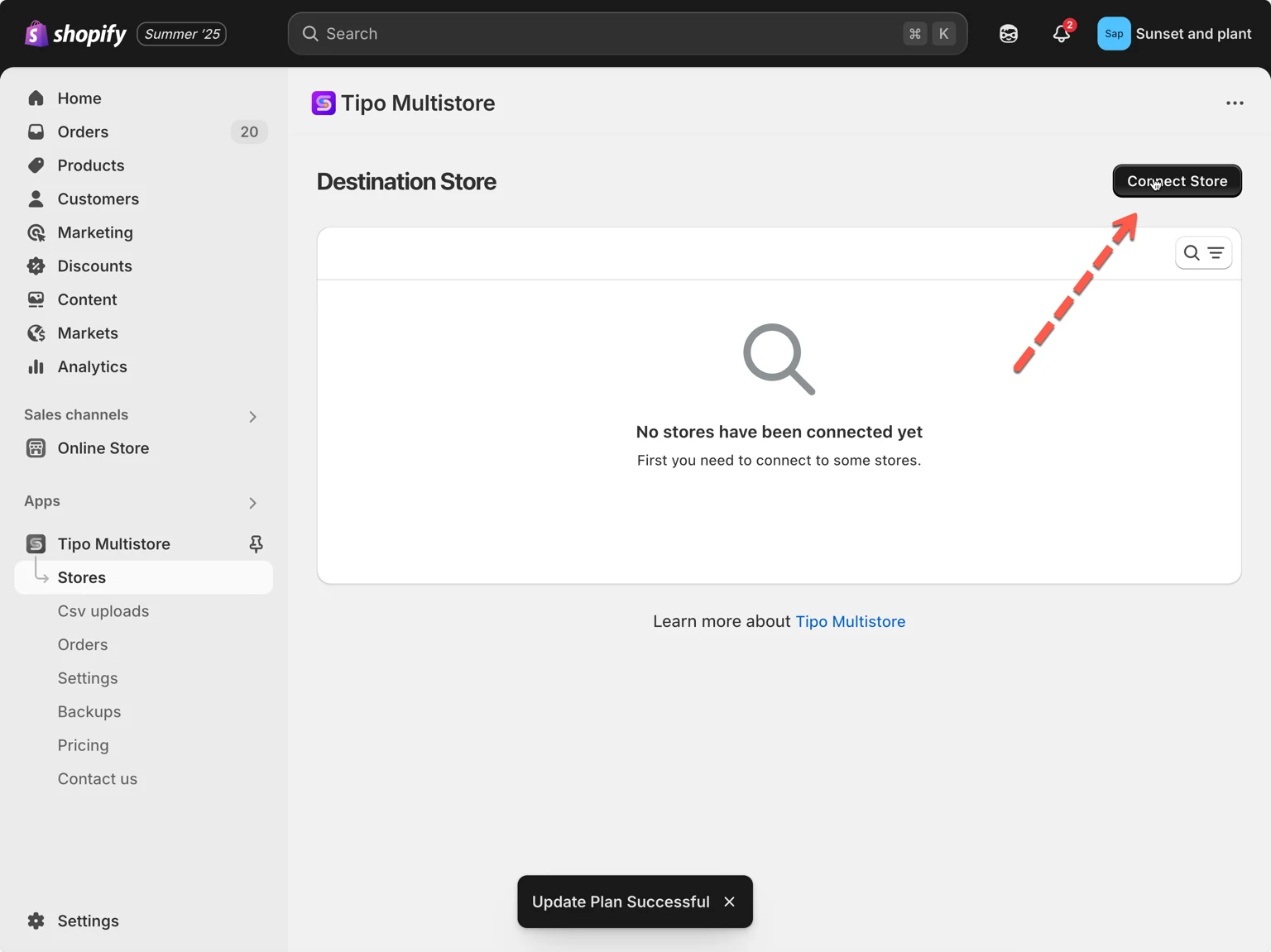
1. 在 Destination store 中開啟應用程式 > 點選 Stores > 點選 **Connect store** 按鈕
 2. 輸入從 Source Store 取得的 Connection Code(位於 Source Store 應用程式的 Settings 之下)。
3. 在 **General** 區段中,找到 **Matching & Imports** > 選擇 **Create & Update**
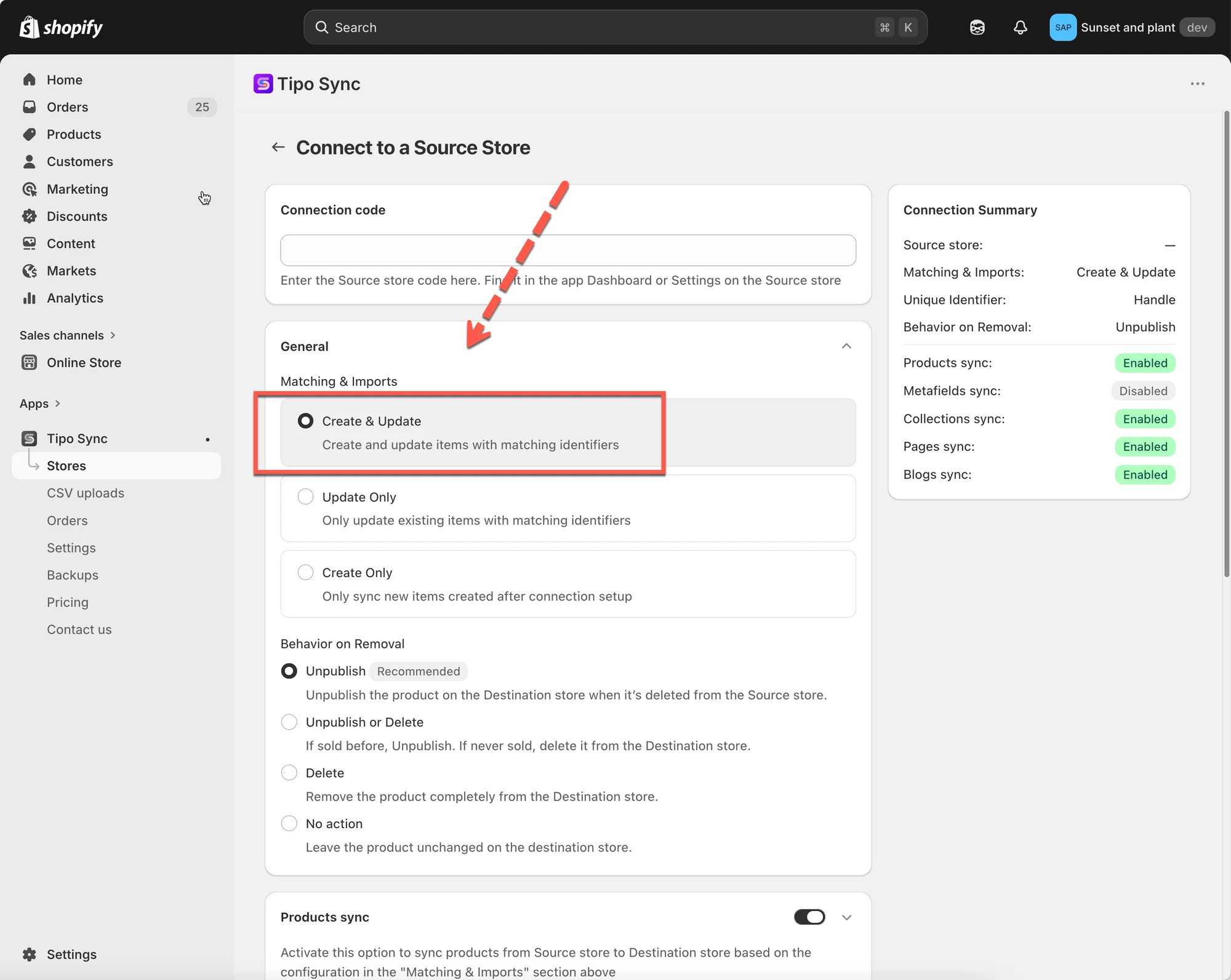 4. 選擇您偏好的 Unique Identifier:
Handle(建議)
SKU(請確保所有款式都有唯一的 SKU)
Barcode(請確保所有款式都有唯一的條碼)
5. 啟用 Product sync 設定 > 選取您要同步的商品
6. 完成連線並點選 Save
***
#### **已在運作中的連線**
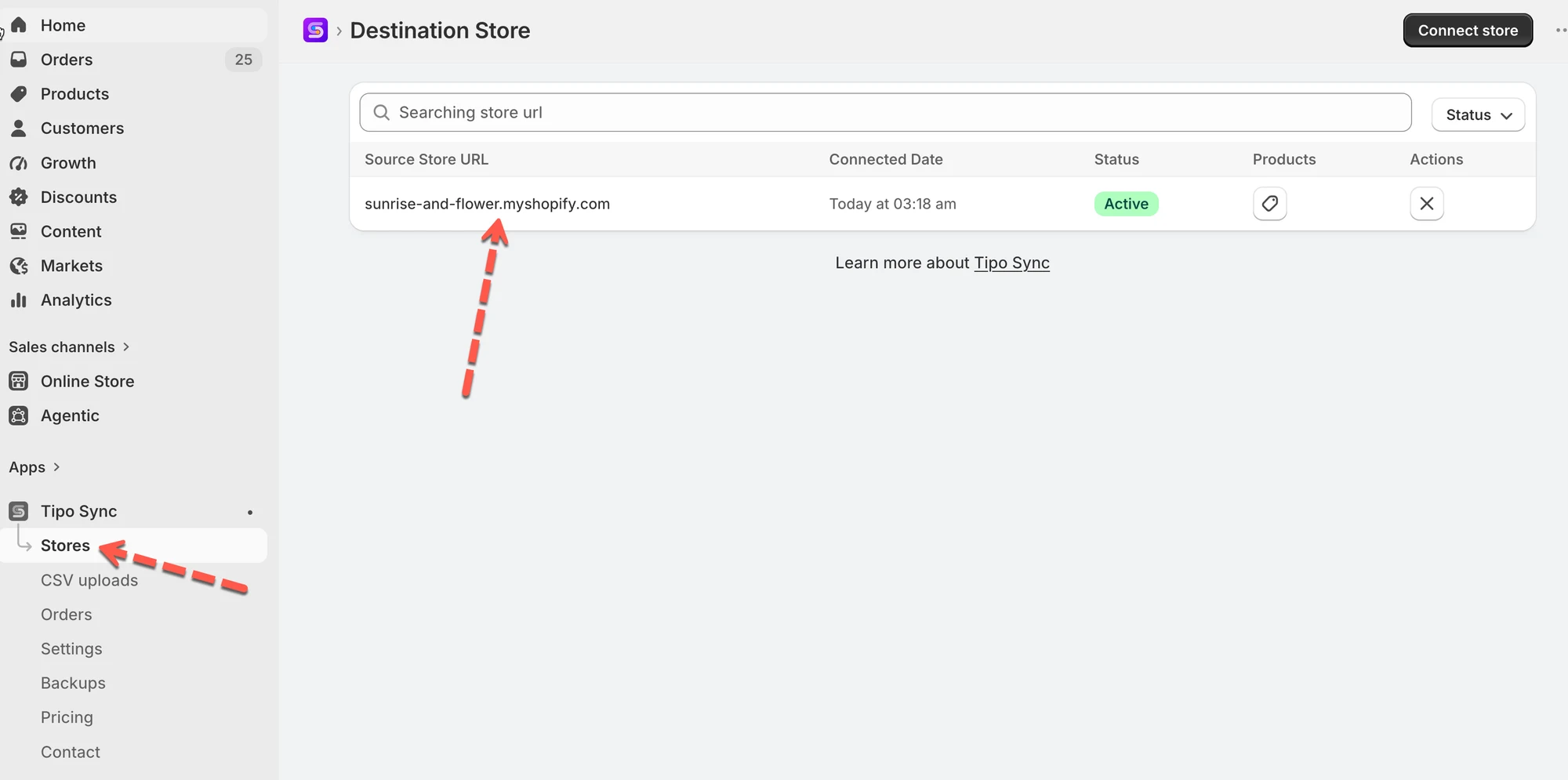
1\. 前往 **Destinations** 商店 > 點選 **Stores** > 點選 Source store 的商店網址,以檢視連線詳細資料
 2. 在 **General** > **Matching & Imports** 區塊 > 選擇 **Create & Update**
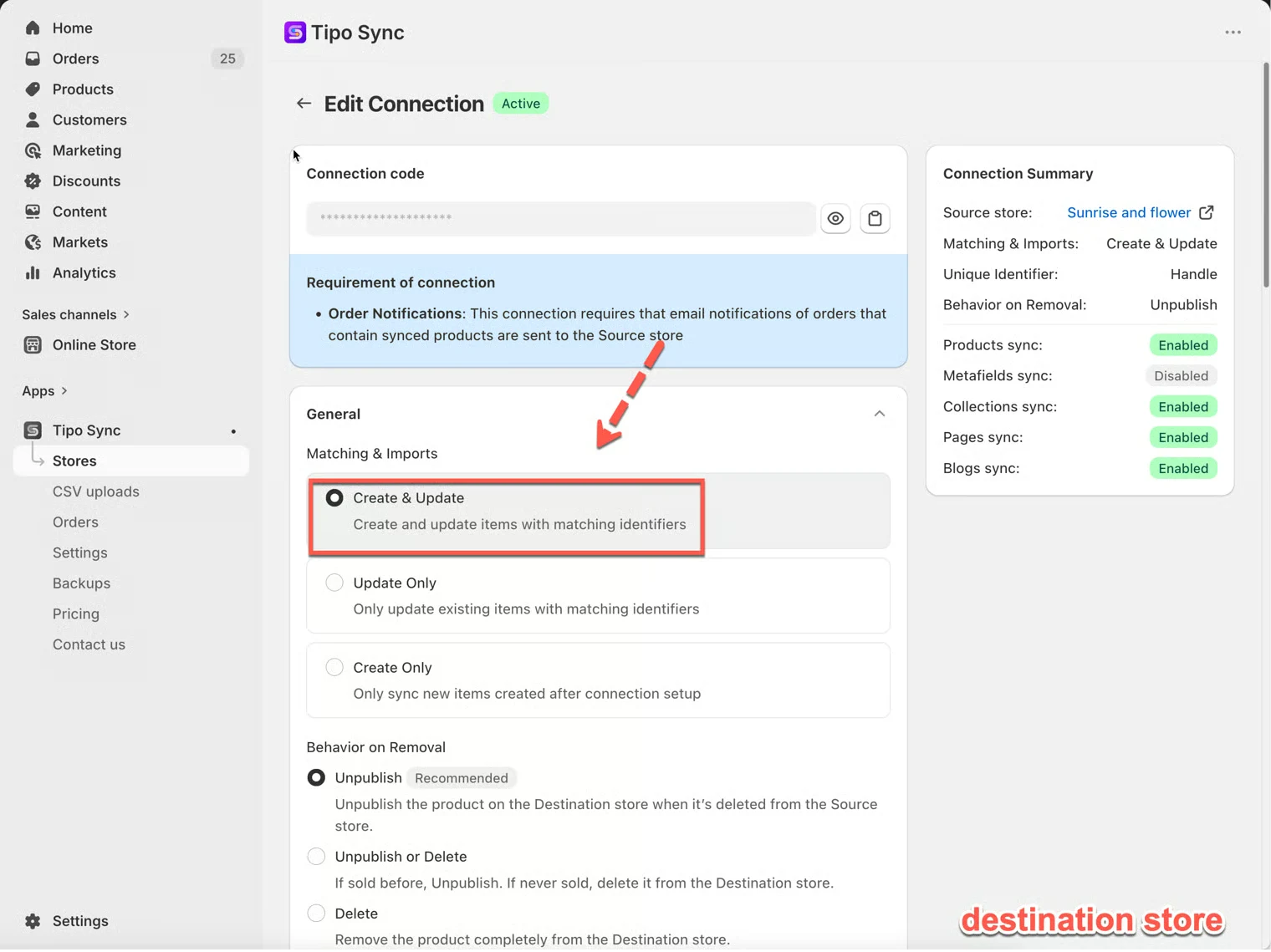 3. 點選 **Save** 以套用變更。
**重要注意事項:** 應用程式會依據所選的其中一種 [Identifiers](/product-syncs/sync-products-based-on-unique-identifiers) 來同步商品:Handle、SKU 與 Barcode
***
### 🔗 Tipo Sync 如何比對商品
在建立或更新商品之前,Tipo Sync 會先檢查該商品是否已存在於 Destination store。
為此,應用程式會使用 **Matching Identifier** 來比較商品。
Matching Identifier 是用來判斷兩間商店中的兩個商品是否為同一個商品的值。
#### 可用的 Matching Identifiers
| 識別碼 | 說明 | 範例 |
| -------------------- | ----------------------------------------- | ------------------- |
| Handle(建議) | 商品網址中的唯一部分 | /kimono-dress-coral |
| SKU | 指派給商品款式的唯一代碼 | SKU-12345-CORAL |
| Barcode | 全球通用的庫存代碼 | 8850123456789 |
***
### 🔄 Create & Update 的運作方式
同步商品時,Tipo Sync 會先檢查所選的 **Matching Identifier。**
| 結果 | 動作 |
| ------------------------- | ----------------------- |
| 找到相符的商品 | 更新現有商品 |
| 找不到相符的商品 | 建立新商品 |
***
#### 🛍 範例 1:找到相符的商品
Source Store
| 商品 | Handle |
| ------------------ | ------------------ |
| Kimono Dress Coral | kimono-dress-coral |
#### Destination Store
| 商品 | Handle |
| ------------------ | ------------------ |
| Kimono Dress Coral | kimono-dress-coral |
由於兩個商品具有相同的 Handle,Tipo Sync 會將它們視為同一個商品。
結果
✅ 商品已更新
✅ 不會建立重複的商品
***
#### 🛍 範例 2:找不到相符的商品
Source Store
| 商品 | Handle |
| ----------------- | ----------------- |
| Linen Shirt Beige | linen-shirt-beige |
#### Destination Store
| 商品 | Handle |
| ----------------- | ----------------- |
| Summer Dress Blue | summer-dress-blue |
找不到相符的 Handle。
結果
✅ 在 Destination store 中建立新商品
***
#### 🛍 範例 3:Create & Update 實際運作
Source Store
| 商品 |
| ------- |
| A |
| B |
| C |
Destination Store
| 商品 |
| ------- |
| B |
| C |
同步後的結果
| 商品 | 動作 |
| ------- | ------- |
| A | 已建立 |
| B | 已更新 |
| C | 已更新 |
商品 A 不存在於 Destination store,因此會被建立。
商品 B 和 C 已存在,因此會被更新。
***
#### 🛍 範例 4:自動同步新商品
初始設定
Source Store 包含:
* 商品 A
* 商品 B
* 商品 C
Destination Store 包含:
* 商品 A
* 商品 B
* 商品 C
連線已設定為 **Create & Update**。
之後
您新增:
* 商品 D
* 商品 E
* 商品 F
到 Source store。
結果
Tipo Sync 會自動建立:
* 商品 D
* 商品 E
* 商品 F
到 Destination store。
如果這些商品之後在 Source store 被更新,這些變更也會一併同步。
***
### ⚖️ 比較同步選項
| 選項 | 建立新商品 | 更新現有商品 | 最適合 |
| --------------- | ------------------- | ------------------------ | ---------------------------------- |
| Create & Update | ✅ 是 | ✅ 是 | 完整同步 |
| Update Only | ❌ 否 | ✅ 是 | 更新已存在的商品 |
| Create Only | ✅ 是 | ❌ 否 | 僅匯入新商品 |
***
**🙋 還需要協助嗎?**
如果您仍需要協助,歡迎隨時寄信至 與我們聯繫,我們很樂意為您提供進一步的協助。