# GetResponse 集成
在 Tipo 日历中完成预约后,客户的电子邮件地址将被添加到所选的 GetResponse 联系人列表中。
### 🔑 步骤 1:获取您的 GetResponse API key
1. 登录 **GetResponse**
2. 前往 **Integrations & API**
3. 复制您的 **API key**
[了解更多](https://www.getresponse.com/help/where-do-i-find-the-api-key.html)
***
### 🔌 步骤 2:连接 GetResponse
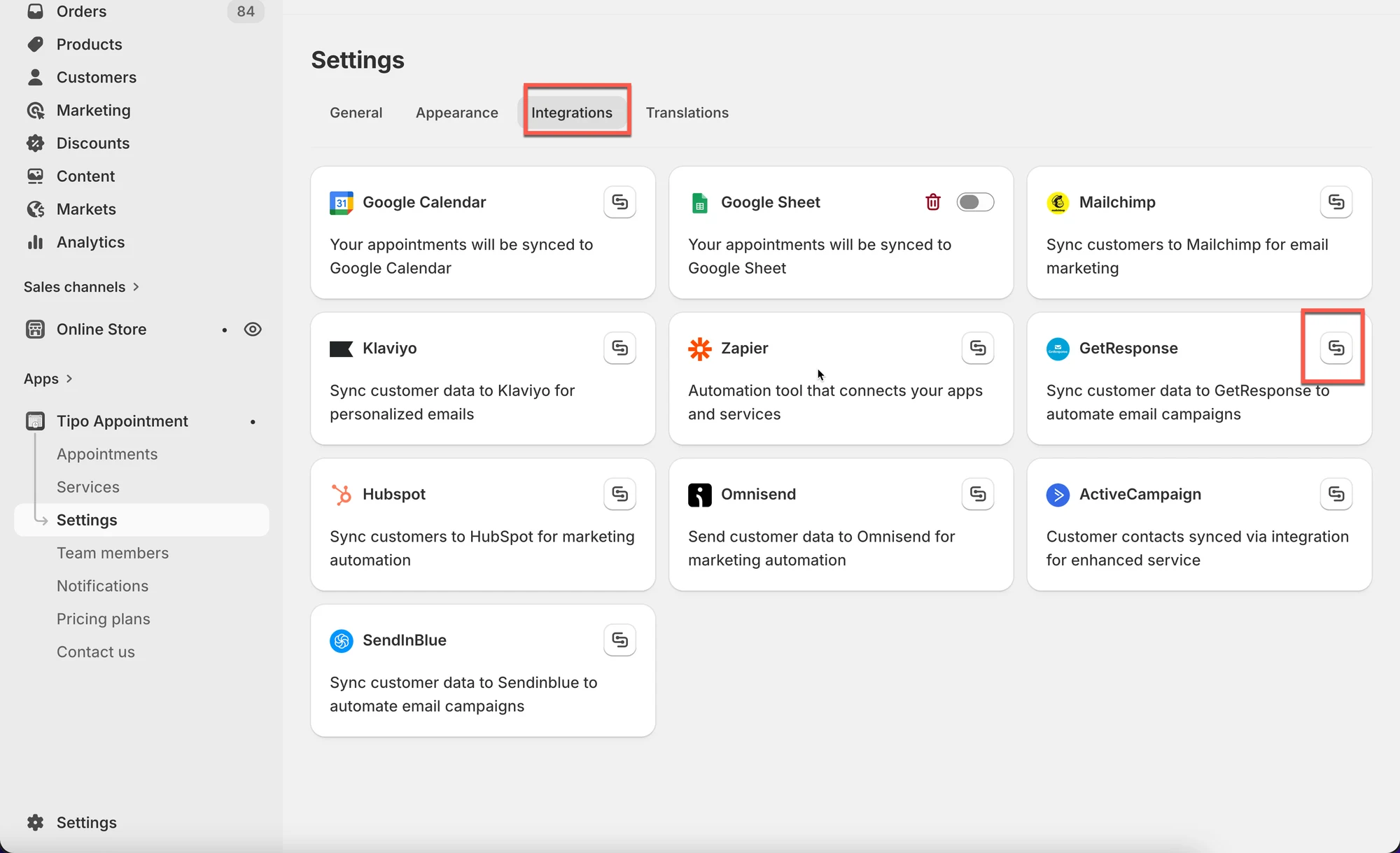
1. 打开应用 > 点击 **Settings** > **Integrations** > 找到 **GetResponse**
2. 点击连接图标
3. 将步骤 1 中生成的 API key 输入到 **API KEY** 字段
4. 点击 **Save**
 ***
### ✅ GetResponse 集成的工作原理
创建预约后:
* 客户的电子邮件地址会被添加到 GetResponse 列表中
* 如果您在 GetResponse 中进行了设置,自动化流程可立即启动
***
**🙋 还需要支持吗?**
如果您仍需要帮助,请随时通过 联系我们。我们很乐意为您提供进一步协助。