# 创建并更新商品
### ⚙️ 如何启用 Create & Update
**Create & Update** 选项可使您的 Source store 和 Destination store 之间的商品保持同步。
启用后,Tipo Sync 将:
✅ 创建 Destination store 中不存在的商品
✅ 更新 Destination store 中已存在的商品
✅ 自动同步添加到 Source store 的新商品
这是大多数商店的推荐选项。
***
### ⚙️ 如何启用 Create & Update
#### 对于新连接
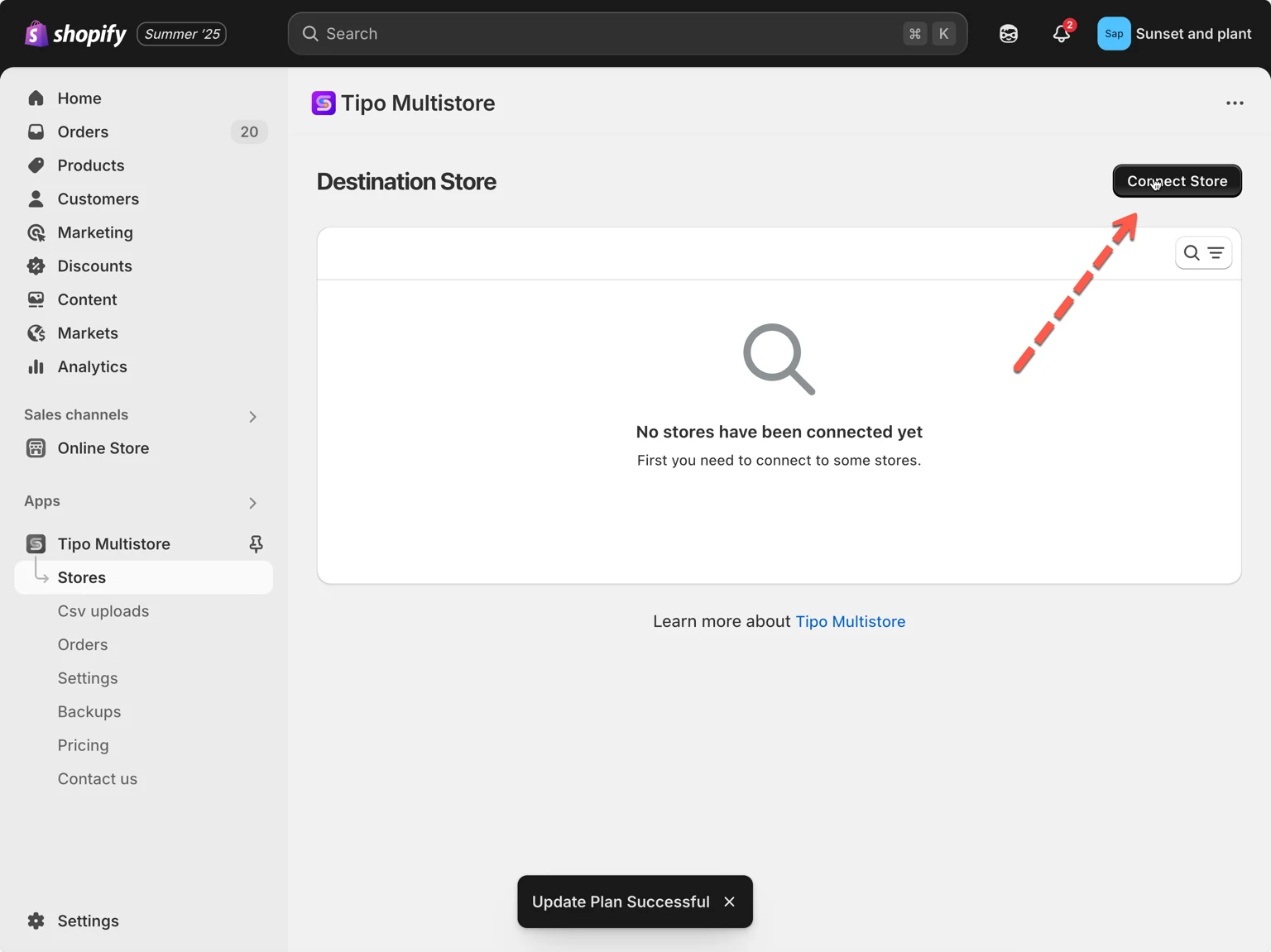
1. 在 Destination store 中打开应用 > 点击 Stores > 点击 **Connect store** 按钮
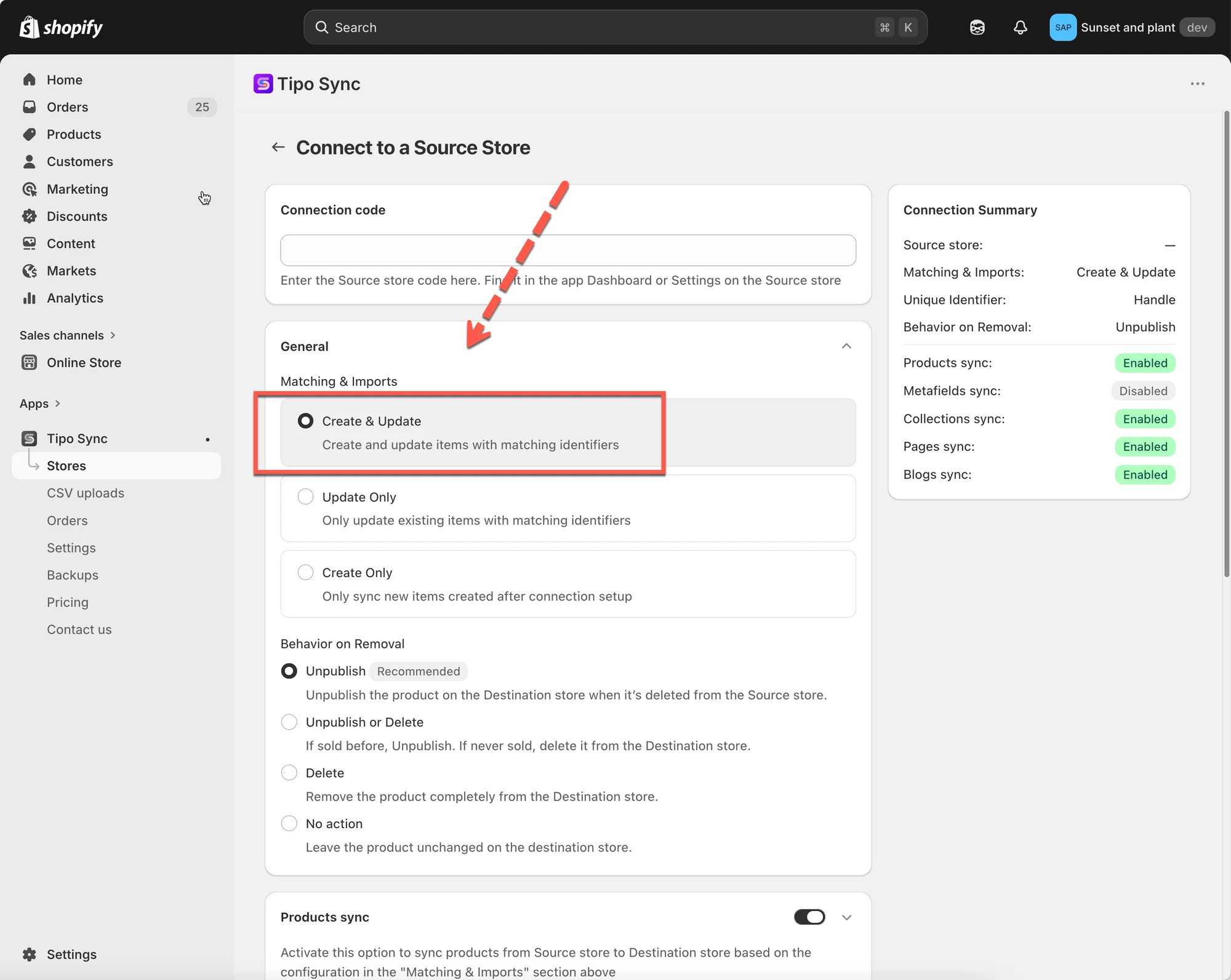
 2. 输入从 Source Store 获取的 Connection Code(可在 Source Store 的应用 Settings 下找到)。
3. 在 **General** 部分,找到 **Matching & Imports** > 选择 **Create & Update**
 4. 选择您偏好的 Unique Identifier:
Handle(推荐)
SKU(确保所有变体都有唯一的 SKU)
Barcode(确保所有变体都有唯一的条形码)
5. 启用 Product sync 设置 > 选择要同步的商品
6. 完成连接并点击 Save
***
#### **对于正在运行的连接**
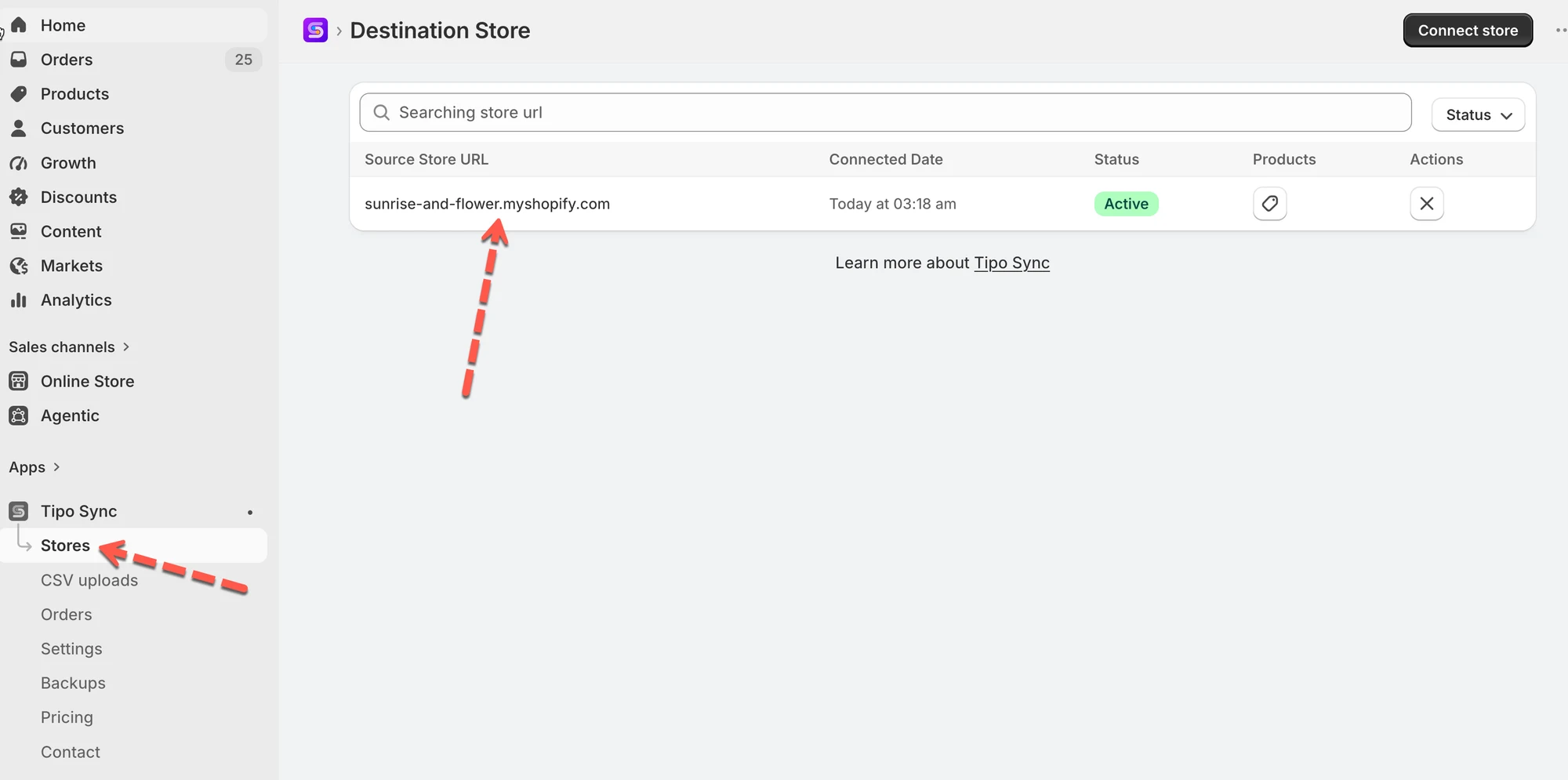
1\. 前往 **Destinations** 商店 > 点击 **Stores** > 点击 Source 商店的网址以查看连接详情
 2. 在 **General** > **Matching & Imports** 部分 > 选择 **Create & Update**
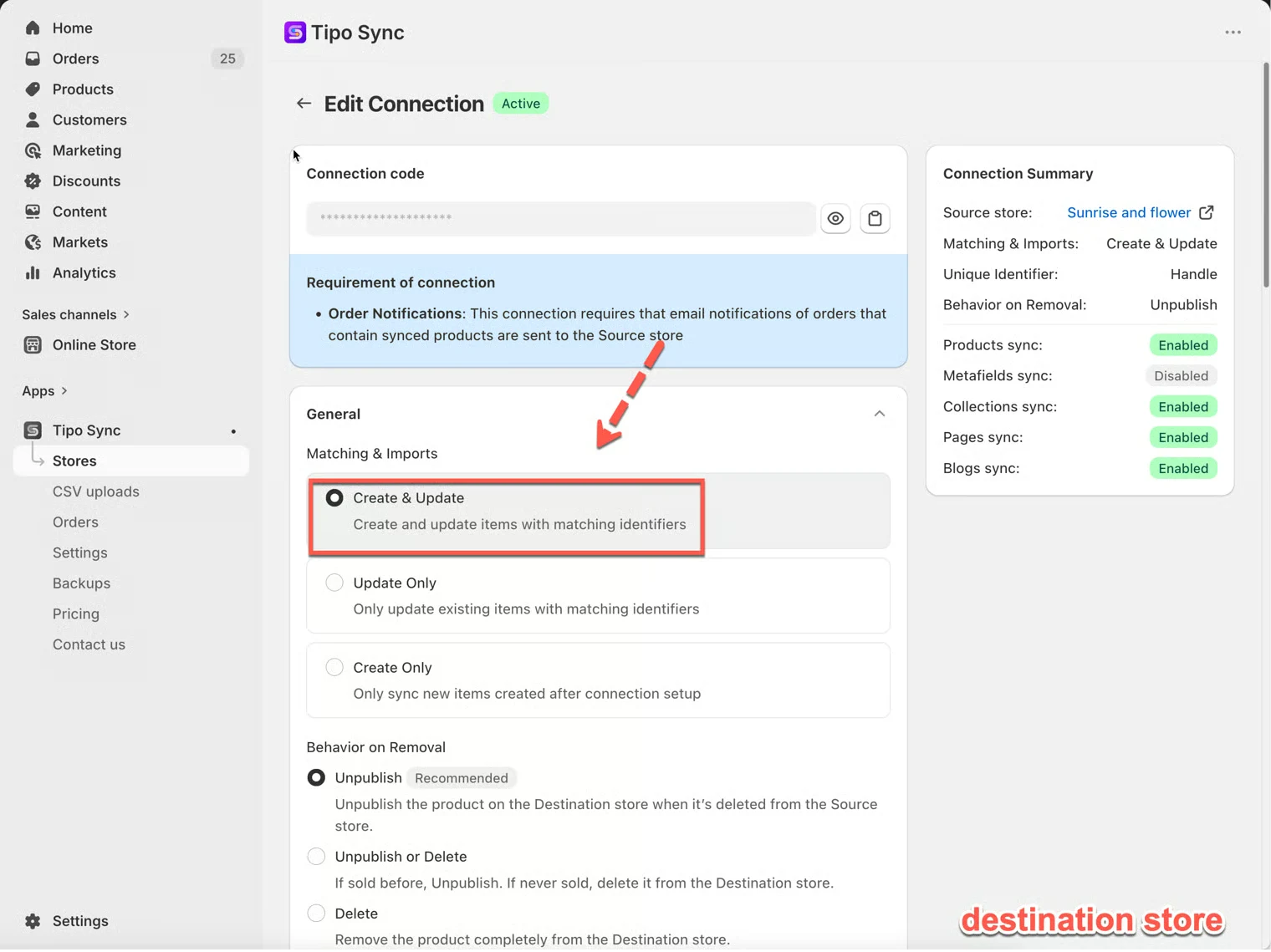 3. 点击 **Save** 以应用更改。
**重要说明:** 应用根据所选的[标识符](/product-syncs/sync-products-based-on-unique-identifiers)之一同步商品:Handle、SKU 和 Barcode
***
### 🔗 Tipo Sync 如何匹配商品
在创建或更新商品之前,Tipo Sync 会检查该商品是否已存在于 Destination store 中。
为此,应用使用 **Matching Identifier** 来比较商品。
Matching Identifier 是用于判断不同商店中的两个商品是否为同一商品的值。
#### 可用的 Matching Identifier
| 标识符 | 说明 | 示例 |
| -------------------- | ----------------------------------------- | ------------------- |
| Handle(推荐) | 商品网址中的唯一部分 | /kimono-dress-coral |
| SKU | 分配给商品变体的唯一代码 | SKU-12345-CORAL |
| Barcode | 全球通用库存代码 | 8850123456789 |
***
### 🔄 Create & Update 的工作方式
同步商品时,Tipo Sync 首先检查所选的 **Matching Identifier。**
| 结果 | 操作 |
| ------------------------- | ----------------------- |
| 找到匹配商品 | 更新现有商品 |
| 未找到匹配商品 | 创建新商品 |
***
#### 🛍 示例 1:找到匹配商品
Source Store
| 商品 | Handle |
| ------------------ | ------------------ |
| Kimono Dress Coral | kimono-dress-coral |
#### Destination Store
| 商品 | Handle |
| ------------------ | ------------------ |
| Kimono Dress Coral | kimono-dress-coral |
由于两个商品的 Handle 相同,Tipo Sync 会将它们识别为同一商品。
结果
✅ 商品已更新
✅ 不会创建重复商品
***
#### 🛍 示例 2:未找到匹配商品
Source Store
| 商品 | Handle |
| ----------------- | ----------------- |
| Linen Shirt Beige | linen-shirt-beige |
#### Destination Store
| 商品 | Handle |
| ----------------- | ----------------- |
| Summer Dress Blue | summer-dress-blue |
未找到匹配的 Handle。
结果
✅ 将在 Destination store 中创建一个新商品
***
#### 🛍 示例 3:Create & Update 实际应用
Source Store
| 商品 |
| ------- |
| A |
| B |
| C |
Destination Store
| 商品 |
| ------- |
| B |
| C |
同步后的结果
| 商品 | 操作 |
| ------- | ------- |
| A | 已创建 |
| B | 已更新 |
| C | 已更新 |
商品 A 在 Destination store 中不存在,因此会被创建。
商品 B 和 C 已存在,因此会被更新。
***
#### 🛍 示例 4:自动同步新商品
初始设置
Source Store 包含:
* 商品 A
* 商品 B
* 商品 C
Destination Store 包含:
* 商品 A
* 商品 B
* 商品 C
该连接已配置为 **Create & Update**。
之后
您添加了:
* 商品 D
* 商品 E
* 商品 F
到 Source store。
结果
Tipo Sync 会自动创建:
* 商品 D
* 商品 E
* 商品 F
到 Destination store 中。
如果之后这些商品中有任何一个在 Source store 中被更新,这些更改也会被同步。
***
### ⚖️ 对比同步选项
| 选项 | 创建新商品 | 更新现有商品 | 最适合 |
| --------------- | ------------------- | ------------------------ | ---------------------------------- |
| Create & Update | ✅ 是 | ✅ 是 | 完全同步 |
| Update Only | ❌ 否 | ✅ 是 | 更新已存在的商品 |
| Create Only | ✅ 是 | ❌ 否 | 仅导入新商品 |
***
**🙋 还需要支持吗?**
如果您仍需要帮助,请随时通过 联系我们。我们很乐意为您提供进一步协助。