# 单向库存同步
单向库存同步只会**沿一个方向**更新库存:
**Source store 控制库存** → **Destination store 跟随**
如果您希望由一个“主”商店来管理库存,这是最安全的选择。
### ✅ 什么时候应该使用单向同步?
在以下情况下使用此模式:
* 您在一个主商店(Source)中管理库存
* 您希望 Destination 商店的库存始终与 Source 保持一致
* 您不希望 Destination store 的销售/调整更改 Source 的库存
***
### ⚙️ **设置单向库存同步的步骤**
#### **在 Source store 中**
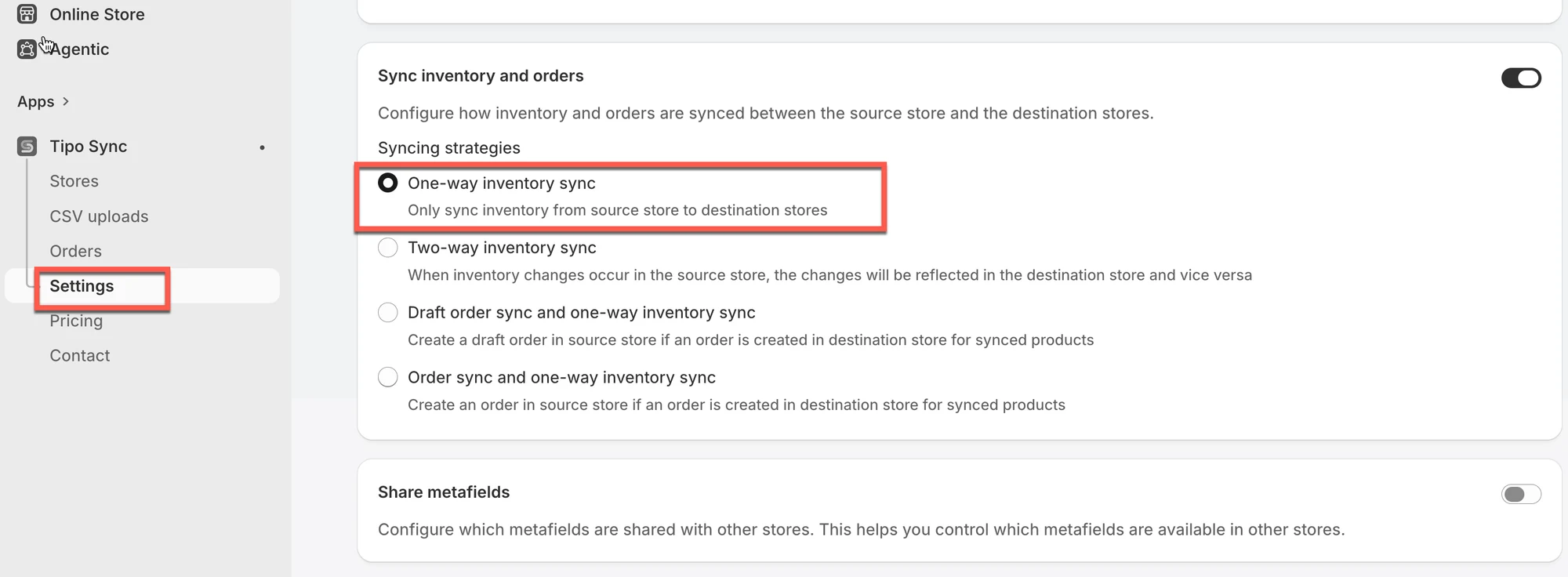
1\. 在 Source store 中打开应用 > 点击 **Settings** > 开启 **Sync inventory and orders**
2. 选择 **One-Way Inventory Sync**
3\. 点击 **Save**
 ***
### ✅ 单向库存同步的工作方式
当 **Source store** 中的库存发生变化(销售、补货、手动调整)时,应用会:
1. 在 Destination 中找到相同的商品(通过 handle、SKU 或 barcode 匹配)
2. 将库存更新应用到已映射的 Destination 地点
3. 更新 Destination 中的库存,使其与 Source 一致
⇒ Destination 可以接收更新\
⇒ Destination 的更改**不会**更新 Source
***
### 🧪 示例:Source 更新 Destination
**单向库存同步(基于商品 Handle)**
假设您连接了两个 Shopify 商店:
* ```
Source Store: https://furniture-eu.myshopify.com
```
* ```
Destination Store: https://furniture-us.myshopify.com
```
您正在同步一件名为以下名称的商品:
商品名称:Modern Oak Bookshelf\
Handle:`modern-oak-bookshelf`
| 商店 | 同步前库存 | 同步后库存 |
| ----------------- | ---------------- | --------------- |
| Source Store | 20 | 15 |
| Destination Store | 20 | **15** ✅ |
当有人在 Source Store 中购买 5 件时,Destination Store 中的库存会自动更新以保持一致(剩余 15 件)。
✅ 之所以可行,是因为两个商品具有相同的 handle:`modern-oak-bookshelf`。
**如果 Destination Store 中的库存发生变化会怎样?**
假设一位客户在 Destination Store 中购买了 2 件。
| 商店 | 同步前库存 | 同步后库存 |
| ----------------- | ---------------- | --------------- |
| Destination Store | 15 | 13 |
| Source Store | 15 | **15** ❌ |
在单向同步中,Source Store 不受影响。Destination Store 中的库存变化不会同步回去。
***
**🙋 还需要支持吗?**
如果您仍需要帮助,请随时通过 联系我们。我们很乐意为您提供进一步协助。