# Delete a widget
Deleting a widget permanently removes it from the app.
#### 🛠️ Step-by-step: Delete a widget
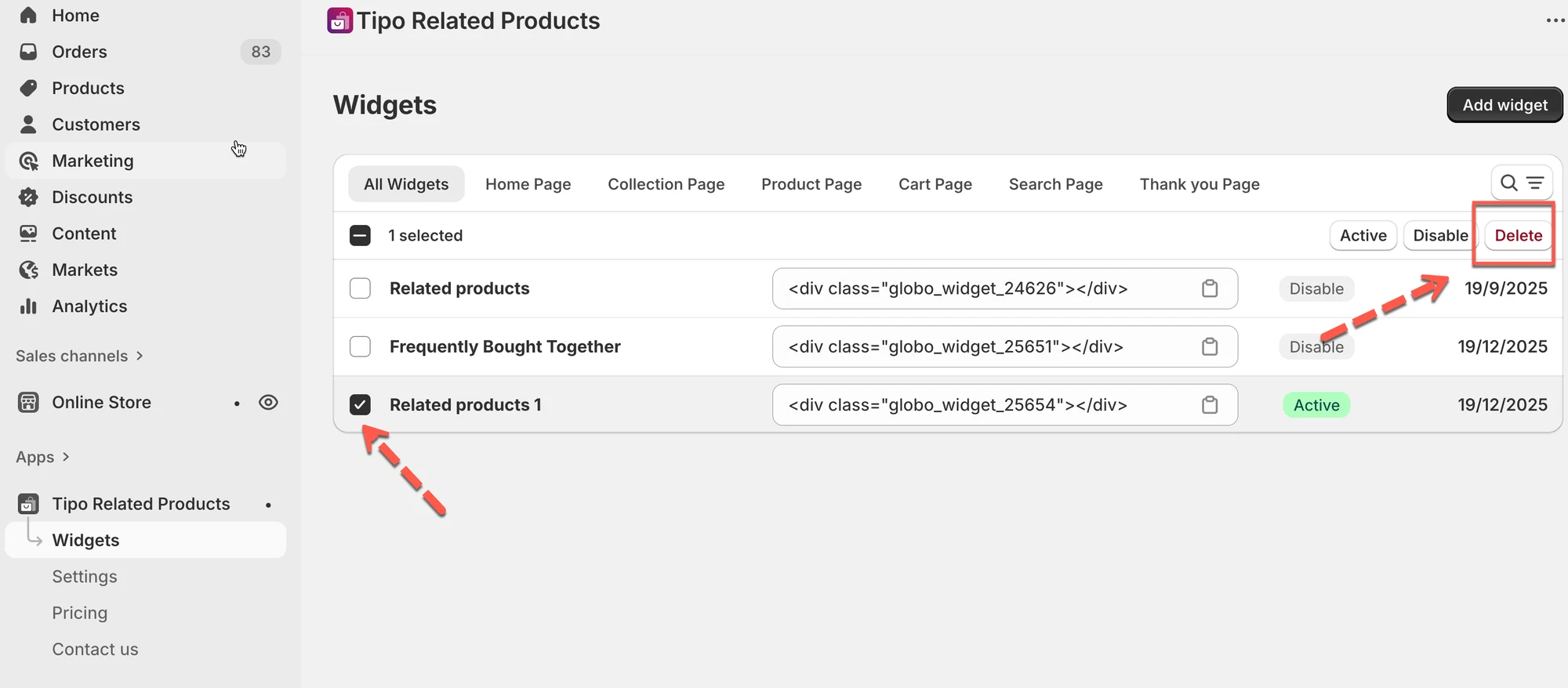
1. Go to the app > click **Widgets**
2. Select the widget you want to delete
3. Click **Delete**
4. Confirm the deletion
***
#### ⚠️ Important before deleting
* Deleting a widget **cannot be undone**
* If you added the widget to your theme:
* **App block** → Remove the block in **Theme Editor**
* **Shortcode** → Remove the shortcode from theme code
***
### 🧪 Example scenarios
* **Temporarily hide a widget** → Set status to **Draft**
* **Replace an old widget** → Set old widget to **Draft**, then create a new one
* **Clean up unused widgets** → **Delete** them
**🙋 Still need support?**
If you still need help, please feel free to contact us at . We’ll be happy to assist you further.