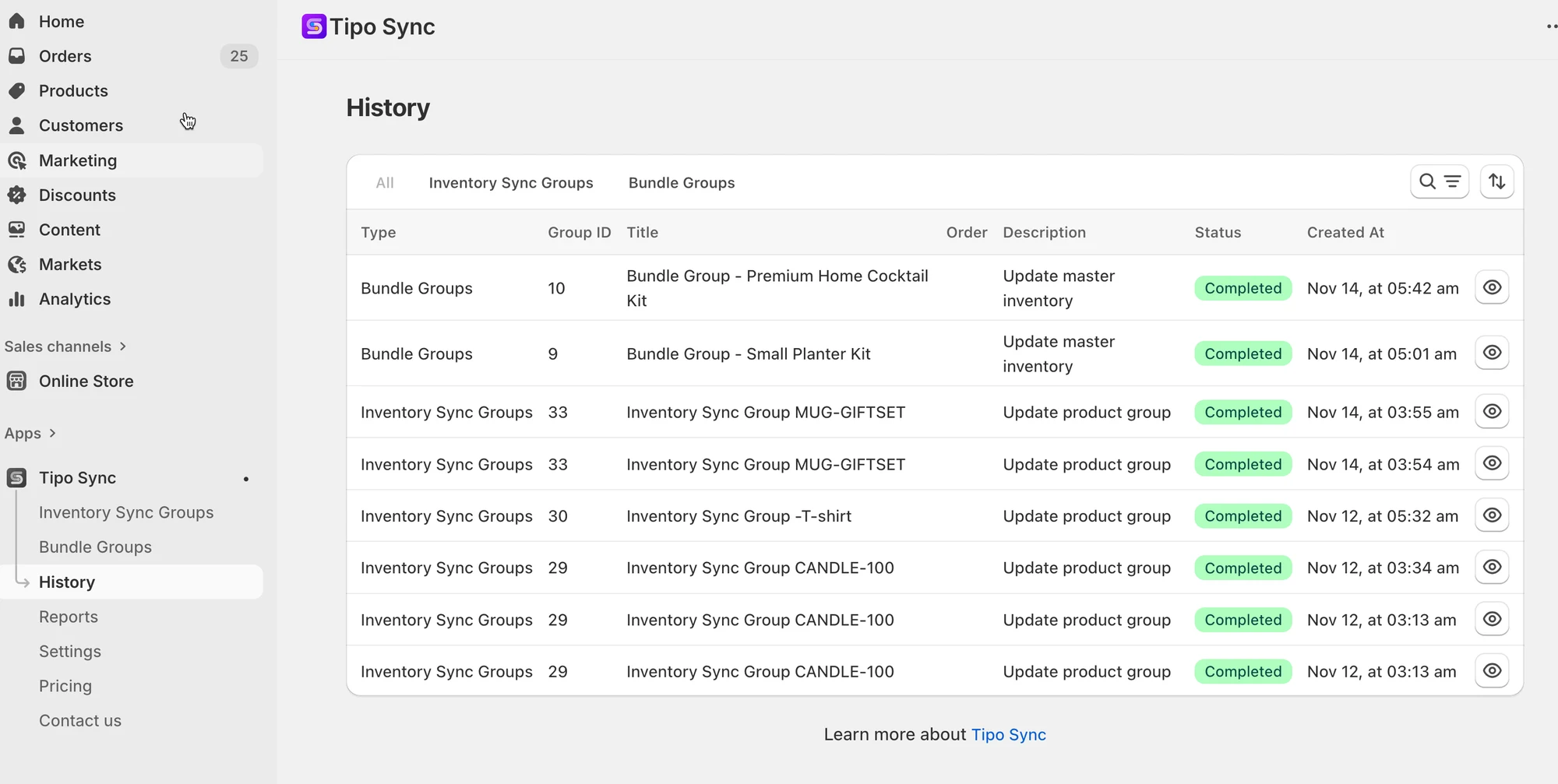
# History (Sync Activity Log)
The History page helps you track what Tipo app has done in your store so you can quickly confirm a sync ran, see the result, and debug issues if something looks off.
### ✅ What you can see in History
### ✅ What you can see in History
On the History table, each row shows one sync action (a “job”), including:
* **Type**: Inventory Sync Group or Bundle Group
* **Group ID**: The group that triggered the update
* **Title**: Group name
* **Order / Action**: What the system did (example: *Update master inventory*, *Update product group*)
* **Status**: Completed / Unchanged / (other statuses if shown)
* **Created At**: When the action happened
* **View**: Open details for that job
***
### 📍 Where to find History
1. Open **Shopify Admin** > open the app
2. Click **History** in the left menu
3. Find the row you want to check > click the 👁️ eye icon > a History Detail popup opens, showing:
* Group name + action type
* Status (example: Completed)
* Inventory results table (what changed)
**🙋 Still need support?**
If you still need help, please feel free to contact us at . We’ll be happy to assist you further.