# Collectiesynchronisatie
Deze handleiding legt uit hoe je **Collection Sync** inschakelt zodat je **Destination store(s)** collecties van je **Source store** kunnen ontvangen.
### ✅ Wat Collection Sync doet
Let op: deze instelling synchroniseert de collectie, niet de producten in de collectie
* collecties aanmaken die nog niet in de Destination store bestaan
* collecties bijwerken zodat ze overeenkomen met de Source store
***
### ⚙️ Collectiesynchronisatie inschakelen in de app-Settings
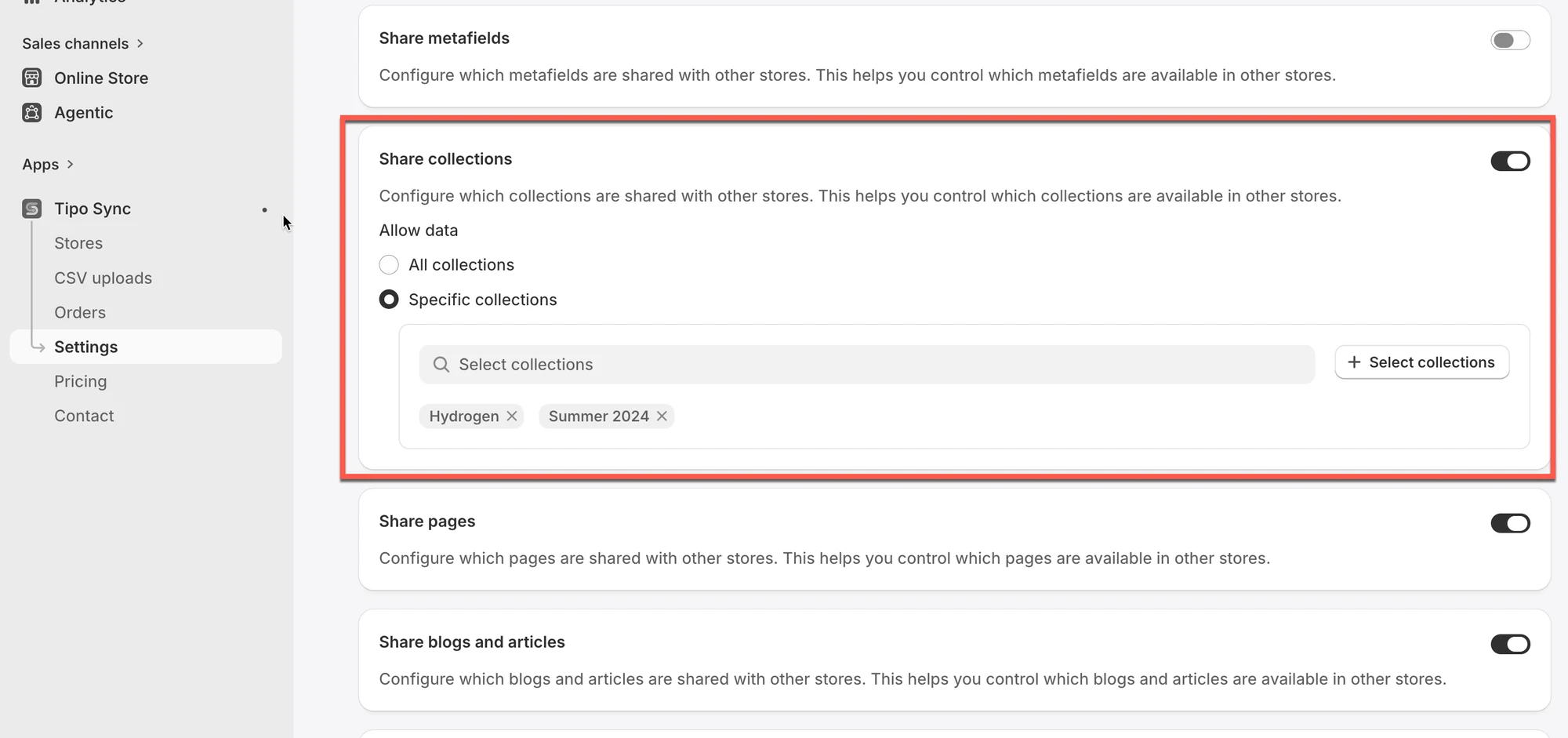
1\. Open de app in de bronwinkel > klik op **Settings**
2\. Zet **Share collections** aan
3\. Selecteer de collecties die je wilt synchroniseren
* **All collections**: alle producten van alle collecties in je winkel worden gesynchroniseerd met de Destination store
* **Specific collections**: alleen de producten van geselecteerde collectie(s) worden gesynchroniseerd met de Destination store
4\. Klik op **Save**
***
### ⚙️ Verbinding maken in de Destination store
Handleiding [hier](/overview/connect-stores)
***
### ✅ Hoe werkt de synchronisatie?
Collection Sync volgt dezelfde logica als productsynchronisatie:
1. De app controleert de collecties in de Source store
2. Het synchroniseert die collecties naar de Destination store(s)
3. Het neemt producten in de collectie alleen mee als die producten gesynchroniseerd of gematcht zijn (op basis van je verbindingsinstellingen)
#### Matching & Imports
Deze instelling bepaalt hoe collecties worden gesynchroniseerd tussen de Source store en de Destination store.
| Optie | Nieuwe collecties aanmaken | Bestaande collecties bijwerken |
| --------------- | -------------------------- | ------------------------------ |
| Create & Update | ✅ | ✅ |
| Update Only | ❌ | ✅ |
| Create Only | ✅ (alleen nieuwe collecties) | ❌ |
#### Optie 1: Create & Update
De app zal:
* Collecties in de Destination store aanmaken als die nog niet bestaan.
* Bestaande collecties die dezelfde **handle** (URL-pad) als de Source delen automatisch bijwerken.
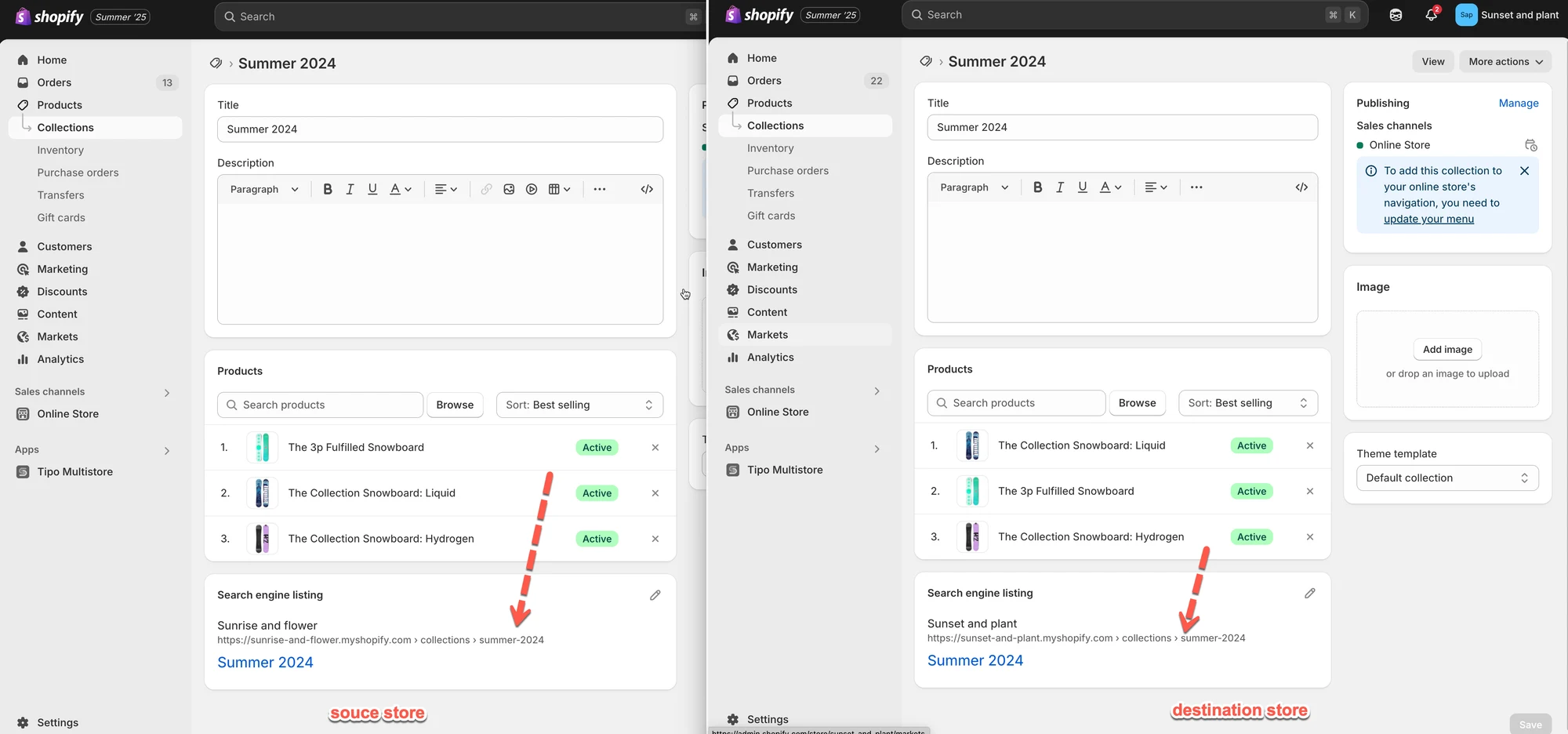
**Voorbeeld**
* Source-collectie: **Summer 2024**\
Handle: `/collections/summer-2024`
* De app zal:
* De collectie **Summer 2024** in de Destination store aanmaken.
* Wijzigingen (bijv. titel, beschrijving, producten erin) van Source naar Destination automatisch blijven synchroniseren.
Let op: toekomstige wijzigingen die je aan de collectie "Summer 2024" in de Source store aanbrengt, verschijnen ook in de Destination store.
#### Optie 2: Update Only
De app zal:
* Maakt geen nieuwe collecties aan.
* Werkt alleen collecties in de Destination store bij die dezelfde handle als de Source al delen.
**Voorbeeld**
* Source-collectie: `/collections/summer-2024`
* Destination heeft ook `/collections/summer-2024`\
→ Updates worden gesynchroniseerd.
* Source heeft `/collections/spring-2025`, maar Destination **niet**\
→ Er wordt geen collectie aangemaakt of gesynchroniseerd.
#### Optie 3: Create Only
De app zal:
* Maakt alleen nieuwe collecties aan en synchroniseert die die na het tot stand brengen van de winkelverbinding aan de Source zijn toegevoegd.
* Bestaande collecties in de destination store worden niet gesynchroniseerd.
**Voorbeeld**
| Collectie | Bestaat in Destination store | Synchronisatieresultaat |
| ----------------- | ---------------------------- | ----------------------- |
| Summer Collection | Ja | Genegeerd |
***
Deze schermafbeelding is niet beschikbaar in de oorspronkelijke documentatie.
**🙋 Heb je nog steeds ondersteuning nodig?**
Heb je nog hulp nodig, neem dan gerust contact met ons op via . We helpen je graag verder.