# Safety backups and undoing a restore

Choose between Full, Incremental and Skip safety backups, and undo a restore by restoring its safety backup.

A safety backup is a backup of your store taken just before a restore writes anything. If the restore turns out wrong, you can restore the safety backup to go back.

## What a safety backup is

* It appears in your **Backups** list with the trigger **Pre-restore**.
* It runs even when your store is over its storage limit, and it doesn't count toward your daily limits.
* The restore starts only after the safety backup finishes. If the safety backup does not finish, nothing is written to your store.

## Choose a type

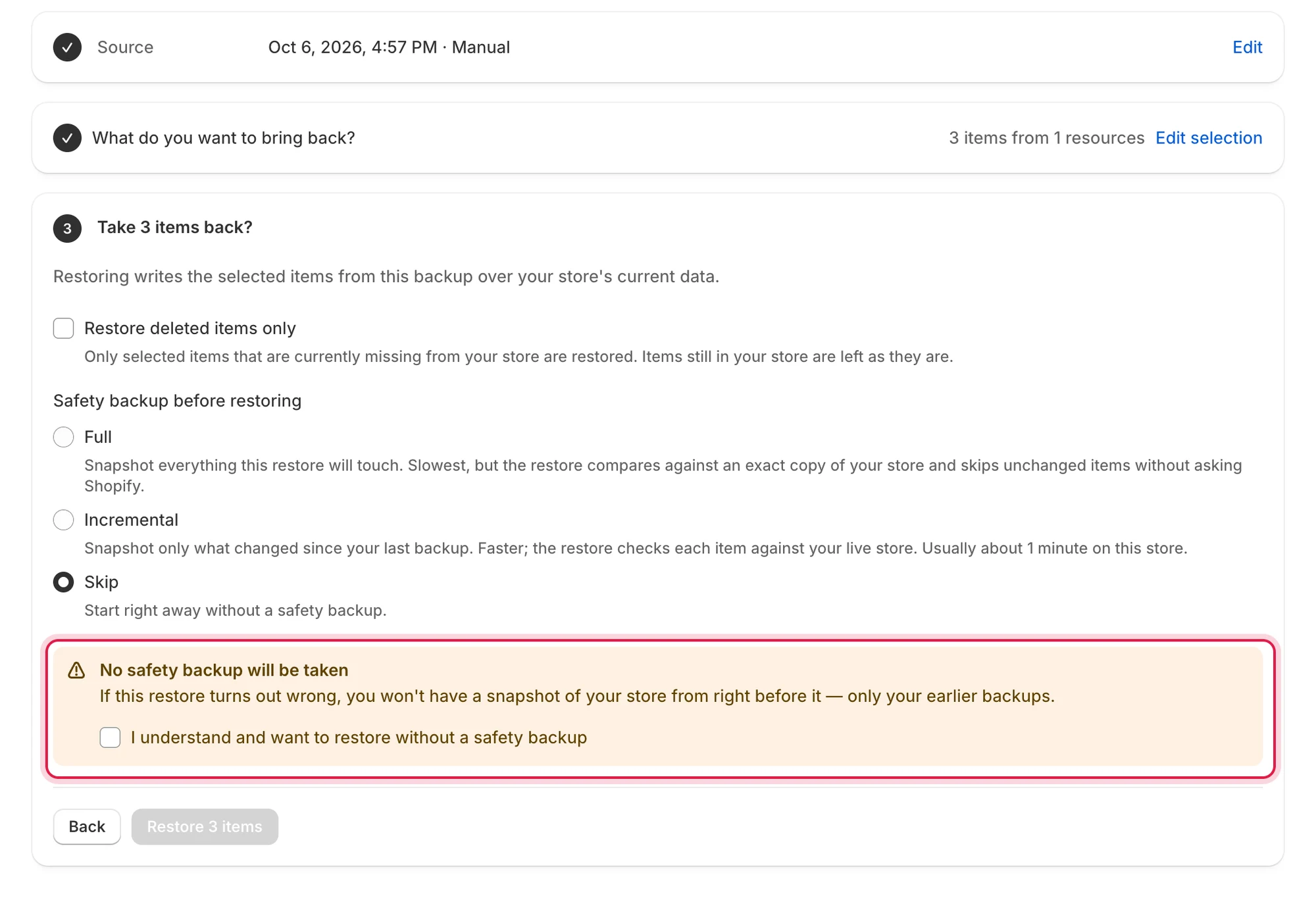
You pick the type in the **Safety backup before restoring** option on the review step.

| Option          | What it does                                                                                                                                                                            |
| --------------- | --------------------------------------------------------------------------------------------------------------------------------------------------------------------------------------- |
| **Full**        | Snapshots everything this restore will touch. It is the slowest option. The restore then compares against an exact copy of your store and skips unchanged items without asking Shopify. |
| **Incremental** | Snapshots only what changed since your last backup. It is faster. The restore checks each item against your live store.                                                                 |
| **Skip**        | Starts right away without a safety backup.                                                                                                                                              |

When your store has backup history, the option shows an estimate such as **Usually about 2 minutes on this store.**

<figure><img src="/media/1db19a7ca47784e61f3b.webp" alt="The Safety backup before restoring options with Skip chosen and the acknowledgement checkbox" loading="lazy" decoding="async"><figcaption><p>Choosing Skip shows a warning and a checkbox you must tick.</p></figcaption></figure>

## What is chosen by default

| Where you restore                                                                                                                                                                                                                | Default                                                                   |
| -------------------------------------------------------------------------------------------------------------------------------------------------------------------------------------------------------------------------------- | ------------------------------------------------------------------------- |
| Restore wizard ([Restore from a backup](/backup-and-restore-tipo/restore/restore/restore-from-a-backup))                                                                                                                      | **Full** when you restore more than 500 items, otherwise **Incremental**. |
| Theme, blog and metaobject definition windows ([theme](/backup-and-restore-tipo/restore/restore/restore-a-theme), [blog or metaobject definition](/backup-and-restore-tipo/restore/restore/restore-blogs-and-metaobjects)) | **Skip**                                                                  |
| Restoring a single item ([Restore a single item](/backup-and-restore-tipo/restore/restore/restore-a-single-item))                                                                                                             | No safety backup is offered.                                              |


:::note

Before you restore a single item, you can select **Back up now** on **Home** to take a backup first. See [Back up now](/backup-and-restore-tipo/backups/backups/back-up-now).

:::


## If you choose Skip

A warning titled **No safety backup will be taken** appears: "If this restore turns out wrong, you won't have a snapshot of your store from right before it — only your earlier backups." Tick **I understand and want to restore without a safety backup**. The restore button stays disabled until you do.

## Undo a restore

<div class="guide-steps">

<div class="guide-step">


### Open the result

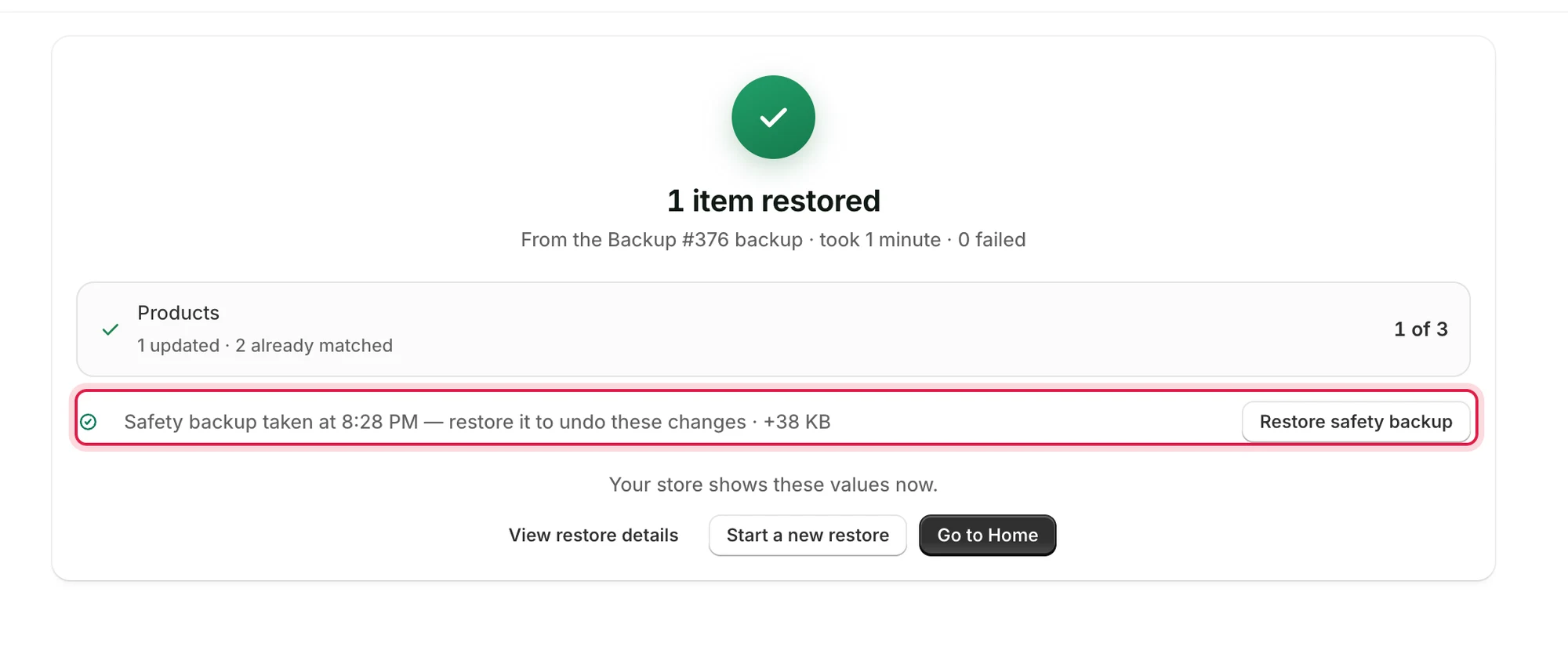
When the restore finishes, the result screen shows a line such as **Safety backup taken at 3:05 PM — restore it to undo these changes**. You can also open the restore from [Restore history and details](/backup-and-restore-tipo/restore/restore/restore-history).

</div>

<div class="guide-step">


### Select Restore safety backup

The restore wizard opens with the safety backup as the source.

</div>

<div class="guide-step">


### Choose what to bring back and confirm

Follow the steps in [Restore from a backup (restore wizard)](/backup-and-restore-tipo/restore/restore/restore-from-a-backup). Choose a safety backup for this new restore too, so you can undo it if needed.
</div>

</div>

<figure><img src="/media/8bebc7830e4b93e5a683.webp" alt="The restore result with the safety backup line and the Restore safety backup button" loading="lazy" decoding="async"><figcaption><p>The Restore safety backup button opens the wizard on the backup taken before the restore.</p></figcaption></figure>


:::caution

Restoring a safety backup overwrites changes made after it was taken, including edits you made in Shopify while or after the first restore ran.

:::


## If the safety backup did not finish

The result screen tells you what happened:

* **The safety backup did not finish, so nothing was written to your store.** The restore did not start writing. It is safe to try again.
* **The safety backup did not finish — it cannot undo this restore.** The restore ran, but the safety backup is incomplete. To go back, restore one of your earlier backups.
* **No safety backup was taken for this restore. To undo it, restore from one of your earlier backups.** You chose **Skip**.

## Next steps

* [Restore from a backup (restore wizard)](/backup-and-restore-tipo/restore/restore/restore-from-a-backup)
* [Follow a restore and read the results](/backup-and-restore-tipo/restore/restore/follow-a-restore)
* [Usage and limits](/backup-and-restore-tipo/pricing/plans/usage-and-limits)
